



Why the Border Router Actually Matters
We’ve watched thread move from niche protocol to core smart‑home fabric, and we know the border router — not the bulbs or hubs — decides latency, reliability, and cross-platform integration; choosing it well transforms everyday device performance and user experience.
What You'll Need

Future-Proof Your Home with This Wi‑Fi System
Start with Use Cases, Not Specs
Do we want blistering local automation or broad device support? One choice rarely fits all.Map real-world priorities before hunting specs in our how-to guides. Decide whether we need latency‑sensitive automations (locks, alarms), multi‑room media control, or high device density (sensors, switches). That clarity frames trade‑offs between single‑box border routers (convenient, integrated) and dedicated hardware (more radio/backhaul control).
Prioritize local IPv6 routing and robust multicast support on your router. These features keep scenes and group commands local and responsive; cloud‑dependent bridges can add unpredictable lag and false negatives during outages.
Match examples to choices
Choose placement with intent: avoid basement closets for time‑sensitive paths; put the border router where devices form the shortest, clearest radio hops.
Check Ecosystem Compatibility First
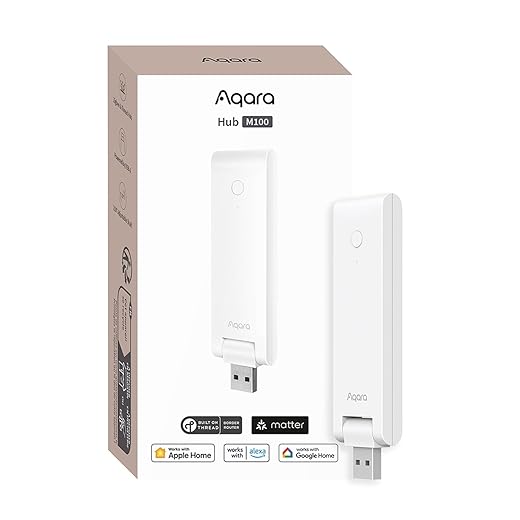
Want HomeKit, Matter, and Google to play nicely? Compatibility beats raw throughput every time.Audit our home’s ecosystem before buying. Confirm the router supports matter over Thread and can act as a true Thread border router/commissioner — that native stack removes cloud or bridge translation and cuts latency. For example, a “Thread‑enabled” bulb that still needs a vendor bridge forces Wi‑Fi → cloud → bridge → Thread, which feels slower than Matter‑over‑Thread.
Verify compatibility with the apps and platforms we use (Home, Google Home, Alexa) — browse smart home gear with clear threads. Check vendor docs and firmware notes for the explicit terms “Thread Border Router” or “Thread Commissioner” rather than just “Thread radio.”
Key checks
Stop ourselves from buying fast hardware that’s locked out of our existing system.
Evaluate Radio, Backhaul, and Antenna Design
A flash chip won’t help if the radio and antenna are mediocre — signal design is the unsung hero.Prefer devices with a strong IEEE 802.15.4 radio: antenna quality, receiver sensitivity, and transmit power directly affect real‑world Thread range. Prefer a wired Ethernet backhaul when possible — Ethernet gives lower, more consistent latency; a Wi‑Fi backhaul can add jitter and packet loss that shows up as slow or flaky automations.
Isolate Thread’s 2.4 GHz radio from congested Wi‑Fi radios. Multi‑band gateways that separate or filter the Thread radio often outperform single‑radio designs because they avoid local interference.
Place the border router for best RF, not just aesthetics: keep it high, clear of metal/large glass, and away from other 2.4 GHz gear. Don’t trust vendor range claims — test with actual devices in our rooms.
Key checks
Assess Software, Security, and OTA Support
Fast hardware without secure, updatable firmware is a ticking time bomb. Are we safe long-term?Inspect vendor firmware cadence and release notes; we want frequent security patches but staged, tested rollouts so updates don’t brick a whole home.
Demand signed images, secure boot, and clear rollback paths; Matter and Thread rely on cryptography, so verified firmware matters for long-term reliability.
Verify OTA reliability by asking how vendors handle interrupted updates and whether they support delta or staged updates to reduce failures.
Check diagnostic and logging tools in the UI: ensure the dashboard shows mesh topology, per-node RSSI, parent-child links, and packet-loss stats so we can spot a weak sensor instead of guessing.
Compare OpenThread vs vendor stacks; choose vendor support when you need guaranteed SLAs, otherwise prefer open stacks for transparency and future-proofing.
Plan Placement, Mesh Density, and Redundancy
Can a second router save a flaky living room scene? Spoiler: yes, sometimes redundancy is the cheapest performance boost.Place the border router near the home’s RF center—hallways or mid-floor landings beat basements and garages. We’ve seen single‑end placements create long multi‑hop chains and sluggish scenes; moving the router one room in often cuts latency noticeably.
Add powered Thread routers (smart plugs, powered sensors, dedicated extenders) to turn weak leaf nodes into stable parents. Prefer outlets in each zone over relying on battery sensors to route.
Use multiple border routers when you have many concurrent devices or distinct network segments (garage workshop, detached studio) to distribute load and avoid a single point of failure.
Commission devices close to a working router, then move them to their final spot to avoid temporary partitioning. After deployment, validate mesh health: check topology, per-node RSSI and hop count, and run simple latency or packet‑loss tests from app tools to confirm coverage.
Test, Measure, and Iterate — Real-World Benchmarks
We don’t trust vendor claims. How fast is ‘instant’ in our house? Let’s measure it.Measure real behavior, not marketing claims. Run three repeatable checks: button-press → light latency, failure/reconnect behavior, and OTA throughput. Capture packet traces with Wireshark (802.15.4 + Thread), grab Thread diagnostic logs (OpenThread/wpantund), and time manual tests with a stopwatch or app timestamps.
Change only one variable at a time (placement, backhaul, extra routers), re-test, and log results so we can quantify gains and justify hardware changes.
Choose for the Whole System, Not a Single Metric
We weigh ecosystem fit, radio-backhaul design, software updates and deployment to favor long-term responsiveness and fewer headaches. Benchmarks inform but user experience wins now — what will our home need next?
Frequently asked questions
What should I prepare before I choose a thread border router for better smart-home speed?
Start with the checklist in the “What we’ll need” section above—measure your space, confirm compatibility with your gear, and read the full walkthrough once before you change settings or buy parts. Thread border router goes faster when prep is done upfront.
How long does it take to choose a thread border router for better smart-home speed?
Most readers finish in about 30–90 minutes if they already have the right parts, but budget extra time for measurements, firmware updates, or a second pass when something does not behave the way the manual suggests on the first try.
What is the hardest part when you choose a thread border router for better smart-home speed?
The step that trips people up is usually alignment or configuration—getting measurements, cable routing, or software settings right before you commit. If results still look off, re-check the basics in order instead of swapping hardware immediately.
What mistakes should I avoid when I choose a thread border router for better smart-home speed?
Skipping measurements, ignoring ventilation or port limits, and rushing the final test are the common failures. Photograph your starting setup, label cables, and verify the outcome with the same content or workflow you will use every day—not a one-off demo.
When should I call a pro instead of trying to choose a thread border router for better smart-home speed myself?
Bring in help when the job needs structural work, licensed wiring, or tools you do not own, or when repeated attempts still fail after you have followed the troubleshooting section. A short paid visit can cost less than replacing gear you damaged by forcing the install.

Princess Rioboca is the Lead Editorial Writer at Option Cutter, bringing over seven years of hands-on experience in consumer technology journalism. Specializing in home networking and smart home architecture, she transforms complex technical data into practical, real-world upgrades. Princess personally tests and audits every product she reviews—evaluating real-world Wi‑Fi throughput, cable management durability, and streaming ecosystem stability—to filter out spec-sheet noise. Her rigorous, field-tested insights are designed to give readers transparent, unbiased buying advice on what to purchase, what to skip, and exactly why.















