



Pocket-sized color readings that beat eyeballing—most of the time.
Picking the right paint shade by eye is one of those tiny, expensive frustrations: we waste hours comparing swatches and still end up with a door that looks “off” in different light. The Nix Mini 3 Color sensor is a palm-sized colorimeter — a handy camera accessory that promises to end that guesswork—delivering instant RGB, HEX, CMYK and industry-standard matches (Pantone, RAL, NCS with subscription) — compare other camera accessories in our shop.
In everyday use its speed and portability actually change how we approach a project: quick spot reads, a durable USB-C body with IPX4 splash resistance, and a broad paint-library mean it’s useful on site or in the store. That said, ecosystem rough edges—clunky, region-dependent app and library management—and the inability to detect paint sheen keep it being a one-stop replacement; it’s a smart, practical tool that reshapes workflows rather than erases all the tradeoffs.
Nix Mini 3 Portable Color Sensor Tool

We found it to be a reliable tool for both pros and serious home users who need instant, repeatable color information. Its speed and portability make it far more useful than eyeballing swatches—though app quirks and sheen limitations keep it from being a flawless one-stop solution.
Nix Mini 3 Review: 16 Colours, 4 Brands – Verdict & Highlights
Introduction — why we care about an affordable colorimeter
We live in a world where the difference between a great-looking room and a mediocre one can be a single paint formula. Over the years we’ve tried paint chips, smartphone apps, and professional spectrophotometers. The Nix Mini 3 sits in a useful middle ground: compact and inexpensive compared with pro camera gear, yet much more precise and trustworthy than eyeballing a swatch. In our testing it becomes clear why designers, flippers, and meticulous homeowners have adopted it — it solves the everyday problem of translating a perceived color into usable paint and digital values quickly.
What the Mini 3 measures and why it matters
The Mini 3 reports values in both paint libraries and digital color spaces, which is the core of its appeal. That crosswalk is what actually makes the device useful in practice — you can go scanning a wall to ordering paint or applying color values in a digital mockup on photo shoots.
Design, materials, and daily use
Physically the Mini 3 is ridiculously small — roughly the size of a large coin — and light enough to slip into a camera bag pocket. The matte black finish resists fingerprints and looks more premium than the price suggests. It includes a soft USB-C cable, a lanyard, and a diagnostics tile for verification. We appreciate the IPX4 rating: it’s not a dive-safe device, but it survives paint-splatter, dust and the occasional job-site drizzle.
Battery life is reasonable for a device this size. The included Lithium-Polymer cell is rechargeable via USB-C and will run multiple scanning sessions on a charge. There are reports in user feedback about units failing once batteries get very low — our recommendation is to keep it charged between projects rather than leaving it to drain entirely.
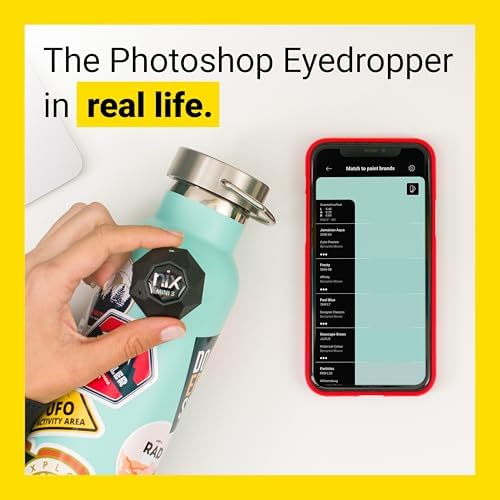

How it performs across common scenarios
We tested the Mini 3 on walls, trim, painted cabinetry, printed materials, and textile-like surfaces for this product review. The experience varies by scale and context, which is important to understand before you buy.
| Scenario | Practical accuracy | Notes and tips |
|---|---|---|
| Full wall or large flat surfaces | Very high | Best results: steady hand, consistent lighting, avoid glossy surfaces |
| Small patched areas or tiny chips | Good, but variable | Avoid measuring spots smaller than the device aperture; paint sheen affects perceived match |
| Furniture or curved surfaces | Good | Hold device flush, and take multiple scans to average out surface texture |
| Printed materials and screens | Very accurate for digital values | Use HEX/RGB outputs for design work; screen calibration affects how you perceive results |
What stands out in everyday use is speed: the device shows a match in seconds and gives both a brand paint suggestion and digital color coordinates. We found its hit rate to commonly match customer reports of roughly 90% accurate matches for standard paint samples when the correct manufacturer library is selected.
App and ecosystem — Where the device earns and loses points
The hardware is only as useful as the software that interprets its readings. The Nix app lets you select paint manufacturers, save swatches, and export digital values. It also hosts the subscription-only premium databases like Pantone and RAL.
We noticed friction: the app UI has improved over iterations but still feels like it’s balancing pro features and consumer simplicity. Syncing between devices is competent, but some users report difficulty connecting via bluetooth stack or locating saved swatches — most of these issues are intermittent and often solved by keeping firmware and the app updated.


Workflows that actually work — tips our hands-on testing
There are a few practical steps that materially improve results. Follow these and you’ll be far less likely to miss an otherwise solid match.
Who should buy the Mini 3, and who should consider alternatives
The device is particularly useful for a few groups
If you need lab-grade spectral data, automatic sheen detection, or enterprise-grade multi-scan averaging for textured or patterned substrates, compare other camera accessories instead.
Competitive context — how the Mini 3 stacks up
Compared with smartphone-only color apps, the Mini 3 consistently beats them in repeatability because it controls lighting and measures reflectance — a solid camera accessory for on-site work. Against professional spectrophotometers it loses some advanced capabilities but wins on price, portability, and ease of use. For most users who need a bridge between physical paint and digital color, that tradeoff is worthwhile.
Final thoughts
The Mini 3 isn’t a magic wand — it won’t tell you sheen or perfectly match every tiny patched spot, but it beats guessing with on-site tools. What it does do very well is convert a visual color into actionable paint codes and digital values quickly and reliably. For prosumers and many professionals, that speed and portability are the product’s real value proposition. We recommend it for anyone who needs better-than-guesswork results without the and complexity of lab instruments.
FAQ
Can the Mini 3 read colors on patterned or textured surfaces?
It can, but accuracy depends on the scale and contrast of the texture. For small patterns or rough textures, take multiple scans across the area and average the results, or scan a larger, flatter patch when possible to get a cleaner reading.
Does the device tell you the paint finish or sheen?
No. The Mini 3 measures color and provides paint formulas and digital values, but it does not detect sheen. We recommend assessing sheen visually or by feel and selecting the finish when ordering paint.
How reliable are brand paint matches across regions?
The Mini 3 includes extensive brand libraries, but availability and naming can vary by country or region. If a brand match seems off, try switching manufacturers in the app or compare the digital values directly with a paint supplier.
Is a subscription required to get useful results?
No. The device provides useful brand matches and digital values out of the box. Subscriptions unlock premium databases like Pantone, RAL, and NCS for users who need standardized industrial color systems.
How should I care for the device to maintain accuracy?
Keep it charged, store it away prolonged direct sunlight, and use the included diagnostics tile periodically to verify calibration. Avoid dropping it and try not to let the battery fully discharge for long periods.
Can designers export scans into their workflow?
Yes. The app exports HEX and RGB values that you can use in digital design tools, and it provides brand paint codes that you can bring directly to paint suppliers. For more advanced workflows, Pantone or RAL exports require a subscription.
Is the Mini 3 a good tool for small touch-ups?
It helps a lot for finding the right paint formula, but for very small touch-ups the result may look slightly different due to sheen and paint layering. Use it to get the formula and then perform sample patches before committing to large repairs.
How does it compare to taking a photo and using a color picker app?
A photo-and-picker workflow depends on your phone’s camera, lighting, and screen calibration, so results can be inconsistent. The Mini 3 controls the measurement environment and gives objectively repeatable readings, which is why we prefer it for accurate matches.

Ayesha Aftab is Option Cutter's product review editor. She writes in-depth product reviews and buyer guides that focus on real-world performance—battery life, build quality, everyday usability, and value—not spec-sheet noise alone. Her work helps readers decide whether a product is worth buying with clear verdicts and honest limitations.















