



Why our chargers and cables keep betraying us
We thought charging was a solved problem: plug in, wait, go. Instead our bags and bedside tables are full of incompatible cables, half-dead bricks, and devices that refuse to charge reliably. We want simple, reliable power, but design decisions, competing standards, and profit have turned an ecosystem into a messy patchwork.
In this piece we unpack how we got here, why charging clutter really matters for usability and design, and what moves let us cut clutter and futureproof our setups. We’ll look at ports, cables, power‑delivery claims, wireless myths, multi‑device docks, and the economics that keep chaos profitable. This is a user‑centered, design‑focused take aimed at helping reclaim predictable charging—without buying into marketing claims.

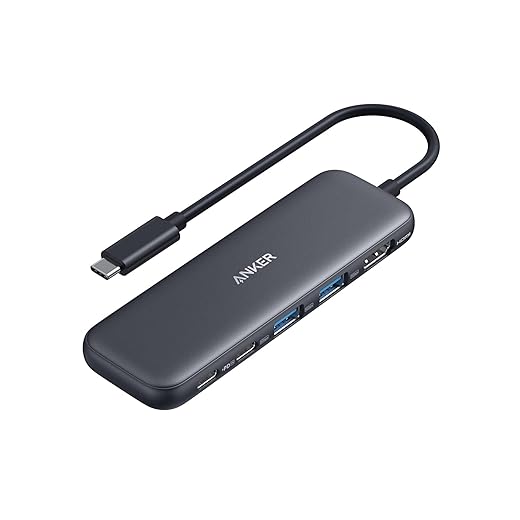


Tidy Your Desk: Easy Cable Management for a Clean Setup and Easy Charging
The fragmented hardware landscape: more ports, more trouble
How we got here
We used to measure convenience by counting charger ports. Today, more connectors doesn’t mean less hassle — it means more decision points. Companies chased incremental convenience or product differentiation (magnetic chargers, thinner laptops, single-cable desks) and left behind a predictable, interoperable stack. The result: every device ships with a slightly different idea of what “USB‑C” or “charging port” should do.
Same shape, different soul
USB‑C is the worst offender in plain sight. Two phones can have physically identical USB‑C ports but wildly different Thunderbolt and USB4 capabilities:
That mismatch turns a single USB‑C cable into an unreliable promise. We’ve had trips ruined because our “USB‑C” laptop wouldn’t charge from the hotel’s USB‑A PD brick, or because our tablet’s USB‑C port wouldn’t carry video to a projector.
What to do right now (practical shortcuts)
We can’t undo the past, but we can make smarter choices today
These are low-friction steps in our how-to guides that restore predictability while manufacturers keep arguing over who owns the port.
Cable quality, specs, and the myth of interchangeability
What a cable actually does
We treat cables like anonymous extensions of our chargers, but they’re active components in a power-and-data conversation. Conductor gauge (thicker wires), shielding, connector construction, and sometimes tiny embedded chips determine whether a cord can safely carry 60 W, stream 4K video, or just trickle-charge a phone. Those details change how devices negotiate power, how hot a cable runs, and whether a laptop wakes a monitor.
Why cheap cords fail us
Cheap or unlabeled cables usually skimp on one of three things
We’ve seen anxious mornings when our phone stopped fast‑charging mid‑commute because the car cable didn’t present the right signal to the charger. Or a transfer that crawls at 480 Mbps when the drive and laptop both support 10 Gbps — the cable was the bottleneck.
Certifications, counterfeits, and trust
Certifications (USB‑IF, MFi for Lightning, PD compliance) help, but they’re not foolproof — counterfeit cables sometimes carry fake logos. Look for clear spec listings: “USB 3.2 Gen 2, 10 Gbps” or “PD 3.1, 60 W” — vague claims like “fast charging” are a red flag. Brands with transparent specs and third‑party tests are worth the premium.
Practical, immediate rules
We don’t have to be cable engineers to make better USB‑C choices — but we do have to stop assuming “USB‑C” is one-size-fits-all.
Chargers and power delivery: inscrutable numbers and unmet expectations
Wattage numbers lie — context matters
We love a big number on the box: 65W. But that single figure rarely tells the whole story. Manufacturers may quote peak output for one port, aggregate output across all ports, or both — and the fine print decides which is true when we plug in a laptop and a phone. Power Delivery (PD) profiles (5V/3A, 9V/3A, 20V/3.25A, etc.) determine what a device will actually ask for; if the charger doesn’t offer the right profile, that 65W is useless. We’ve had laptops that trickle at 30–40W because the charger presented the wrong voltage ladder, even though it “supports” 65W on paper.
GaN, size, and thermal tradeoffs
Gallium nitride (GaN) lets companies shrink bricks and claim high numbers, but small size brings thermal consequences. A compact GaN charger like the Anker Prime series can hit advertised outputs — until it gets hot and throttles to protect itself. That’s fine for occasional boosts, but on a long flight or a big software compile, thermally constrained chargers can fall short of user expectations.
Multi‑port power sharing and prioritization
Multi‑port hubs dynamically split capacity. Some allocate a guaranteed amount to the primary USB‑C port and share the rest; others are opportunistic, favoring quick‑charge handsets with aggressive protocols and starving laptops. Brands also bundle proprietary fast‑charge profiles (Samsung, Oppo, Qualcomm), which further skews real-world results.
How we shop and use chargers now
Wireless charging and the illusion of simplicity
How the promise breaks down
Wireless charging sold us the dream of “set it down, forget it.” In practice, the UX is messier: coil alignment, pad size, phone‑side coil placement and phone activity all decide whether a device charges, trickles, or heats. Different flavors of Qi (and the newer Qi2 effort) plus vendor tweaks mean one pad’s 15W isn’t the same as another’s. We’ve watched phones creep off a mat and stop charging overnight — the convenience becomes a new kind of anxiety.
Magnetic ecosystems and standards
Apple’s MagSafe and Samsung’s magnetic/codependant accessories push alignment fixes, but they also lock us into ecosystems. MagSafe makes pickup‑and‑go predictable for iPhone 12+ owners, yet third‑party mags vary in strength. Qi2 aims to standardize magnetic alignment, which matters for cross‑brand predictability, but adoption is still uneven.
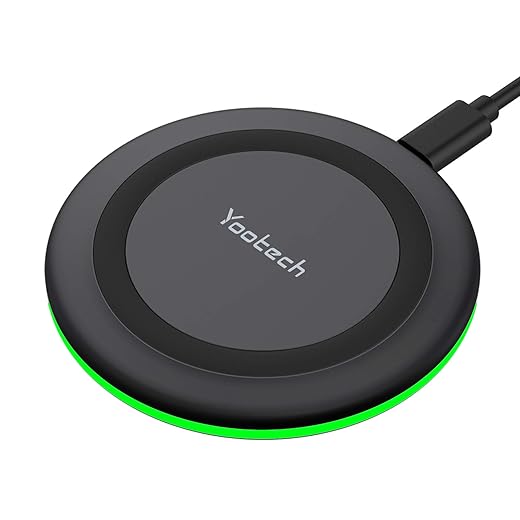
Real tradeoffs — efficiency, heat, and shared pads
Wireless is inherently less efficient than wired — often 60–75% — so more energy becomes heat. That throttles charging speed and can trigger thermal management that toggles off charging or limits to a trickle. Multi‑device docks share limited power across coils, so two phones and a watch rarely get “fast” charges simultaneously.
Practical tips to make it work
When wireless helps
Wireless shines for overnight top‑offs, hotel desks, and communal counters where convenience beats peak speed — but it’s not a cable substitute for every scenario.
Multi‑device docks and the ergonomics of heroic aggregation
The promise — and the catch
Buying a single dock to tame five chargers and half a tangle of cables is seductive: one brick, one outlet, an instantly tidy nightstand. In practice, consolidation hides a set of new compromises. Docks trade distributed freedom for a shared power budget, fixed port layouts, and a chassis that must juggle heat, cable routing, and device-specific quirks. We’ve seen elegant aluminum hubs that charge an iPhone at full speed while trickling an AirPods case and refusing to fast‑charge a laptop until the phone is unplugged.

Real‑world ergonomics: bedside, desk, travel
On a bedside table we want predictable behavior: independent indicators, simple cable swaps, and a way to prioritize a watch or low‑power earbuds overnight. At the desk, we expect simultaneous laptop + phone performance without thermal throttling. In a suitcase, compactness matters more than port count. Many docks optimize for the hero device—the brand’s own laptop or phone—so secondary ports get lower current or shared rails that underperform during heavy use.
Design choices that matter
Competitive reality and buying tips
Manufacturers headline total wattage; we focus on per‑port delivery under real use. If you travel, choose a compact GaN PD hub; for home, prioritize docks with clear status LEDs and hot‑swap friendly cables. The ideal dock is one that exposes, not hides, its compromises—so we can design our setup around them rather than discover them overnight.
Standards, security, and the economic incentives that keep chaos alive
Why vendors tinker
We’ve moved past a world where one plug fit all. Companies deliberately tweak connectors, tweak charging profiles, or stitch accessories into a product family because it’s an easy way to differentiate—and to keep customers buying within an ecosystem. Think MFi for Apple accessories, Qualcomm’s Quick Charge forks, and laptops that prefer their vendor’s proprietary barrel jack or branded USB‑C implementation. Those small differences add up to a lot of friction for us.
Certifications help — but don’t solve everything
Standards bodies (USB‑IF, Qi, MFi) exist to create common ground, and when they work we benefit from predictable behavior. But consensus is slow, certification costs can be high, and programs are unevenly enforced. A charger bearing a logo might meet pinout rules yet still underdeliver at realistic cable lengths, or ignore heat issues that force throttling. That gap is where frustration — and extra purchases — begin.

Security risks of a fragmented market
Fragmentation isn’t just annoying; it’s attack surface. Juice jacking remains a real threat at public ports; maliciously configured chargers can attempt firmware-level attacks or exploit negotiation quirks in USB‑PD. Hardware that behaves unpredictably can also damage batteries over time. The safest devices are those with transparent specs, active firmware support from vendors, and community scrutiny.
What would actually reduce fragmentation
Meaningful change requires cheaper, faster certification, mandatory per‑port labeling, and stronger compliance checks. Regulators could force clear wattage/PD profile disclosures and require firms to publish firmware‑change logs for docks and hubs. Industry could also agree on fallbacks that favor interoperability over vendor lock‑in.
Practical rules of thumb
With those guardrails in place, we can move from diagnosis to practical cleanup.
Practical cleanup: what we can do right now
We don’t need a single industry standard to make charging less painful; we need smarter choices and disciplined habits. Consolidate around a sensible connector (USB‑C where practical), buy two or three high‑quality, certified cables, and pick chargers with clear, behavior‑focused specs (PPS/PD with per‑port limits). That reduces friction across devices and gives predictable performance in today’s fragmented market.
Treat wireless as a convenience layer, not a replacement: use it for bedside and desk trickle charging, but keep wired fast charging for work and travel. Avoid cheap, uncertified gear, favor reputable brands with transparent specs, and buy fewer things that actually work well together. Small changes now save us from chaotic upgrades later.
Frequently asked questions
What is the main point of “Why Your Charging Setup Is Probably a Mess”?
This piece explains where why your charging setup is probably a mess matters in real buying decisions—not just headline specs. We focus on trade-offs, who benefits most, and what to verify before you spend.
Who should read this why your charging setup is probably a mess guide?
Read it if you are actively shopping, upgrading, or trying to separate marketing claims from day-to-day use. Skip it if you already own the gear and are not planning a change this season.
What changed recently around why your charging setup is probably a mess?
Prices, firmware, and feature tiers shift quickly in this category. We call out what is new enough to affect your decision and what is incremental hype you can safely ignore.
How should I use this editorial when buying?
Treat it as context before you compare models: note the risks and priorities here, then cross-check specs and current pricing on the picks that match how you actually use the product.
What is easy to get wrong about why your charging setup is probably a mess?
Buyers often overweight one spec—brightness, speed, or brand—and underweight fit for their room, ecosystem, or warranty support. We flag the mismatch we see most often in reader questions.
Where should I go next after reading?
Use the related comparisons and top picks linked near the end of this article for model-level shortlists, then confirm return policies and compatibility with the devices you already own.

Iqra Jumar is Option Cutter's editorial writer. She writes practical editorials and buyer guides that focus on real-world upgrades—better Wi‑Fi, cleaner cable setups, smarter streaming, and everyday fixes—not spec-sheet noise alone. Her work helps readers decide what to change now, what to skip, and why.









