



Why the Network Is the Unsung Apartment Upgrade
We watch tenants accept flaky Wi‑Fi and overloaded routers as normal, trading a perfect faucet for dropped streaming video calls. In cramped layouts and aging wiring, the network becomes the daily compromise nobody shows on listing photos. This is a problem of experience and design.
A well‑designed apartment mesh network removes friction across work, smart home, streaming, and home gear. It also reduces landlord headaches and unlocks new services. We argue that network upgrades are higher leverage than cosmetic fixes.
Below we map what an apartment‑friendly backbone looks like and how to deliver it—practically, affordably, and with future growth in mind. This matters now as devices multiply and expectations rise, everywhere, instantly, too.


25 Must-Try Renter-Friendly Upgrades That Transform Your Apartment ✨
How Current Apartment Networks Fail Us
Symptoms, not causes
We start with what we actually feel: dead zones, wildly different room-to-room speedss, Wi‑Fi that implodes when two people join video calls, and ISP gateway setups that are opaque and locked down. These are the symptoms — frustrating, visible, and immediate. But they’re rarely just about “bad Wi‑Fi”; they’re the result of how buildings are wired and managed.
Building features that amplify brittleness
Dense concrete walls, plumbing stacks, and service risers all turn router radio signals into moving targets. Legacy wiring — old coax daisy‑chained between units or century‑old telephone pairs — adds loss and crosstalk. A single ISP demarcation in a closet means one coax or fiber handoff serves an entire floor or building, so one misconfigured gateway can drag down many apartments. In practice we’ve seen a 5 ghz.4 GHz limps along.
Why renters can’t just fix it
We’ve tested quick fixes: moving a router, changing channels, or buying a fancy new mesh kit mesh kit. Those help sometimes, but renters face constraints: no drilling, limited access to closets, and landlords who aren’t incentivized to rewire for one tenant. Swapping ISP hardware is often impossible — the gateway is rented or locked down — so the practical fixes must be noninvasive and reversible.
The market’s imperfect answers
ISPs sell all‑in‑one gateways (ARRIS, Technicolor, Netgear models) because it reduces support calls and simplifies billing, but those devices lock out advanced routing and often enforce CGNAT or poor Wi‑Fi placement. Consumer mesh systems (Google Nest Wifi, Eero, Netgear Orbi) promise easy coverage, yet many fail in multiunit buildings where shared interference and thin walls break mesh backhaul. Enterprise solutions (Ubiquiti UniFi, Cisco) work beautifully but are expensive and often too heavy for renters.
Practical takeaways
Measure first: run speed tests in each room and note where video calls stutter. Try moving a single node before buying a system. If you must buy, prioritize options that support wired backhaul or AP mode and avoid powerline adapters unless you verify your building’s electrical topology.
What an Apartment‑Friendly Network Backbone Looks Like
We think the single most useful upgrade isn’t a faster modem or a prettier router — it’s a simple, managed backbone that treats a building like the small network it is. Below we break that backbone into tangible pieces you can design, sell, or install without turning a hallway into IT chaos.
The spine: a modest service closet and a managed switch
Start with one small central point where the ISP handoff sits — a service closet or riser. From that spine we want a managed Ethernet switch that supports VLANs, QoS, and link aggregation so multiple flats can get segmented, prioritized service without sharing a single flat network.
A switch like this lets you power APs and cameras without separate injectors and lets you carve tenant VLANs or provide simple pass‑through provisioning for a resident’s own router.
Access: PoE APs, mesh nodes, and real Ethernet drops
Coverage should be wired-first: ceiling or high-wall PoE access points (Ubiquiti UniFi U6-Lite, Aruba Instant On AP22, or TP-Link EAP610) connected to the switch give consistent backhaul. In‑unit Ethernet drops aren’t aspirational — place two to four RJ45 ports where people actually work and stream (living room TV, primary bedroom, home office, kitchen table). If new cabling isn’t possible, use MoCA over coax or short fiber runs rather than unreliable powerline adapters.
Redundancy and capacity, not headline speed
We prioritize low jitter and consistent per‑device throughput. That means dual uplinks or per-floor aggregation, multiple APs on wired backhaul, and QoS rules to keep video calls and gaming responsive even when guests stream. In practice, few apartments need more than 100–300 Mbps per active user — what they need is steady latency and no sudden drops.
Noninvasive install and a clean aesthetic
Run cables in surface-mount raceways, use existing conduits, or terminate to tasteful flush wall plates. Ceiling APs look intentional; compact in‑unit ports reduce the “spaghetti” feel. The goal is a backbone that’s invisible in daily life, not a tangle of hardware in the living room.
Ecosystem neutrality and tenant privacy
Pick standards‑friendly hardware that plays nicely with Apple, Google, Amazon devices and upcoming standards like matter. Use VLANs or DHCP pass‑through so landlords can provide connectivity without inspecting or controlling tenant traffic. That balance — managed infrastructure, private networks — is what makes a building backbone both useful and respectful.
Next we’ll walk through realistic implementation paths for renters, landlords, and ISPs.
Practical Implementation Paths: DIY, Landlord, and ISP Options
We walk through pragmatic choices for executing the backbone upgrade and what each path means for day‑to‑day reliability, tenant autonomy, and long‑term maintenance. Below are realistic ways to get the job done, with tradeoffs you can feel in your video calls and Netflix streams.
DIY: Fast wins for tenants
If you rent and need immediate improvement, we recommend three escalation steps
Practical tips: prefer mesh nodes with Ethernet backhaul support, use MoCA adapters (Actiontec) if coax is available, and check your lease before drilling or hauling ladders. Expect diminishing returns: consumer mesh masks problems but won’t fix overloaded building upstreams.
Landlord / Property manager playbook
For repeatable, low‑maintenance installs we favor a simple standard
Make management simple: choose devices with remote monitoring (SNMP/cloud), firmware. Budget for 3–5 year refresh cycles and keep spare units. Contractually, define uptime SLAs, who replaces failing APs, and a privacy clause that forbids tenant traffic inspection.
ISP and neutral‑host models
Carriers can deliver whole‑building Wi‑Fi but often lock hardware and bundle surveillance or captive portals. Alternatives:
Key tradeoffs: ISPs handle last‑mile but may limit tenant equipment; neutral hosts preserve tenant choice but require stronger SLAs and governance. From a purchasing perspective, pick ecosystem‑friendly hardware (standard PoE, WPA3, VLANs) so tenants can always bring their own router or mesh without friction.
Across paths, prioritize warranties, clear upgrade cycles, and contractual responsibility for uptime and data privacy so the backbone is durable — and doesn’t become tomorrow’s tangled mess.
Design Details That Make a Backbone Feel Like Home
We zoom in on the small design choices that turn “good enough” into effortless everyday joy. These are the practical, human‑centered details landlords and tenants notice first — and complain about last.
Placement: think axis, not closet
Where you put an AP is as important as which AP you buy. Center access points on the long axis of living rooms and mount them in hallways or on ceilings rather than hidden in cabinets. That avoids wall shadowing and gives more even coverage — a single ceiling AP down the hall often kills dead spots better than two desk‑level units stuffed into furniture. Quick tip: install at adult eye height or higher (8–10 ft) and avoid metal obstructions near the antenna.
Power choices: invisible, reliable
Powering devices with PoE keeps outlets free and eliminates messy bricks. A small, quiet PoE switch tucked in the service closet or in‑unit EMT box makes installs cleaner and easier to maintain.
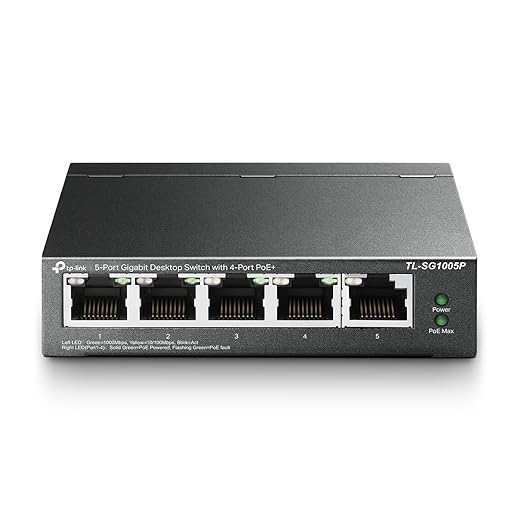
Use switches with spare PoE ports for future cameras or APs. For in‑unit power needs, spec wall outlets with integrated USB‑A/C (Leviton Decora USB‑C receptacles) and pair them with a good surge protector (APC Essential SurgeArrest or similar) for controlled charging and device safety.
In‑unit ports and ergonomics
Place at least two RJ45 drops: one near the main TV and one at the primary work desk, both at desk/screen height. Label each faceplate clearly and include a small diagram inside the unit or on the faceplate showing which port maps to the building closet. Provide a couple of dedicated charging ports with known wattage limits, and avoid putting ports behind furniture.
Software, ecosystems, and privacy
Default SSIDs should be simple (BuildingName‑Unit) with an easy guest SSID that keeps resident traffic on separate VLANs from building management systems. Support common smart‑home standards (Thread/Matter bridging, WPA3) so doorbells, thermostats, and voice assistants just work without forcing tenants to expose everything to the landlord network. Where possible, let tenants opt into local hub access while routing vendor cloud traffic through tenant VLANs to preserve privacy.
Maintenance flow and usability testing
Design for remote diagnostics, automated updates, and a clear tenant support path: QR code in the unit that opens a short welcome guide, a reset procedure, and a ticket link. Test installs with real users — measure latency, roaming handoffs, and the five‑minute setup experience — then iterate. Small fixes here save hundreds of support calls later, and that’s the difference between a technically adequate network and one that genuinely improves daily life.
Costs, Benefits, and the Case for Future‑Proofing
Economics at a glance: modest installs versus enterprise builds
We like to think in realistic brackets. For a small building (10–30 units), a modest backbone — a fiber or high‑speed cable uplink, a quiet PoE switch in the closet, and two to four quality ceiling APs — typically runs $2,000–$8,000 installed. That spreads to roughly $2–$7 per unit per month over five years. A premium, enterprise‑grade rollout (redundant uplinks, 10Gb SFP+ spine, managed controller, higher‑end APs and monitoring) can move into the $15,000–$50,000 range — closer to $12–$40 per unit per month amortized. Those are order‑of‑magnitude numbers, not quotes, but they map well to real projects we’ve audited.
How landlords realistically recover investment
Connectivity is now a line‑item amenity. We’ve seen three practical recovery paths
A simple model: if an upgrade reduces vacancy by one week per year in a 20‑unit building, that alone offsets a chunk of the modest install. Bundling reliable network access with leasing materials and clear SLAs makes the value tangible to prospective tenants.

Tenant returns: measurable, mostly nonmonetary
Renters can quantify benefits beyond dollars. Expect
Those translate into fewer complaints, less DIY networking chaos, and a higher perceived quality of life.
Future‑proofing choices that keep upgrades cheap
We recommend prioritizing modularity and spare capacity: SFP+‑ready switches, PoE+ ports, Wi‑Fi 6 (802.11ax) APs, and open‑friendly ecosystems (UniFi, OpenWrt‑compatible edges, or cloud‑managed vendors with APIs). Embrace open protocols (WPA3, Matter/Thread bridging) and leave headroom — 1GbE per unit minimum, 10Gb for trunks. Those choices allow incremental upgrades instead of rip‑and‑replace.
Rolling it out without drama
Start small: pilot 3–5 units for 30 days, measure latency, throughput, and roaming; present results; then scale. Negotiate SLAs with clear uptime and latency targets (for example, 99.9% uptime, <30ms median latency), offer opt‑out paths for tenants who prefer their own ISP, and use transparent billing or fee credits during outages. These steps reduce friction, contain risk, and make ROI trackable as we move toward full deployment.
From here, we’ll wrap up with why this upgrade punches above its weight for both residents and owners.
A Small Upgrade, Outsize Impact
We’ve argued the single most impactful apartment upgrade isn’t a new stove or a designer sink but a thoughtfully designed, landlord‑friendly network backbone. When done with attention to user experience, neat aesthetics, ecosystem compatibility, and clear responsibilities, it transforms WFH reliability, smart‑home stability, and tenant satisfaction, while giving properties a durable competitive edge in a market where connectivity is a core amenity.
We urge designers, landlords, and tenants to treat connectivity like any other product: prototype, test, iterate, and document. Choose solutions that balance simplicity for users with remote management for owners, and embed graceful fallbacks. Small upfront effort and clear policies yield outsized returns—fewer support calls, longer tenancies, and homes that actually work. We’ll keep refining recommendations as device ecosystems and expectations evolve steadily.
Frequently asked questions
What is the main point of “The Upgrade Most Apartments Need”?
This piece explains where the upgrade most apartments need matters in real buying decisions—not just headline specs. We focus on trade-offs, who benefits most, and what to verify before you spend.
Who should read this the upgrade most apartments need guide?
Read it if you are actively shopping, upgrading, or trying to separate marketing claims from day-to-day use. Skip it if you already own the gear and are not planning a change this season.
What changed recently around the upgrade most apartments need?
Prices, firmware, and feature tiers shift quickly in this category. We call out what is new enough to affect your decision and what is incremental hype you can safely ignore.
How should I use this editorial when buying?
Treat it as context before you compare models: note the risks and priorities here, then cross-check specs and current pricing on the picks that match how you actually use the product.
What is easy to get wrong about the upgrade most apartments need?
Buyers often overweight one spec—brightness, speed, or brand—and underweight fit for their room, ecosystem, or warranty support. We flag the mismatch we see most often in reader questions.
Where should I go next after reading?
Use the related comparisons and top picks linked near the end of this article for model-level shortlists, then confirm return policies and compatibility with the devices you already own.

Iqra Jumar is Option Cutter's editorial writer. She writes practical editorials and buyer guides that focus on real-world upgrades—better Wi‑Fi, cleaner cable setups, smarter streaming, and everyday fixes—not spec-sheet noise alone. Her work helps readers decide what to change now, what to skip, and why.









