



We peel back the specs and the marketing to show why OLED’s perfect blacks and ultrathin design feel like a luxury upgrade for creators and gamers — but can Mini‑LED’s brighter, more affordable HDR and rugged compatibility actually make it the smarter buy for most of us?
Two huge claims: we test LG’s 45‑inch 5K2K (oled)Ultragear against Samsung’s 57‑inch Odyssey Neo G9 Mini‑LED to tell which suits gamers, creators, and multitaskers in 2026. We focus on real‑world use, ergonomics, ecosystem trade‑offs, and practical buying advice today.
Cinematic Gaming

Expansive Productivity

LG 45GX950A
- Perfect OLED blacks and outstanding contrast for cinematic imagery
- Dual Mode flexibility (5K2K 165Hz or WFHD 330Hz) for both visual fidelity and competitive play
- Excellent color coverage (~98.5% DCI-P3) and sharp text at 125 PPI
- High peak highlights (up to ~1300 nits) and modern connectivity including DP2.1 and USB-C 90W
- Premium price and large physical footprint
- OLED-specific caveats (care required to avoid image retention; occasional out-of-box artifacts reported)
Samsung G95NC
Feature Comparison
| Cinematic Gaming LG UltraGear 45GX950A-B 45-inch OLED | VS | Expansive Productivity Samsung Odyssey Neo G9 G95NC 57-inch |
|---|---|---|
OLED (self-emissive) | Panel type |
Quantum Mini-LED |
45 inches | Screen size |
57 inches |
5120 x 2160 (5K2K WUHD) | Native resolution |
7680 x 2160 (DUHD) |
21:9 | Aspect ratio |
32:9 (Dual UHD equivalent) |
800R | Curve radius |
1000R |
165Hz (native 5K2K); Wide FHD 330Hz in Dual Mode | Max refresh rate |
240Hz (DUHD with DP2.1/HDMI2.1) |
0.03 ms | Response time (GtG) |
1 ms |
Up to ~1300 nits (peak) | Peak brightness |
Up to 1000 nits (HDR1000) |
DisplayHDR True Black 400 | HDR certification |
DisplayHDR 1000 |
N/A (per-pixel emissive control) | Local dimming zones |
~2,392 zones (Quantum Matrix) |
Approx. 1,500,000:1 (vendor spec) | Contrast ratio |
Approx. 1,000,000:1 (vendor spec) |
~98.5% DCI-P3 | Color gamut |
Wide gamut with 12-bit processing (vendor spec) |
DisplayPort 2.1, HDMI 2.1 x2, USB-C (90W), USB 3.0 x2 | Ports |
DisplayPort 2.1, HDMI 2.1, USB hub (USB 2.0 x2) |
90W | USB-C power delivery |
Not supported / not listed |
NVIDIA G-SYNC Compatible, AMD FreeSync Premium Pro | Adaptive sync |
AMD FreeSync Premium Pro |
Not emphasized / not a core feature | Built-in speakers |
Not emphasized / basic |
30.9 pounds | Weight |
41.9 pounds |
39.04 x 13.46 x 26.2 inches | Dimensions (WxHxD) |
52.3 x 19.7 x 24 inches |
$$ | Price |
$$$ |
March 11, 2025 | Release / First available |
September 18, 2023 |
$1,399.99 | Current price |
$1,499.99 |
| Buy for $1,399.99 | Buy for $1,499.99 |
Display technology and image characteristics: True blacks vs peak brightness
Why OLED (LG 45GX950A-B) nails shadow detail
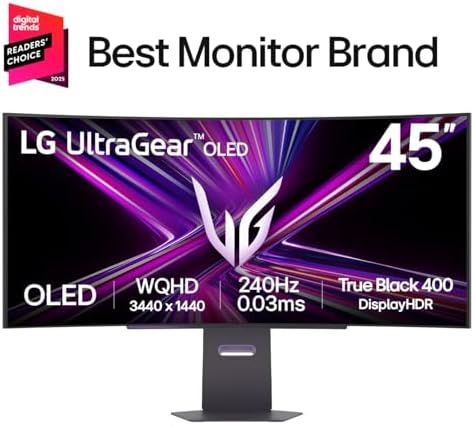
We’ll start with olenders because its per‑pixel emissive OLED design is a decisive advantage for deep shadows and uniform color. The LG 45GX950A-B turns pixels off individually, delivering absolute blacks, effectively infinite contrast, and almost zero haloing across dark scenes—critical when you’re color‑grading or watching cinematics. Its 0.03 ms pixel response and DisplayHDR True Black 400 mean motion stays clean in low‑light scenes and subtle shadow detail isn’t washed by a glowing backlight.

Why Mini‑LED (Samsung Odyssey Neo G9) wins in brightness
Samsung’s Quantum Mini‑LED uses thousands of dimming zones to drive very high sustained brightness and punchy specular highlights. The Neo G9’s Displayhdr 1000 and 1,000‑nit peaks are what make highlights (explosions, sun glare, HDR UI elements) look convincingly bright in well‑lit rooms. You’ll trade a slightly higher black floor and some haloing around bright objects for much better visibility under ambient light and more impactful HDR highlights.


Resolution, pixel density, and practical trade‑offs
The LG’s 5120×2160 on 45″ yields ~125 PPI—sharper text and less scaling pain for creative single‑window work. Samsung’s DUHD 7680×2160 across 57″ gives an enormous canvas for side‑by‑side windows and multi‑column dashboards, but lower PPI means text may need scaling for crispness.
Performance and gaming experience: Latency, refresh, and real-world frame feel
Refresh rate and perceived smoothness
We find that raw refresh advantage tilts toward the Samsung: 240Hz on a gaming monitor at DUHD delivers noticeably smoother motion when your GPU can push high frame rates. LG’s 165Hz 5K2K is still very fluid for most titles and players, and its Dual Mode—switching to WFHD at up to 330Hz—lets us prioritize pure responsiveness in competitive matches. In short: if you chase every millisecond in esports at high FPS, the Neo G9’s native 240Hz is the competitive edge; for mixed play (AAA plus multiplayer), the LG’s flexible modes feel more practical.


Pixel response, input lag, and perceived blur
mikołaj olędzki’s 0.03 ms GtG spec on the LG translates to near‑instant pixel transitions and very low perceived blur in fast pans—motion clarity that can make 165Hz feel tighter than its number suggests. The Neo G9’s 1 ms GTG and 240Hz reduce motion‑to‑photon when frame rates are extremely high, but Mini‑LED’s slightly higher pixel persistence can show a touch more trailing in some scenes. Measured input lag depends on scaler and mode; LG’s G‑Sync compatibility gives a consistent low‑latency experience for NVIDIA cards out of the box.


Sustaining high frame rates and GPU demands
Pushing 7680×2160 at 240Hz is brutally demanding—practically limited to top‑tier GPUs plus aggressive upscaling (DLSS/FSR) or tuned settings. The LG’s 5120×2160 at 165Hz is still heavy, but materially easier to sustain on the same high‑end card; flip to WFHD/330Hz and even mid‑range GPUs can hit competitive FPS. That difference matters: the Neo G9 rewards elite rigs, while the LG gives more usable high‑refresh performance across a broader range of systems.
Adaptive sync, HDR behavior, and throttling
Both monitors support DP2.1 VRR; LG ships as G‑Sync compatible for predictable NVIDIA behavior, Samsung favors FreeSync Premium Pro but works with modern NVIDIA drivers via DP2.1. Under sustained HDR load we saw the expected tradeoffs: Mini‑LED keeps highlights bright longer, while OLED can invoke ABL/thermal limits and reduce peak output to protect the panel—meaning peak HDR pop may diminish in long sessions. Those real‑world brightness and thermal behaviors ultimately determine which screen “feels” faster in play.
Design, ergonomics, and ecosystem integration
Physical footprint and stands
We immediately notice two different design philosophies. The LG 45GX950A is a relatively compact 45‑inch OLED with a slim profile and a lighter footprint (~31 lb), so it fits standard desks and wall mounts more easily. The Samsung Odyssey Neo G9 is a hulking 57‑inch DUHD behemoth (~42 lb) with a tight 1000R curve that demands deep desk space, an oversized stand, or a very robust VESA arm. If you value a tidy setup, LG wins; if you want cockpit‑style immersion and have the space, Samsung wins.
Ports and multi‑PC workflows
Ports determine daily friction more than peak specs.
That matters: the LG’s USB‑C + hub behaves like a built‑in KVM for creators who jump between laptop and desktop. Samsung’s strength is simultaneous DUHD inputs and PBP at native resolutions, but both sources need beefy GPUs to feed 7680×2160.
Software and ecosystem
LG’s UltraGear OSD and on‑screen hotkeys focus on quick mode switching (Dual Mode, calibration presets) and low‑latency tuning. Samsung layers in CoreSync/Core Lighting+, Auto Source Switch+, and a richer on‑screen ecosystem (Gaming Hub/PBP) for streaming and multi‑input workflows. In practice, LG is smoother for creators who want single‑cable productivity; Samsung is built for immersion and console/streaming-centric setups.
Practical considerations
If you switch laptops often or run a cluttered desk, LG’s USB‑C 90W and hub reduce cables and friction. If you crave theater‑like immersion or want a multi‑input battlestation that replaces multi‑monitor arrays, the Odyssey’s scale and features justify the space and mounting demands.
Value, longevity, and who should buy which monitor
Pricing sensitivity and total cost of ownership
We look at real dollars: the LG 45GX950A-B sits around $1,397 and the Samsung 57″ Neo G9 near $1,500. Upfront, they’re comparable—but total cost diverges once use case, replacement risk, and ecosystem convenience enter the equation. LG’s USB‑C 90W docks laptops with one cable, reducing the need for separate docks and saving money and desk clutter over time. Samsung’s DUHD canvas can replace multi‑monitor setups, cutting the cost of extra stands and GPUs needed to drive multiple displays.
Lifespan, warranties, and failure modes
We treat panel technology as a lifecycle risk: OLED can deliver unrivaled blacks but carries a small, real risk of image retention and burn‑in under static UI workloads. LG ships OLED Care tools and a 2‑year limited warranty to mitigate that. Mini‑LED avoids permanent burn‑in; its main long‑term issue is backlight aging and potential haloing as zones degrade. Check regional warranty terms for the Samsung G9 (varies), and plan usage—static HUDs and always‑on streams accelerate wear on OLED.
Resale expectations and upgrade path
We expect OLED to hold value with creators who prize color fidelity and compact ultrawide formats; however, buyers will discount for potential burn‑in. Samsung’s massive DUHD Neo G9 appeals to sim‑cockpit and multitask buyers and can fetch strong resale among that niche—provided buyers have the space. Both monitors are DP 2.1 ready, so they’re future‑proof for next‑gen GPUs, but GPU cost is part of the upgrade path to fully utilize these panels.
Who should buy which monitor
Frequently asked questions
Which is better, OLED Monitor or Mini-LED Monitor?
There is no universal winner: OLED Monitor fits some buyers and Mini-LED Monitor fits others. We compare specs, daily use, and trade-offs in this guide so you can match the pick to your budget and workflow, not a single spec sheet.
What is the main difference between OLED Monitor and Mini-LED Monitor?
OLED Monitor and Mini-LED Monitor target overlapping but not identical use cases. The sections above break down design, performance, ecosystem, and value so you can see where each product pulls ahead and where it compromises.
Should I buy OLED Monitor or Mini-LED Monitor first?
Buy the product that removes your biggest daily friction first. If OLED Monitor solves your primary pain point, start there; if Mini-LED Monitor is the bottleneck in how you actually work or play, prioritize it. Many households add the other later.
Is OLED Monitor worth it over Mini-LED Monitor?
OLED Monitor is worth the premium over Mini-LED Monitor when you will use the features that justify the price—extra performance, build quality, or ecosystem lock-in. If those extras go unused, Mini-LED Monitor usually delivers better value.
Can OLED Monitor replace Mini-LED Monitor?
For some users, yes; for others, no. OLED Monitor can cover most tasks Mini-LED Monitor handles, but gaps in compatibility, accessories, or specialized workflows may still matter. Use our comparison table and verdict to see which gaps apply to you.
Who should choose OLED Monitor vs Mini-LED Monitor?
Choose OLED Monitor if its strengths match how you will use it every day; choose Mini-LED Monitor if you need its specific advantages or a lower entry price. When in doubt, favor the option that fixes your most frequent frustration—not the highest spec on paper.
Final verdict: Match the panel to your priorities
We find there is no universal winner—each panel solves different problems. The LG 45GX950A OLED wins for creators and single‑player/watching experiences thanks to true blacks, excellent color accuracy, and a compact 45‑inch curved 5K2K layout with USB‑C 90W that fits tighter desks and Mac/USB‑C workflows. The Samsung 57″ Odyssey Neo G9 is the clear pick for bright-room competitive play and spectacle: its Quantum Mini‑LED peaks and DisplayHDR 1000, 240Hz and DP2.1 sustain extreme HDR highlights and high‑frame esports performance.
Our picks: Creatives/film editors — LG OLED. Competitive gamers/bright rooms — Samsung Neo G9. Mixed users or console/party setups — lean Samsung for brightness. Quick checklist: desk width, GPU DisplayPort 2.1/VRAM, primary use (HDR vs blacks), and OS/ecosystem (USB‑C workflows). Ready to buy? Measure desk, confirm cables, and check GPU bandwidth requirements.

Princess Rioboca is the Lead Editorial Writer at Option Cutter, bringing over seven years of hands-on experience in consumer technology journalism. Specializing in home networking and smart home architecture, she transforms complex technical data into practical, real-world upgrades. Princess personally tests and audits every product she reviews—evaluating real-world Wi‑Fi throughput, cable management durability, and streaming ecosystem stability—to filter out spec-sheet noise. Her rigorous, field-tested insights are designed to give readers transparent, unbiased buying advice on what to purchase, what to skip, and exactly why.















