


We put compact desktops and portable gaming rigs head-to-head to see which one actually saves space, simplifies setup, and delivers the best everyday play—so you can tell whether ‘small’ means compromise or smarter performance in today’s crowded hardware market.
Cramped desk? We cut to what matters: footprint, noise, connectivity, and real‑world performance. Here we compare two Intel NUC 13 Pro mini PCs against gaming laptops to show which wins for small spaces, focusing on design, thermals, displays, and practical value and ecosystem integration today.
Office Compact
We find this tiny NUC a great fit for small spaces where desktop‑class responsiveness matters more than raw GPU power. Its combination of upgradable storage, multiple display outputs, and reliable connectivity makes it a sensible choice for home offices, digital signage, and compact workstations. The trade‑offs are modest: integrated graphics and occasional manufacturer labeling variance in third‑party listings.
Business Ready
We appreciate how this NUC balances a small chassis with modern connectivity and enough compute for most productivity and media‑creation tasks. The extra polish in port selection and quieter thermal behavior mean it slots neatly into living rooms and compact desks where space and noise matter. For users who need discrete GPU power, a different form factor or external GPU will still be necessary.
NUC 13 Pro
NUC 13 Pro
NUC 13 Pro
NUC 13 Pro
NUC 13 Pro
NUC 13 Pro
Design & Footprint: Built for Tight Desks
Small, mountable by design
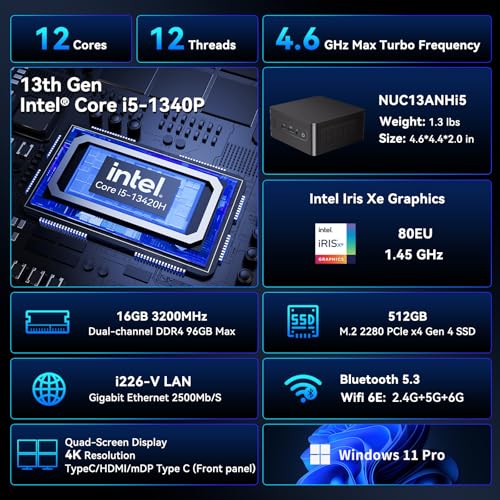
We measure footprint by what stays visible on your desk. Both NUC 13 Pro variants use the same compact 4.6 × 4.4 × 2.1‑inch chassis and are VESA‑compatible, so you can mount either unit behind a monitor, on a stand, or tuck it vertically beside a display. That changes the spatial conversation: instead of dedicating horizontal desk area to a clamshell laptop, a mini PC disappears into the setup and keeps surfaces clear.
Placement tradeoffs vs. gaming laptops
A gaming laptop bundles screen and keyboard — great for portability and immediate use — but it needs open desk space while you work or game. Mini PCs, by contrast, concentrate the compute box into a tiny, stationary element. That means:
Wireless, I/O, and where you can hide it
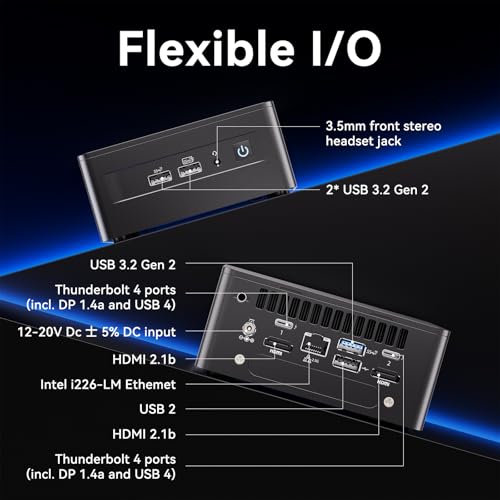
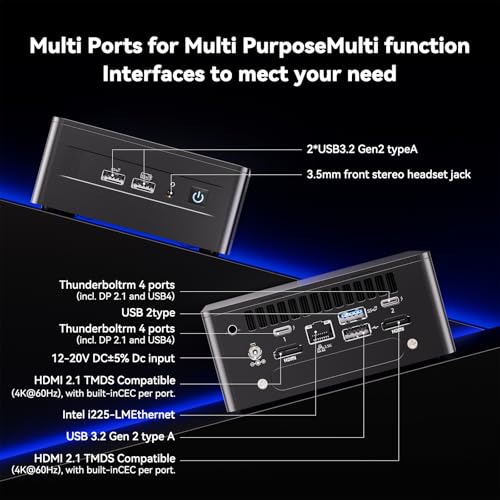
Small differences in I/O and wireless matter for placement. One NUC listing highlights 2.5Gb Ethernet and Wi‑Fi 6 (helps if you want a hidden wired node behind a monitor without sacrificing network speed). The other emphasizes Thunderbolt 4 / DisplayPort 2.1 and Wi‑Fi 6E — letting you route high‑res displays and docks over single USB‑C cables, which makes mounting even neater. In short: choose the I/O profile that matches how you’ll connect displays and peripherals.
Performance & Thermals: Real‑World Workloads and Light Gaming
What the i5‑1340P actually gives you
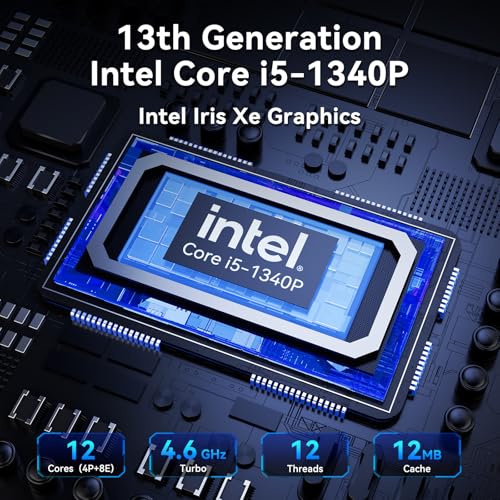
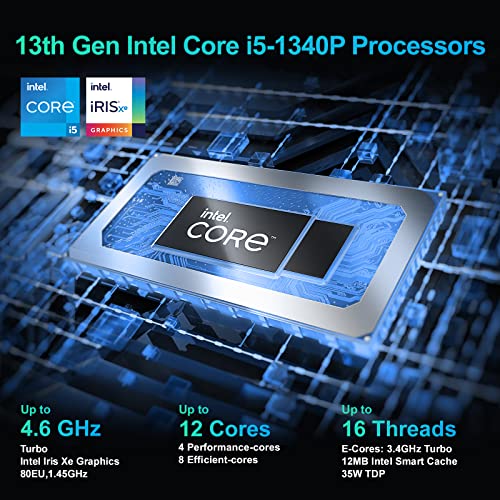
We test the 13th‑Gen i5‑1340P as a fast, efficient all‑rounder: four P‑cores, eight E‑cores, 16 threads and up to 4.6GHz turbo. That maps to very snappy multitasking (many browser tabs, Office suites, light photo edits) and reliable media playback — the NUC listings claim 8K decode-capable pipelines, which matters if you plan to use the box as a compact media hub or for high‑res streaming to external displays.
Sustained loads and cooling behavior
In a 4.6 × 4.4 × 2.1‑inch chassis you’re buying efficiency, not raw thermal headroom. Under day‑to‑day productivity and background builds the NUC holds boost clocks well and runs quietly; under prolonged CPU+GPU stress it will pull back clocks to control temps. That’s perfectly fine for office use, video conferencing, and export jobs that can tolerate longer runtimes — but it won’t sustain the peak power envelope of a gaming laptop with a discrete GPU and aggressive cooling.
Realistic light‑gaming expectations
Product notes — NENCHIN listing
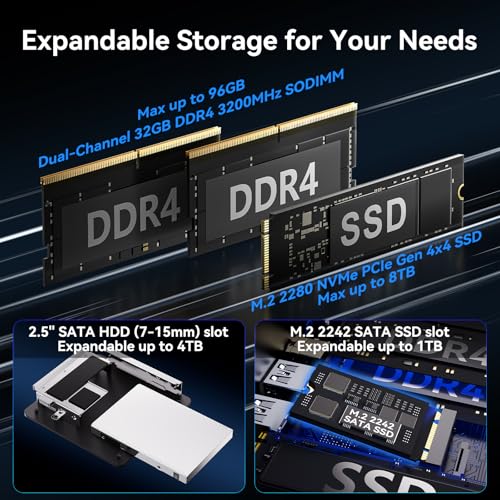
The NENCHIN variant emphasizes 2.5Gb Ethernet, Wi‑Fi 6 and a built‑in fan for steady office operation; in our view it’s tuned for silent, efficient office/media use.
Product notes — GEEK+ listing
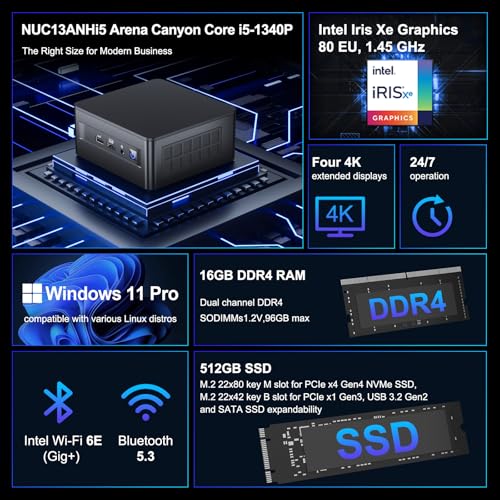
The GEEK+ listing leans on Thunderbolt 4 / DisplayPort 2.1 and Wi‑Fi 6E — better for multi‑display docking and external GPU scenarios if you ever need more graphics headroom.
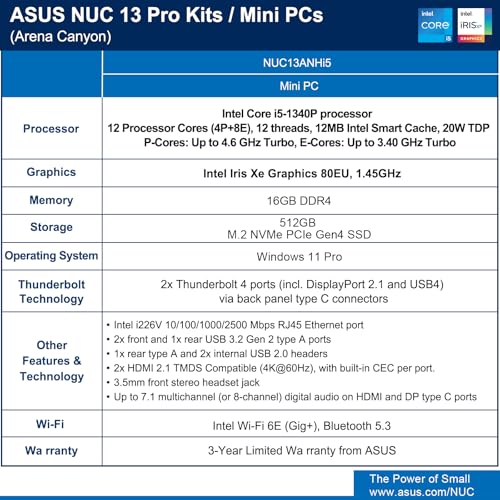
Both NUCs share the same silicon and similar thermal limits, so performance differences in everyday use are negligible; pick the I/O and wireless package that matches how you’ll work.
Connectivity, Displays & Ecosystem Integration
Physical ports & networking
We look first at the basics: both NUC listings give you more than a laptop’s average port density. Each includes wired Ethernet (at least gigabit; both listings even call out Intel i226/i226V 2.5Gb-capable silicon in places), multiple USB‑A ports, and Thunderbolt‑capable USB‑C. That means reliable wired networking for crowded Wi‑Fi environments and plenty of wired peripherals without a separate dock.
Display outputs & multi‑monitor
We care about what the box can drive. Both NUCs expose modern display pipelines (HDMI 2.1 + Thunderbolt/DP) and advertise 4K/8K playback. The second listing pushes the practical advantage: Thunderbolt 4 with DP 2.1 and explicit quad‑display support makes it easier to run multiple high‑res monitors from a single unit — ideal for dense desks or when you want a VESA‑mounted NUC behind a monitor and still drive two external displays.
Windows 11 Pro & business manageability
Windows 11 Pro matters in small‑space offices because it unlocks BitLocker, Group Policy, domain join, and enterprise remote management. The second listing also flags Intel/ASUS NUC management features (NPSS, remote boot/KVM, unattended control) — useful if the box becomes the single networked endpoint in a meeting room or shared workspace.
Peripheral docking vs laptop docking
We prefer the NUC as a central hub: a single Thunderbolt cable to a monitor/dock gives power, network, and multiple displays while keeping a tidy desk. Compared with a gaming laptop, which can dock but still carries heat/noise and fewer long‑term manageability options, the NUC’s port-rich, VESA‑friendly design is the cleaner, more future‑proof choice for small spaces.
Value, Upgradeability, and Use‑Case Decision Matrix
Where value lands
We see both NUC listings as better value than most gaming laptops for small‑space productivity. They pack 13th‑Gen i5 performance, Thunderbolt 4, dual HDMI, upgradeable SODIMM RAM and M.2 NVMe slots, plus a 3‑year ASUS/Intel warranty — features that extend useful life and reduce replacement costs. If price is the same, the Wi‑Fi 6E listing (~$699) is the marginally better buy: 6E reduces local Wi‑Fi congestion on busy apartment or office bands and gives lower latency for cloud apps and remote collaboration.
Upgradeability & future proofing
Both units:
That means more lifespan than a sealed gaming laptop and far quieter operation in small rooms.
When to pick a gaming laptop instead
Choose a gaming laptop if you need:
Quick checklist (pick one)
In short: for small spaces and long‑term value, we favor the NUCs; for portable, high‑end gaming, stick with a gaming laptop.
Feature Comparison


Final Verdict: Small Spaces Lean Toward Mini PCs—With Caveats
We choose the Intel NUC 13 Pro as the clear winner for most small‑space setups: home offices, dorms, and compact living rooms. Its tiny footprint, quiet thermal profile, flexible VESA mounting, and multi‑display support produce a cleaner, more integrated experience than a bulky gaming laptop in tight quarters. In today’s market where space and noise matter, that translates to better daily usability and longer utility.
If serious, dedicated gaming or true portable play is your priority, choose a gaming laptop, which still leads on raw GPU power and battery‑driven portability. Between the two NUC listings, opt for the Wi‑Fi 6E/Bluetooth 5.3 model if the price premium is small; the extra wireless resilience and future‑proofing matter in apartments and streaming. Otherwise the standard NUC delivers the same core strengths. Think about it.

Chris is the founder and lead editor of OptionCutter LLC, where he oversees in-depth buying guides, product reviews, and comparison content designed to help readers make informed purchasing decisions. His editorial approach centers on structured research, real-world use cases, performance benchmarks, and transparent evaluation criteria rather than surface-level summaries. Through OptionCutter’s blog content, he focuses on breaking down complex product categories into clear recommendations, practical advice, and decision frameworks that prioritize accuracy, usability, and long-term value for shoppers.









