



We break down why IPS’s color and speed versus VA’s contrast and value actually shape our gaming setups—how each fits modern consoles, GPUs, and living-room designs, and which trade-offs really matter to our playstyles.
We’ve all faced the moment when color, contrast, or motion ruins a game— panel choice matters. We compare IPS vs VA focusing on color accuracy, viewing angles, contrast, motion, design and ecosystem in LG 27GL83A-B (IPS) vs Samsung Odyssey G7 (VA).
Color Focused

Immersive Scale

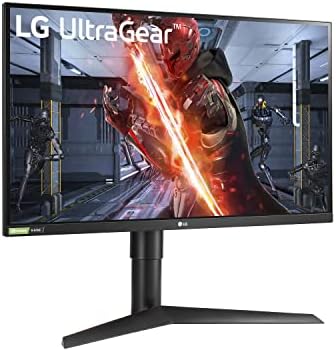
LG UltraGear 27GL83A
- Excellent out-of-box color accuracy and wide viewing angles
- Fast 144Hz refresh and 1ms (GtG) responsiveness suited to competitive play
- NVIDIA G-SYNC Compatible + FreeSync support minimizes tearing
- Adjustable stand and slim 3‑side borderless design for multi-monitor setups
- IPS black levels and contrast lag behind VA alternatives
- HDR is basic (HDR10) and not as impactful as true HDR displays
Samsung Odyssey G7
Feature Comparison
| Color Focused LG UltraGear 27GL83A | VS | Immersive Scale Samsung Odyssey G7 |
|---|---|---|
9 / 10 | Color Accuracy |
7.5 / 10 |
8.5 / 10 | Response & Motion Handling |
8.8 / 10 |
6.5 / 10 | Contrast & Black Levels |
9.2 / 10 |
8 / 10 | Features & Ergonomics |
8.5 / 10 |
$246.00 | Current price |
$647.99 |
| Buy for $246.00 | Buy for $647.99 |
IPS vs VA Monitors for Gaming: Which Is Best?
Panel Technology and Image Quality: Precision vs Contrast
Resolution & pixel density — sharpness where it matters
We look first at pixels. The LG 27GL83A-B is a 27″ QHD (2560×1440) IPS monitor, which translates to about 109 ppi — crisp text and clear HUD elements at normal desktop distance, ideal for spotting enemies in multiplayer matches. Because it’s small and dense, fine UI and competitive crosshairs stay legible without scaling.

The Samsung Odyssey G7 stretches a 21:9 WUHD (5120×2160) across 40″, giving roughly 139 ppi — paradoxically higher pixel density than the LG. On paper that means excellent perceived sharpness, but the 1000R curve and typical farther viewing distance change how we experience that detail: it feels more cinematic and immersive, not “zoomed-in” like a smaller monitor.
Color, viewing angles, and black levels — what each panel emphasizes
IPS (LG) gives us consistent, accurate color and wide viewing angles straight out of the box — great for color-critical work, stream overlays, and keeping colors consistent when teammates glance at your screen. VA (Samsung) trades some angular accuracy for much deeper blacks and higher native contrast, which makes shadows pop and HDR scenes feel weightier with DisplayHDR600.
The takeaway: IPS prioritizes fidelity and predictability; VA prioritizes mood and atmosphere. For fast shooters we favor the LG’s consistent visuals; for single‑player and spectacle-driven titles the Odyssey’s contrast delivers a stronger emotional impact.
Performance: Refresh Rate, Response, and Real-World Gaming
Raw specs vs what we actually feel
On paper both panels advertise 1ms (GtG), but the experience differs. The LG 27GL83A-B’s 144Hz IPS delivers consistently snappy inputs and reliable motion clarity with minimal color wash — the pixel transitions are predictable, so fast crosshair tracking and rapid flicks feel immediate. Its smaller 27″ size and QHD resolution keep perceived motion tight, which helps in twitch shooters.


The Samsung Odyssey G7 pushes 180Hz on a 40″ curved VA. That higher refresh rate and strong native contrast promise smoother frame pacing and more cinematic motion, but we sometimes see VA-specific smearing or overshoot during quick horizontal pans. On large fast displays, motion artifacts and pixel travel across the curve are more noticeable than raw Hz numbers imply.


Adaptive sync, input lag, and competitive impact
Design, Ergonomics, and Ecosystem Integration
Build and footprint
We look at how these monitors live on a desk (or in a living room). The LG 27GL83A-B is compact and unassuming — a 27″ QHD panel with thin bezels that disappears into multi-monitor rigs. It’s easy to place close to your keyboard and keeps perceived pixel density high for competitive play. The Samsung Odyssey G7’s 40″ 1000R curve dominates a space; it creates immersion you can feel, but it also forces a different room layout and a much larger GPU to drive native WUHD at high Hz.
Ergonomics and stand
Physical adjustability matters in daily use. The LG ships with tilt/height/pivot adjustments and a 100 x 100 VESA option, so we can angle it for long sessions, portrait mode, or multi-monitor alignment. The Samsung offers tilt and height but its sheer size and curve make pivoting or tight dual setups impractical — it’s built to be the centerpiece, not part of a desktop stack.
Ports, menus, and firmware features
Both are well-equipped, but with different priorities


Ecosystem fit — why it matters
We think ecosystem fit often beats raw specs. The LG plugs cleanly into mixed GPU setups and laptops, hits 1440p at playable frame rates on midrange GPUs, and suits esports-focused workflows. The Samsung is perfect if you want a console‑style, cinematic centerpiece (and own a high‑end GPU or use downscaling). Its advanced Samsung software and hub features reward living‑room or single‑display multitaskers, but they’re overkill for small desktop battlestations.
Value, Use Cases, and Who Should Buy Which
Price vs. practical value
We put price and practical use at the center. At roughly $230 on Amazon, the LG 27GL83A-B is a clear midrange value: QHD resolution, accurate IPS color, and 144Hz responsiveness that most gamers and creators can actually drive with a midrange GPU. The Samsung Odyssey G7 sits around $750 — a premium asking price for a 40″ WUHD curved canvas, HDR600, and 180Hz ceiling that reward users who want immersion more than raw pixel-per-dollar.
Desk, room, and GPU demands
The trade-offs are concrete and matter in daily use.
Long-term value considerations
We look beyond specs to longevity and ownership headaches. Both monitors come from established vendors with solid returns and firmware update cadence, but value retention differs: the LG’s strong price-to-performance and broad compatibility makes it easier to resell to competitive players or creators. The Samsung’s niche (ultrawide, HDR, curve) preserves value for enthusiasts but narrows the buyer pool.
Who should buy which
We make recommendations based on how you game and what you value.
If you’re undecided, pick the LG for practicality and the Samsung only if size, curve, and HDR experience are priorities worth the extra cost.
Frequently asked questions
Which is better, IPS or VA Panel?
There is no universal winner: IPS fits some buyers and VA Panel fits others. We compare specs, daily use, and trade-offs in this guide so you can match the pick to your budget and workflow, not a single spec sheet.
What is the main difference between IPS and VA Panel?
IPS and VA Panel target overlapping but not identical use cases. The sections above break down design, performance, ecosystem, and value so you can see where each product pulls ahead and where it compromises.
Should I buy IPS or VA Panel first?
Buy the product that removes your biggest daily friction first. If IPS solves your primary pain point, start there; if VA Panel is the bottleneck in how you actually work or play, prioritize it. Many households add the other later.
Is IPS worth it over VA Panel?
IPS is worth the premium over VA Panel when you will use the features that justify the price—extra performance, build quality, or ecosystem lock-in. If those extras go unused, VA Panel usually delivers better value.
Can IPS replace VA Panel?
For some users, yes; for others, no. IPS can cover most tasks VA Panel handles, but gaps in compatibility, accessories, or specialized workflows may still matter. Use our comparison table and verdict to see which gaps apply to you.
Who should choose IPS vs VA Panel?
Choose IPS if its strengths match how you will use it every day; choose VA Panel if you need its specific advantages or a lower entry price. When in doubt, favor the option that fixes your most frequent frustration—not the highest spec on paper.
Final Verdict: Pick Based on Priorities
We pick the LG 27GL83A-B as the clearer winner for most players, its QHD, color fidelity, low latency, and ergonomic stand deliver precision and pro-level ecosystem compatibility for competitive play.
We recommend the Samsung Odyssey G7 if you want cinematic scale, deeper contrast and stronger HDR punch, ready to trade precision for presence — browse our product comparisons?

Princess Rioboca is the Lead Editorial Writer at Option Cutter, bringing over seven years of hands-on experience in consumer technology journalism. Specializing in home networking and smart home architecture, she transforms complex technical data into practical, real-world upgrades. Princess personally tests and audits every product she reviews—evaluating real-world Wi‑Fi throughput, cable management durability, and streaming ecosystem stability—to filter out spec-sheet noise. Her rigorous, field-tested insights are designed to give readers transparent, unbiased buying advice on what to purchase, what to skip, and exactly why.















