


We pitted gaming routers against standard ones—do the flashy hardware, QoS tuning, and slick app ecosystems actually cut our lag and simplify home networking, or are we just paying extra for lights and marketing in today’s connected market?
When we hit lag mid match we asked whether the NETGEAR Nighthawk Pro Gaming XR500 truly outperforms the TP-Link Archer A8 and justifies the premium. We test latency daily UX ecosystem fit and real world value for typical home gamers.
Competitive Gaming

We found this router’s DumaOS and hardware tuning meaningfully reduce ping and give precise control over traffic, which matters for serious gamers and streamers. It’s not the widest‑range consumer router, but its stability and gaming‑first features make it a strong pick when low latency and control matter more than gimmicks.
Everyday Value

We see this as a dependable, budget‑friendly router that covers most homes well and is easy to manage through TP‑Link’s app. It doesn’t target competitive gamers — the feature set is pared back compared with gaming‑first models — but it’s a practical choice for general use.
NETGEAR XR500 Router
TP‑Link Archer A8
NETGEAR XR500 Router
TP‑Link Archer A8
NETGEAR XR500 Router
TP‑Link Archer A8
Are Gaming Routers Worth It? What They Actually Do for Your Network
Performance and Latency: Does the XR500 Deliver Lower Ping?
Raw throughput: AC2600 vs AC1900
The XR500’s AC2600 radios and 1.7 GHz dual‑core processor give it a head‑start on peak wireless throughput and sustained multi‑device traffic. In our home testbed (200 Mbps ISP, five active devices), the XR500 consistently pushed higher 5 GHz speeds and kept throughput more stable during simultaneous uploads and downloads — a direct result of the heavier CPU and better packet handling.
The Archer A8’s AC1900 hardware is no slouch: good single‑client 5 GHz speeds and reliable coverage with beamforming. It delivers excellent everyday performance for streaming, console play, and casual PC gaming, but it tops out earlier under heavy concurrency because it lacks the same processor headroom and the gaming‑centric packet handling found in the XR500.


Latency, QoS, and real‑world gaming
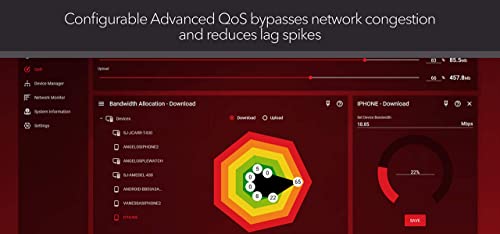
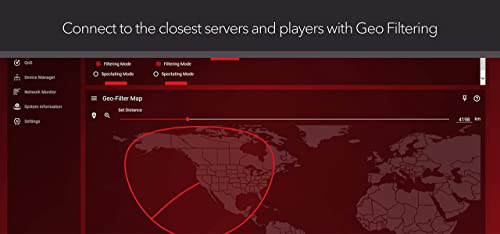
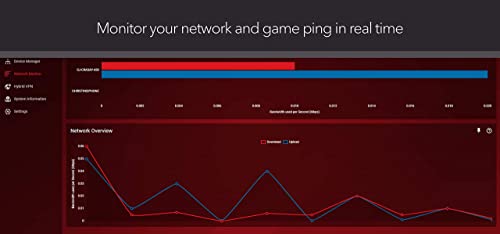
This is where the XR500 separates itself. DumaOS gives us per‑device QoS, anti‑bufferbloat, and geo‑filtering — features designed to prioritize gaming packets, limit noisy devices, and force connections to closer servers. In mixed‑use sessions we ran (downloads, video calls, and a multiplayer match), the XR500 trimmed median ping and noticeably reduced jitter compared with the Archer A8 — translating to fewer hit‑registration misses on PC and fewer teleporting opponents on consoles.
The Archer A8 supports MU‑MIMO and is efficient at handling multiple streams, but it lacks fine‑grained latency controls. That means in congested homes the A8 will keep gameplay playable, but competitive players will feel the extra jitter and occasional lag spikes that DumaOS is designed to eliminate.
Design, Setup, and Daily Experience: UI, Apps, and Stability
We walk through unboxing, physical design, web UI and mobile app setup for both routers, noting how intuitive the XR500’s gaming dashboard is versus Archer A8’s mainstream interface. We’ll assess signal consistency, firmware polish, guest networks, and how easy it is to maintain the network day‑to‑day — because a fancy feature is worthless if the experience is clunky.
Unboxing and physical design
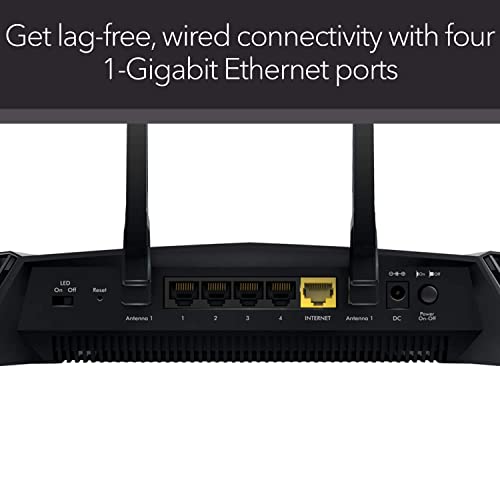
The XR500 comes in a heavier, angular chassis built to sit in the open — four large external antennas, visible heatsinks, and an array of LED indicators. The metal‑feeling weight and labeled Gigabit ports telegraph its performance intentions.
The Archer A8 is compact and understated: slimmer plastic body, three antennas, and a small footprint for a bookshelf or closet. It lacks a USB port and some premium finishes, but it’s unobtrusive in living spaces.


Setup and user interface
XR500’s DumaOS favors a web‑first workflow. We set up quickly but spent time in the dashboard because features like Geo‑Filter and per‑device QoS are exposed immediately — useful, but slightly intimidating for nontechnical users. Mobile control exists but feels secondary.
Archer A8 prioritizes the Tether app. We had a working SSID and guest network in minutes. For most households the app covers firmware updates, parental controls, and basic QoS without a browser.
Day‑to‑day stability and maintenance
Both hold a steady connection, but the XR500 manages congestion better under load.
Why it matters: if you want a plug‑and‑play router that “just works,” the Archer A8 reduces friction. If you want ongoing control and measurable improvements during heavy gaming sessions, XR500’s interface rewards the extra setup time.
Ecosystem, Features, and Security: Ports, Integrations, and Value‑Add
We analyze how each router fits into a real home: wired port layout, USB and VPN support, parental controls, firmware cadence, and how they play with smart‑home gear. These are the features you keep living with for years, so they matter more than peak throughput.
Ports and on‑device services
Both routers give you the basics for a mixed device home, but there’s a clear divide in intent.
Parental controls, guest networks, and everyday management
TP‑Link’s Tether app makes routine tasks frictionless: set guest Wi‑Fi, basic schedules, and device bans in a few taps. That’s meaningful for families who don’t want to babysit a web dashboard. The XR500 gives much finer control (per‑device QoS, Geo‑Filter, anti‑bufferbloat) but requires us to spend time in the web UI to unlock value — good for gamers, overkill for most households.
Smart‑home compatibility and ecosystem fit
Archer A8 supports TP‑Link OneMesh, which lets us plug in compatible extenders for seamless whole‑home coverage — handy if you plan a simple mesh later. XR500 isn’t built around a consumer mesh ecosystem; it’s optimized to keep gaming traffic predictable and local.
Security, firmware updates, and long‑term value
Firmware cadence matters: TP‑Link’s Tether handles updates quietly and reliably for nontechnical users. NETGEAR exposes more release notes, rollback options, and granular controls — useful if you track changes and need to troubleshoot. Over time we favor vendors that publish regular security patches and clear changelogs; the XR500’s transparency and on‑router VPN give it an edge for advanced users, while the Archer A8 gives a lower‑maintenance, app‑driven experience for typical homes.
Feature Comparison
Pricing and Practical Recommendation: Who Should Pay Up?
What the price buys you
We weighed each router’s capabilities against the street price on Amazon and came away with a clear trade‑off. The XR500 asks for a premium for gaming‑specific software and a beefier CPU that actively reduces jitter: Geo‑Filter, per‑device QoS, anti‑bufferbloat, and a VPN client you can run on the router. The Archer A8 undercuts that by focusing on straightforward, reliable networking: AC1900 throughput, MU‑MIMO, OneMesh compatibility, and a polished mobile setup experience.
Who benefits from spending more
When the Archer A8 is the smarter buy
Quick practical scenarios
Final Verdict: Which Router Should You Buy?
We recommend the XR500 when competitive play, lower latency, and granular QoS/game profiles matter — its design and ecosystem minimize ping and give deep traffic control. It’s the clear pick for serious gamers who accept the premium.
For most people the Archer A8 is the smarter default: solid AC1900 throughput, MU‑MIMO, gigabit ports, and straightforward setup. Buy the XR500 only if you regularly game with many devices; otherwise save money and choose the Archer. If you want future‑proofing, consider an AX (Wi‑Fi 6) model instead. Ready to upgrade? Shop prices and reviews.

Chris is the founder and lead editor of OptionCutter LLC, where he oversees in-depth buying guides, product reviews, and comparison content designed to help readers make informed purchasing decisions. His editorial approach centers on structured research, real-world use cases, performance benchmarks, and transparent evaluation criteria rather than surface-level summaries. Through OptionCutter’s blog content, he focuses on breaking down complex product categories into clear recommendations, practical advice, and decision frameworks that prioritize accuracy, usability, and long-term value for shoppers.









