


Why your charger often feels slower than it should
We’ve all pulled a compact charging brick from a bag and expected it to race our phone or laptop back to life — only to watch the battery crawl. The number printed on the box is a clue, not a promise. In this piece we unpack what that wattage really means, what happens inside the charger, and why devices, cables, and connectors all shape real-world speed.
We’ll also look at the market and design forces that keep many bricks modest, and give practical advice so you can pick a charger that actually meets your needs. Read on for a clear, pragmatic guide to faster, more predictable charging for daily use, too.


What the wattage on the box actually means
We’ve all been sold on a single big number — 65W! — and assumed that’s what our device will always get. The reality is messier. Here’s the vocabulary and context we use to separate marketing from what actually ends up in a battery.
Peak vs. sustained power
Manufacturers often quote peak output: the maximum power a charger can deliver under ideal lab conditions for a short time. In real use, sustained power is what matters — and that number is usually lower because heat, efficiency, and the device’s own charging logic throttle things down.
Multi-port math
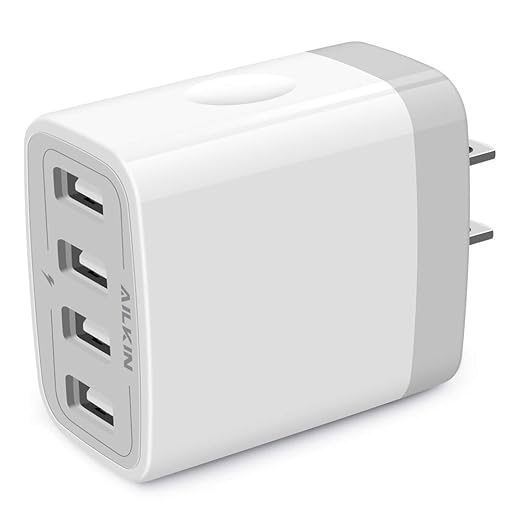
“65W total” isn’t the same as “65W to every port.” Many multi-port bricks will list both a total and per-port ceilings. Read the fine print: a spec sheet might say 65W total, 45W max to USB‑C1, and 20W to USB‑C2 when used together. That means two laptops at once? Don’t expect full-speed charging on both.
Negotiation: USB Power Delivery and Quick Charge
Modern chargers and devices speak protocols — USB Power Delivery (PD), Quick Charge, and variants like PPS. These are negotiation languages for volts and amps. The charger advertises what it can do; the device requests a profile. If either side doesn’t support the same profiles, you get a fallback speed — often much slower than the headline wattage.
Why lab numbers don’t map to daily life
Test conditions are controlled: cool ambient temperature, single device, new cables. In a backpack on a hot train, with two devices and an older cable, the charger will hit thermal limits, fold back voltage, or split power across ports.
Quick checks we use before buying:
Understanding these distinctions lets us stop being swayed by a single number and start matching chargers to real-world needs.
Inside the charger: design choices that throttle real output
We’ve talked about labels and negotiation; now let’s open the brick and look at the physical and design realities that stop a charger from delivering headline numbers in the wild. The constraints aren’t mysterious — they’re thermal, electrical, and economic — and they show up as throttled speeds, warm housings, or mixed-port math.
Power conversion and efficiency
Every charger is a small power plant: AC in, DC out, with switching regulators doing the heavy lifting. Efficiency matters — a 95% converter wastes 5% as heat, a 90% one wastes twice that. That extra heat forces voltage foldback or current limits to keep temperatures and component stress within safe bounds. In practice, efficiency curves vary by load: a charger optimized for 30–65W may be inefficient down at 10W or spike in heat at full load.
Component choices and the rise of GaN
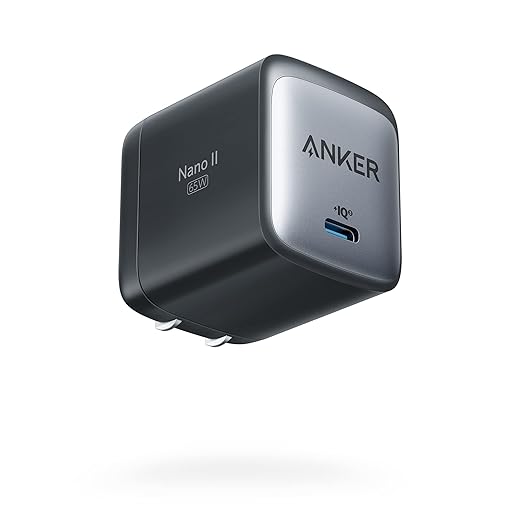
Switch-mode components, inductors, capacitors, and semiconductors determine size and loss. Gallium nitride (GaN) transistors have reshaped the market: they switch cleaner, run cooler for a given power, and let manufacturers shrink bricks (see Anker Nano II). But GaN doesn’t erase physics — smaller packages have less mass to soak heat, and cost pressures can mean thinner PCBs and cheaper passive parts that still limit sustained output.
Thermal management and protection logic
Most modern bricks are fanless, so heat-shedding relies on case material, copper pours, and thermal throttling in firmware. Chargers monitor temperature, current, and voltage; when they sense hot spots, overloads, or negotiation conflicts, they step down voltage or cap current. That’s why your laptop might hit 65W for a minute, then settle to 30–40W while the charger cools.
Multi-port distribution and negotiation quirks
Beyond hardware, power-routing ICs arbitrate ports. When two devices request top profiles simultaneously, the charger’s firmware enforces safety limits using preset rules — “port A gets priority,” “split 45/20,” or “reduce both.” If devices misreport capabilities or use different PD versions, the brick errs on the safe side.
Practical takeaways (how to avoid surprises)
Why the device determines how fast it charges
Batteries don’t charge like faucets
We often treat charging speed as a single number, but lithium-ion cells follow a charging curve: a relatively high-current “bulk” stage until roughly 50–70% state of charge, then a tapering constant-voltage stage that slows current to protect cell chemistry. Practically, that means a phone that hits 60% in 20 minutes may take an hour to reach 100%. We see this pattern across iPhones, Pixels, and Galaxy phones — the spike is real, the taper is deliberate.
Firmware is the referee
The phone’s firmware controls that curve. OEMs enforce current and voltage limits based on temperature, age, and safety margins. Companies tune these limits differently depending on product goals: some chase headline wattage for marketing (short, aggressive boosts), others dial back peak current to extend battery lifespan and reduce heat. In our testing, identical bricks produce very different on-device results because the phone decides how much to accept.
Ecosystem lock‑in and protocol negotiation
Charging is a negotiation: device, charger, and cable must agree on a profile. USB‑PD, PD‑PPS, Qualcomm Quick Charge, and proprietary systems (VOOC, Warp) aren’t interchangeable. A 100W third‑party brick can be artificially constrained if it doesn’t support the phone’s preferred handshake or if the cable lacks the right e‑marker. That’s why some phones only reach full advertised speed with branded chargers or certified partners.
Practical tips — what we do
Understanding that the device sets the pace changes how we pick chargers: it’s less about raw wattage and more about protocol compatibility and thermal reality.
Cables, connectors, and the invisible bottlenecks
We’ve all had the moment: a shiny new 100W brick, yet our phone inches up in percent. Often the missing piece isn’t the brick — it’s the cable and the tiny electrical rules living inside the connector. Here’s how those everyday bits shape real‑world charging.
Wire gauge and voltage drop
Cables are wires. Thinner conductors (higher AWG numbers) have more resistance, which means voltage drops over length and heat. That drop reduces the power the device actually sees. Short, thick USB‑C cables carry 3A–5A with minimal loss; long, thin or cheaply made cables can cut effective current drastically. In practice, keep runs under ~1m for peak speeds unless the cable is specifically rated for higher current.
Connector quality, e‑markers, and signaling
USB‑C isn’t magic — it relies on CC pins and, for >3A or >60W, an e‑marker chip to tell the device it’s safe to pull more current. Bad soldering, frayed ends, or counterfeit cables can corrupt that handshake and force fallback speeds. USB‑A lacks the PD negotiation pins entirely, so adapters or legacy chargers often limit power even if the charger itself is capable.

Habits that sabotage speed
Quick diagnostics we use
These checks usually tell us whether to upgrade the cable, the brick, or nothing at all — and they set up the bigger choices manufacturers make about ports and pricing, which we’ll unpack next.
Market and design forces that keep bricks modest
Cost, margins, and the math of product pricing
Companies make chargers the same way they make phones: by balancing cost vs. perceived value. A bigger, higher‑watt brick costs more (components, bigger transformers, extra PCB real estate), so shrinking or downgrading the charger is an easy way to protect margins without changing the headline device price. We’ve seen this play out since companies like Apple stopped including chargers with iPhones in 2020 — an immediate parts‑cost saving that also short‑circuited resale and logistics pain.
Ecosystem play: accessories as recurring revenue
Bricks are also a piece in a broader ecosystem strategy. If the phone comes with a modest 20W charger, many users will buy an upgraded third‑party brick or an official faster adapter. That’s predictable revenue. Brands use this to upsell branded chargers, cables, and power banks — all higher‑margin accessories than the phone itself.

Packaging, aesthetics, and shipping constraints
Smaller boxes are cheaper to ship, look “cleaner” on shelves, and fit into slimmer packaging. That drives decisions toward flatter, lighter chargers or none at all. We see this in phones that tout thinness and minimalism while quietly relying on users to buy a separate, bulkier charger for fast top‑ups.
Battery health and product simplicity
Sometimes the limit is deliberate: manufacturers tune charging curves to protect long‑term battery health or to avoid support calls about “battery swelling.” Limiting peak currents via firmware or shipping lower‑rated bricks simplifies warranty and safety handling across regions.
Practical takeaways we use when shopping
These commercial choices explain why many bricks feel underpowered, and they set up the practical buying advice we’ll cover next: how to pick a charger that actually fits your needs.
How to choose a charger that actually meets your needs
Match the charger to your device mix
We start by listing what you actually charge. Phones typically need 18–45W for meaningful speed; earbuds 5–10W; tablets 18–45W; laptops 45–100W if you want full‑speed charging. Buy for the highest sustained need in your set, not the biggest number you can find. If you want one brick for everything, plan for 65–100W.
Look for protocols and certifications
Prioritize chargers that explicitly support the protocols your devices use: USB‑PD (including PD3.1 where relevant), PPS for Samsung/Google fast charge, or QC4+ for older Android models. Also check for USB‑IF, UL, or similar safety marks — those reduce the chance of overpromising numbers on the spec sheet.

Port count and power sharing: read the fine print
A 100W multiport brick doesn’t always give 100W to one device. Look for per‑port maximums and advertised power distribution (e.g., 65W on USB‑C1, 30W shared across others). If you frequently charge multiple devices, prefer a brick that guarantees sufficient per‑port output rather than one big headline wattage.
Practical tests we run at home
GaN vs. larger bricks — the tradeoffs
GaN bricks are compact and efficient, great for travel, but can run hotter and may throttle under sustained max load. Larger bricks dissipate heat better and sustain full power longer. Choose GaN for portability; choose a bigger, cooler unit when you need continuous high power (laptops, creative workflows).
Cables matter
Don’t pair a high‑watt charger with an under‑rated cable. For >60W, use a USB‑C cable with an e‑marker. For quick wins, swap in a known good cable before blaming the brick.
These practical checks get us close to real performance and prepare us for the final step: what to do if your charger still isn’t cutting it.
Stop blaming the cable: what to do next
We’ve shown that a charger’s spec sheet is only half the story—protocol negotiation, thermal throttling, cable and connector limits, and merchant incentives all conspire to make bricks weaker in practice. That matters because it shapes daily device readiness, multitasking comfort, and device longevity in a market that rewards compactness over honest throughput.
Do this: test per‑port behavior, use quality cables, match charger and device protocols, and buy a vetted high‑capacity brick if speed is important. Small attention here yields consistently faster, more reliable charging. We’ll save you time, money, and frustration fast.






