
Who actually runs your house — a local brain, a cloud speaker, or a tiny USB bridge with attitude?
Most smart-home headaches start with the hub. Setups that promise ‘one-tap’ control often mean ten menus and a firmware update later. We spent time with ten hubs to see which ones make a home smarter — and which just make it louder.
We focused on three things: setup, design, and ecosystem fit. Short installs, clean interfaces, and solid integrations matter more than specs. We tested for real-world reliability, how much runs locally versus in the cloud, and how the hubs play with Zigbee, Z‑Wave, Thread, Matter, and voice assistants.
Top Picks





Hubitat Elevation C-8 Pro Automation Hub
We recommend it for people who want maximum control, privacy, and complex automations processed locally. It’s not the easiest out-of-the-box experience, but for those willing to learn it provides unmatched flexibility and reliable local operation.
Why we test Hubitat differently
Hubitat is less about simplicity and more about control. We evaluated the C-8 Pro as the hub for people who want to build complex automations, maintain local processing for speed and privacy, and integrate a wide range of devices from different protocols without depending on the cloud.
Power-user capabilities and integrations
The hub supports Zigbee and Z-Wave natively, Matter through bridges, and a huge catalogue of community device drivers. Advanced rule-building tools and custom dashboards let you tailor automations in ways consumer-focused hubs can’t. We found response times to be consistently fast because rules execute locally rather than waiting on cloud round trips.
Real-world trade-offs and support
Hubitat requires patience: the initial setup and device pairing can be slower, and advanced automations benefit from time spent learning the UI and exploring community guides. The company’s forums are an excellent resource, but official support response times vary, so plan for a steeper DIY investment compared with plug-and-play hubs.
Philips Hue Bridge (Latest Bridge)
We consider it essential for anyone building out a Philips Hue lighting system: it unlocks the platform’s full feature set, reliable Zigbee mesh control, and Matter support. The bridge delivers consistent response times and advanced automations that wireless-only bulbs can’t match.
Purpose and positioning
The Hue Bridge is the canonical way to get the most out of Philips Hue lights. We approached it as both an upgrade path for existing users and as the core component for any new Hue installation. The bridge converts individual Bluetooth bulbs into a coordinated Zigbee network with cloud access, automation, and advanced features.
Performance and day-to-day benefits
Once installed, the Hue Bridge dramatically improves responsiveness compared with Bluetooth-only bulbs and enables powerful features like room-based scenes, motion-triggered automations, and the Hue Sync ecosystem for movies and gaming. The Zigbee mesh gives you reliable local control, and the bridge maintains settings through power cycles.
Ecosystem and future-proofing
The newest Bridges add Matter support, which helps bridge Hue’s rich lighting capabilities into cross-vendor routines. That’s important because it means your lights can participate more easily in HomeKit, SmartThings, and other Matter-enabled systems without losing the Hue-only features that make the system unique.
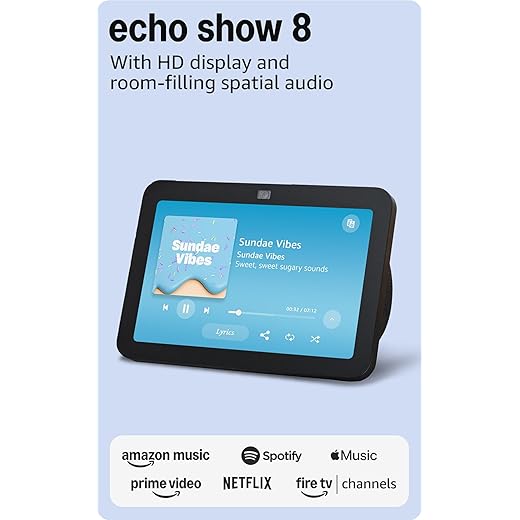
Echo Show 8 (3rd Gen) Spatial Audio Display
We found it strikes the best balance between screen size, speaker performance, and smart-home control for kitchens and open-plan living spaces. The spatial audio and 8" HD touchscreen make it useful as a daily control surface and media device.
What we set out to evaluate
We tested this Echo Show as a primary countertop display and as a smart-home command center. Our remit was to judge whether it makes sense as the hub of an Alexa-centric home, both functionally and as a daily-use surface for recipes, video calls, media, and device control.
Hardware and daily use
The 8" display is the sweet spot for kitchens and bedside tables: big enough for video calls and recipe steps, small enough to avoid dominating a counter. Spatial audio is a tangible upgrade over earlier Shows; music and dialog sound fuller and more room-filling.
Smart-home capabilities and ecosystem
This Show supports Zigbee, Thread, and Matter, meaning it can act as a local hub for a broad set of devices without extra hardware. That matters today because Matter is increasingly the bridge between ecosystems, and having a display that also functions as a hub reduces clutter.
Caveats and realistic expectations
In whole-home audio groups the Show occasionally introduced brief audio instability during extended group playback in our experience, which means we wouldn’t recommend stacking many display-equipped Echos in a primary multi-room music setup. For most people who use it as a central control surface, however, those issues won’t be a dealbreaker.
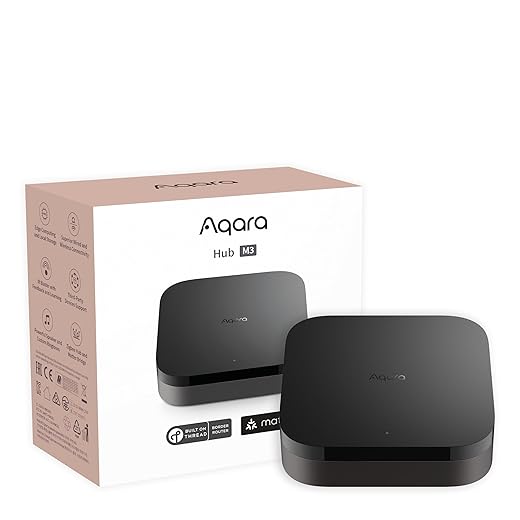
Aqara Smart Hub M3 Thread & Matter Controller
We found it to be the most feature-rich Aqara hub, with Thread, Matter bridging, PoE, and strong local automation capabilities. It’s well suited to power users who want local-first automations and Matter exposure for selective devices.
The M3 in context
We approached the M3 as Aqara’s bid to move from inexpensive entry-level hubs to a professional-grade, multi-protocol controller. It’s designed to be the local automation brain in a smart home that blends Aqara accessories with Matter and Thread-capable gear.
Advanced features and performance
The M3’s combination of Thread for low-power mesh devices, Zigbee for Aqara sensors, and Matter bridging makes it versatile for modern homes. The Edge Hub model shifts automations locally, so routines run quickly even if your internet drops. We particularly liked the PoE option and USB-C mini-UPS capability for installations where uptime matters.
Practical trade-offs
The hub is more expensive than basic models and requires you to remain largely within Aqara’s accessory catalog for Zigbee devices. In our larger-home testing we found the coverage to be good but recommended additional repeaters or secondary hubs for very large footprints.
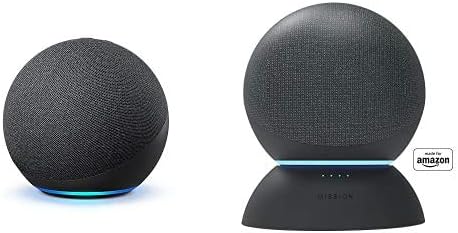
Echo (4th Gen) with Battery Base
We found it delivers fuller, richer sound than the smaller Echo models and the bundled battery base adds useful portability for short stretches away from outlets. Its built-in Zigbee hub makes it a pragmatic central device for many Alexa-first smart homes.
Why we tested it
We looked at this Echo bundle as a practical entry point for anyone who wants better sound than a Dot plus basic hub capabilities. In our testing it functioned as a multi-purpose device—speaker, voice assistant, and Zigbee bridge—so we judged it across audio performance, smart-home integration, and day-to-day usability.
Design and audio
The spherical body gives the speaker a surprising amount of midrange and bass compared with smaller Echo devices. In our listening sessions we appreciated the clarity on vocals and the tunable EQ in the Alexa app; pairing two units for stereo or incorporating them into a Fire TV home-theater setup noticeably improves immersion.
Smart-home and practical use
The onboard Zigbee radio cuts down on hub proliferation: in many homes you can connect lights, sensors, and a lock directly without a separate bridge. The battery base is useful for moving the device short distances (up to the quoted runtime) and for temporary setups like a backyard gathering or a kitchen counter during a party.
Where it falls short
We noticed the mic performance degrades when playback is very loud, and some reviewers reported occasional recognition issues. The bottom light ring looks distinctive but is less obvious from some angles, which matters when you want a quick glance to see whether the assistant heard you. For people who value screen-based controls or the tightest voice pickup, a display-equipped Echo might be a better fit.
Google Nest Hub Max 10-Inch Smart Display
We liked the Max for families who want a robust, all-in-one home display with a bigger screen and better speakers. Its built-in Nest Cam and larger surface make it an excellent command center for shared spaces.
What we looked for
We focused on how the Nest Hub Max performs as a central family display: visibility from across a living room, video calling quality, and the usefulness of having a camera and stronger speakers built in. For households that want a more commanding presence than a 7" Hub, the Max is purpose-built.
Media, calls, and home control
The larger screen improves readability for recipes and calendar items, and the 6.5 MP camera delivers clearer video calls with auto-framing. Built-in speakers are noticeably better than the small Hub, which makes music and YouTube more enjoyable when played directly from the unit.
Reliability and setup notes
Most users will find setup straightforward. We did see isolated reports of units arriving with language or connectivity problems—again typically tied to marketplace-renewed items. When functioning normally, the device is a reliable hub for Google-centric smart homes.
Final take
For anyone who wants a larger, more capable Google smart display and values the Nest Cam integration, the Max is a clear step up from the smaller Hubs. It’s most useful in kitchens and living rooms where the screen and camera can be put to regular use.
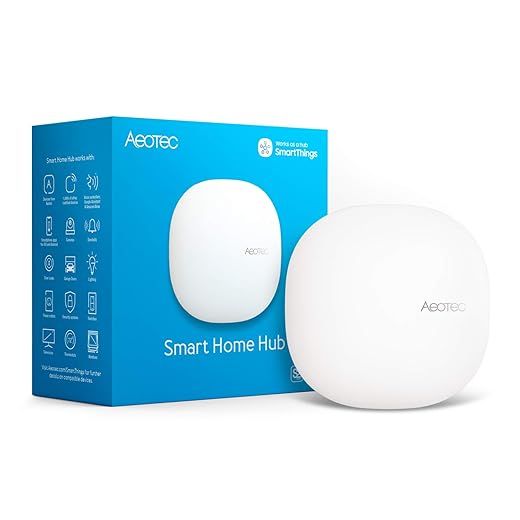
Aeotec Smart Home Hub (SmartThings Gateway)
We found it to be a solid, official gateway for SmartThings fans who want Matter, Z-Wave, and Zigbee support in one box. It’s a sensible option if you’re invested in the SmartThings app and want a simpler path to local automations.
Where this hub fits
We evaluated the Aeotec hub as a practical bridge to Samsung’s SmartThings ecosystem, focused on users who want broad protocol compatibility without jumping to an entirely new platform. It’s intended for people who want one device to manage Z-Wave, Zigbee, Matter, and cloud-connected Wi‑Fi devices via the SmartThings app.
Implementation and day-to-day
Setup is straightforward: connect via Ethernet or Wi‑Fi, sign into SmartThings, and begin pairing devices. For typical consumer scenarios the hub handles routine automations and voice assistant integration smoothly, and many automations now run locally to reduce latency and increase reliability.
Who should pick it and limitations
This hub is a good fit for moderate-to-advanced users who want the convenience of SmartThings’ device ecosystem and a broad protocol spread. If you’re a tinkerer who needs deep local scripting or an advanced rule engine, there are more configurable (but more complex) alternatives like Hubitat or Home Assistant.
Aqara Smart Hub M2 Zigbee Bridge
We found it to be a cost-effective way to centralize Aqara sensors and automations, and its IR blaster is a handy extra for legacy devices. It requires 2.4 GHz Wi‑Fi and is best suited for homes primarily using Aqara peripherals rather than mixed-brand Zigbee networks.
Who this hub is for
We tested the M2 as the most affordable way to build an Aqara-centric smart home. It’s tailored to users who plan to buy Aqara sensors, switches, and outlets rather than mix-and-match Zigbee devices from different vendors.
Features that stand out
The M2 packs a surprising amount of utility for its price: Zigbee coordinator duties, a 360° IR blaster for remotes, and a built-in speaker for alarms. Setup is straightforward on the Aqara app, and once devices are paired the automations are responsive for typical use cases like presence-based lighting and security alerts.
Pragmatic limitations
Aqara’s decision to limit third-party Zigbee support means you’ll likely need to use Aqara-branded outlets or repeaters to extend the mesh—those can increase total ecosystem cost. We also encountered reports of intermittent offline behavior in rare units; if uptime is critical, consider a higher-end hub or a redundant network of repeaters.
Aqara Smart Hub E1 Compact Bridge
We liked the tiny footprint and USB-powered flexibility for squeezing a hub into small areas or powering it from a power bank. Its limitations—USB power reliability and occasional longevity issues—mean it’s most appropriate for low-cost, secondary installations.
Intended use and approach
We treated the E1 as a compact, low-cost way to add Aqara device support where a full-sized hub isn’t practical. Its tiny size and USB power make it ideal for remote corners of a house, temporary installs, or tight cabinetry where a normal bridge would be too bulky.
Practical benefits in real homes
The Hub E1 is surprisingly capable for its form factor: Zigbee connectivity for sensors and lightweight automations, plus the ability to act as a 2.4 GHz Wi‑Fi repeater in limited situations. It’s a great choice if you need a discrete hub to extend coverage into a single room or garage.
Durability and caveats
A minority of users report failures after a year or flaky connections that require reboots. Because the device relies on USB power, using a reliable wall outlet adapter rather than a phone USB port significantly improves stability. The E1’s Aqara-only Zigbee limitation is the same trade-off as other Aqara hubs: it simplifies pairing but reduces cross-brand flexibility.
Google Nest Hub (2nd Gen) Compact Display
We appreciated the small footprint and tight integration with Google services for hands-free information and basic smart-home control. Some refurbished units can arrive with setup or language issues, so buy from a reliable source or a new unit for smoother onboarding.
The role this device plays
We treated the Nest Hub (2nd Gen) as a compact, voice-first display for bedrooms, small kitchens, and desks. Its strengths are its Google Assistant smarts, low-profile design, and the convenience of visual feedback without the footprint of a large smart display.
Day-to-day experience
From timers and reminders to quick video previews of doorbell cameras, the Hub gives you instantly glanceable information. The audio is fine for casual listening and voice responses, but don’t expect booming sound—this is a companion device rather than a primary speaker.
Setup and reliability
We saw reports of units bought as renewed arriving with the wrong language or stability quirks; that’s more a marketplace and refurbishment caveat than a product limitation. Buying new from Google or an authorized retailer avoids those edge-case headaches and ensures timely firmware updates.
Who this is for
If you want a discreet Google Assistant display that won’t dominate a countertop and you value routines and camera previews, this is a sensible, affordable option. If robust audio or a larger screen is important, consider the Nest Hub Max or a paired speaker.
Final Thoughts
If you want the MOST control and the cleanest privacy model, we recommend the Hubitat Elevation C-8 Pro Automation Hub. It earned our top score because it processes automations locally, so routines fire even when the internet doesn’t. The C-8 Pro is not plug-and-play; expect a learning curve. But for anyone building complex automations, bridging mixed-brand Zigbee/Z‑Wave devices, or prioritizing uptime and privacy, Hubitat is the best long-term investment. Its strengths: powerful Rule Machine-style automation, stable local operation, and deep device compatibility — ideal for power users, homeowners with many sensors, or anyone who hates flaky cloud rules.
For most people building a lighting-forward smart home, the Philips Hue Bridge (Latest Bridge) is our clear second pick. It unlocks Hue’s full feature set, delivers a rock-solid Zigbee mesh, and now provides Matter support for smoother cross-platform control. Setup is easy, the app is polished, and the Bridge makes advanced lighting scenes and schedules reliable. Choose the Hue Bridge if you want simple onboarding, best-in-class lighting features, and the least friction when adding bulbs and accessories.
Want voice and a screen as your control surface? The Echo Show 8 (3rd Gen) is the best mid-size display if you prefer Alexa-first homes — it’s the most practical all-in-one for kitchens and living rooms. But if your priority is local automations or industry-standard lighting features, start with Hubitat or the Hue Bridge respectively. These picks reflect a market that’s finally splitting into two clear paths: local-first hubs for reliability and power, and polished ecosystem bridges for convenience and mainstream adoption.

Chris is the founder and lead editor of OptionCutter LLC, where he oversees in-depth buying guides, product reviews, and comparison content designed to help readers make informed purchasing decisions. His editorial approach centers on structured research, real-world use cases, performance benchmarks, and transparent evaluation criteria rather than surface-level summaries. Through OptionCutter’s blog content, he focuses on breaking down complex product categories into clear recommendations, practical advice, and decision frameworks that prioritize accuracy, usability, and long-term value for shoppers.