



Why a Small Accessory Deserves a Big Moment
We’ve all stood at a counter, untangling cords while devices fight for outlets. The issue isn’t gadget abundance but that the charging station hasn’t evolved for our habits. We believe a small, well-designed accessory can reorder that mess into a calm, functional hub that respects aesthetics and workflows.
In this product reviews piece we analyze what it does, how it fits into power and device ecosystems, and where it beats alternatives. We’ll be practical about setup and upkeep, critical about limits, and focused on making smarter, cleaner charging the default rather than an afterthought.


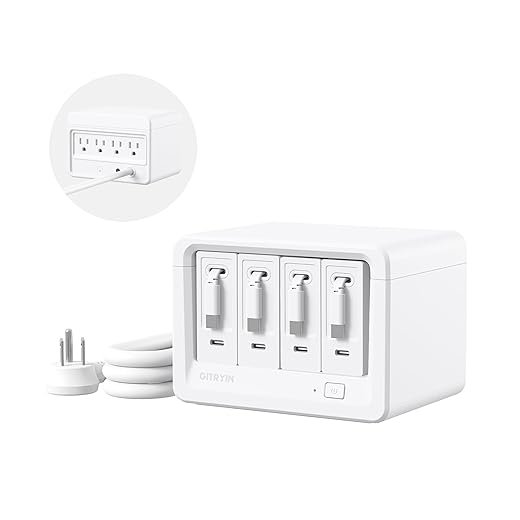

Mapping the Mess: What Charging-Station Clutter Actually Costs Us
Time, attention, and tiny daily frictions
We underestimate how many seconds a tangled bedside or desk costs us. Pulling apart cables, hunting a missing adapter, or testing which port will deliver a fast charge adds up — often 3–10 minutes per day for households with two or more devices. Those are minutes we waste repeatedly: the commute of the countertop, not the appliance. The fix is less about aesthetics and more about reclaiming time and cognitive bandwidth.
Hardware wear and efficiency losses
Every forced yank, repeated plugging, or coil left kinked accelerates connector and cable failure. Replacing a Lightning or USB-C cable every 12–18 months is a real cost; worse, using mismatched chargers (a low-amp port for a power-hungry laptop or tablet) forces devices into trickle charge, which prolongs charging cycles and produces more heat. In practice, a MacBook Pro using a 60W port instead of its 96W charger will charge slower and stress thermal management — and that’s avoidable with better port matching.
Shared-space friction and social cost
In offices and family hubs, competing power bricks and proprietary plugs create negotiation: who gets the fast port, who moves their phone, which charger is “ours.” That social transaction is a usability failure. We see it in the docking pile — a 96W MacBook brick, an Anker 65W, a couple of phone chargers (USB-A and USB-C), and an old iPad adapter — cords crossing like urban traffic.
Design decisions that created the problem
Proprietary connectors, bulky OEM bricks, and staggered power-delivery standards are the negative externalities of device manufacturers optimizing for form factor or margins, not shared use. The practical response: consolidate capable ports, standardize on PD where possible, and reduce mechanical stress through smarter cable routing. Those are small, precise interventions that meaningfully lower the daily tax of clutter and make other solutions — accessories, chargers, and organization systems — actually work.
What the Accessory Does: Design Principles and Core Features
Core design principles — the thinking that drives the details
We designed this accessory around four non-negotiables: modularity (so one base fits many use cases), cable management that protects fragile connectors, power intelligence to match devices without wasting heat, and visual restraint so the solution doesn’t become another eyesore. Those principles let the accessory solve real daily frictions — not just tidy cords for a photo.
Practical features that embody the principles
These features aren’t marketing fluff: a magnet-aligned dock saves the ten seconds we spend nudging a phone into place each night; cable channels reduce the micro-bends that snap a $20 cable after a year.
The little choices that matter
We prioritize rubberized surfaces to stop devices from creeping during vibration, discrete warm-tone LEDs to indicate activity without glare, and detachable trays for quick wiping or swapping. In practice that means fewer late-night wakeups from bright LEDs, and a charging station that actually lives on a bedside table without dominating it.
Trade-offs and how we navigate them
Designers juggle size vs. capacity (a large hub holds more devices but becomes obtrusive), integrated electronics vs. user-replaceable modules (soldered PD controllers are compact but harder to repair), and aesthetics vs. universal fit. Our approach leans modular: a compact base with snap-in inserts for laptops, tablets, or an essentials-only nightstand setup — so the accessory grows with how we live, not the other way around.
Next, we’ll show how that modularity and cable-first thinking change everyday setup and routines.
The Setup Experience: How It Changes Everyday Routines
Unboxing and fast wins
We judge any accessory by how quickly it becomes “the place” everyone uses. Out of the box, the best designs get us there in three steps: pick a template, anchor the base, and snap in the cable channels. A five–ten minute setup — not an afternoon project — turns good intentions into habit. Our recommendation: start with the smallest template that fits your nightly needs and scale up.
Anchoring and physical installation
Different homes demand different anchors. For painted drywall or plaster, removable 3M Command-style strips are the low-friction choice; for raw wood, short screws give the cleanest hold; for desks with limited underside clearance, adhesive feet keep the top surface pristine. Snap-in cable organizers click around each cord and hide strain points; optional mounting clips let us convert the unit for vertical entryways or kitchen counters without losing access.
How routines change — mornings and nights
Once installed, the accessory shifts charging from ad hoc to procedural. Phones land in the same dock every night; earbuds go into the shallow tray; laptops queue to a labeled PD port. The outcome is predictable: fewer panicked searches for chargers, and — importantly — we stop leaving devices tethered in inconvenient places because the surface is usable again.
Cognitive benefits and household mental models
Clarity reduces decision fatigue. With obvious slots and simple visual cues, each family member internalizes “their spot.” That clearer mental model means fewer mismatched chargers, fewer duplicate purchases, and less nagging to tidy up.
Common frictions and fixes
These small setup choices determine whether the accessory changes behavior or becomes just another shelf. Next we’ll dig into how compatibility and power management make those routines reliable at scale.
Ecosystem Fit: Compatibility, Standards, and Power Management
Physical compatibility: cases, thickness, and connector orientation
No accessory exists in a vacuum — we design for phones with thick cases, earbuds in wireless charging pods, and laptops that need angled connectors. Test these rules of thumb:
Small adjustments — deeper trays, slotted pass-throughs, or a rotate-able USB-C outlet — eliminate most “won’t fit” surprises.

Power delivery and thermal trade-offs
Supporting fast charge across multiple ports requires more than bigger numbers on the box. We look for
Practical tip: leave ~20% headroom on total wattage to reduce throttling and heat during heavy use.
Smart-home and safety interoperability
Decide whether you want intelligence or simplicity
Standards and vendor ecosystems
Proprietary magnets (MagSafe) are convenient but narrow compatibility. We favor accessories that support universal Qi and USB-C PD while offering optional adapters for vendor-specific systems. With the industry moving toward USB-C consolidation, products that embrace open standards will cause fewer headaches long term — faster, safer charging and fewer surprises as devices evolve.
Comparing Alternatives: How This Accessory Stacks Up
DIY cable wraps and trays
DIY fixes win on price and personalization — a 3D-printed divider or a roll-up leather cable bundle can look great and match exact dimensions. But in our tests they usually miss two things that matter
Quick tip: if you go DIY, pair it with a certified GaN brick and add rubber grommets at pass-throughs to protect cables.

Bulkier multi-port chargers
What they do well: centralized power and fewer wall warts. Models like Anker’s high-watt GaN bricks handle laptops and phones simultaneously. Where they fail: they concentrate energy but not devices — phones, earbuds and chargers still sprawl, so you trade outlet chaos for surface chaos.
Vertical charging towers
Towers reclaim surface area and look purposeful on a counter. Our hands-on shows they’re excellent for similar-thickness phones and cases. Problems arise with uneven case thicknesses and heavier devices (they wobble) — and they force a single orientation that doesn’t suit every cable or plug.
Fully integrated furniture solutions
Built-in chargers (tables, nightstands) are clean and elegant. They demand commitment: location is fixed, retrofitting is expensive, and upgrades are harder when standards change.
Side-by-side metrics that matter
Practical takeaway: often the best route is hybrid — a quality multi-port brick for power and small modular trays or clamps where devices live.
Buying, Maintenance, and Future-Proofing: Practical Advice
What to look for when buying
If we’re ready to invest, pick an accessory that solves today’s clutter and survives tomorrow’s devices. Prioritize

How to maintain it without fuss
Small habits keep a system tidy and safe
Warranty, firmware, and replacement parts
We prefer brands that publish firmware support package. A two-year warranty with clear service options is a good baseline. Cheap disposables might save money now but cost more in replacement and e-waste.
Future-proofing and buying scenarios
Think about the direction of your devices
Next, we’ll wrap up why this small fix delivers outsized benefits and how to choose the right footprint for your life.
A Small Fix with Disproportionate Impact
We’ve shown that an intelligently designed accessory does more than hide cables: it nudges behavior, protects hardware, and smooths daily routines. When modular, standards-aware, and focused on user experience, it becomes a durable upgrade—less flashy than a charger overhaul but more practical for most households and offices. It matters now because device diversity and fast‑charging standards make tidy, safe power management a utility, not a luxury.
We don’t claim it cures all friction, but buying one is often the simplest, least disruptive way to reclaim minutes and patience. Try one; the difference is immediate.
Frequently asked questions
What is the main point of “The Accessory That Solves Charging-Station Clutter”?
This piece explains where the accessory that solves charging-station clutter matters in real buying decisions—not just headline specs. We focus on trade-offs, who benefits most, and what to verify before you spend.
Who should read this the accessory that solves charging-station clutter guide?
Read it if you are actively shopping, upgrading, or trying to separate marketing claims from day-to-day use. Skip it if you already own the gear and are not planning a change this season.
What changed recently around the accessory that solves charging-station clutter?
Prices, firmware, and feature tiers shift quickly in this category. We call out what is new enough to affect your decision and what is incremental hype you can safely ignore.
How should I use this editorial when buying?
Treat it as context before you compare models: note the risks and priorities here, then cross-check specs and current pricing on the picks that match how you actually use the product.
What is easy to get wrong about the accessory that solves charging-station clutter?
Buyers often overweight one spec—brightness, speed, or brand—and underweight fit for their room, ecosystem, or warranty support. We flag the mismatch we see most often in reader questions.
Where should I go next after reading?
Use the related comparisons and top picks linked near the end of this article for model-level shortlists, then confirm return policies and compatibility with the devices you already own.

Iqra Jumar is Option Cutter's editorial writer. She writes practical editorials and buyer guides that focus on real-world upgrades—better Wi‑Fi, cleaner cable setups, smarter streaming, and everyday fixes—not spec-sheet noise alone. Her work helps readers decide what to change now, what to skip, and why.









