
Tired of desk spaghetti? We wrangled the cords so you don’t have to.
We hate cable chaos. One rogue charger can turn a sleek desk into a tangly nest in minutes.
If you care about clean lines, safer power runs, and less desk-floor wrestling, small hardware choices matter. We tested clamp trays, adhesive raceways, J-channels, and starter kits to find what actually stays put and keeps heat and bulk under control.
Our Top Picks





Self‑Adhesive No‑Screw Cable Trays (Set of 2)
We found these trays to be a tidy, adhesive‑based alternative to screw‑in baskets, and they held up to multiple heavy power bricks in our testing. For users who can’t or won’t drill, these are an elegant solution.
Why these trays work for many users
These adhesive cable trays target people who want a hidden under‑desk solution without the commitment of screws. The double‑tray set is sized to handle common home and office power arrangements, and the adhesive backing is notably robust when applied to clean, smooth surfaces.
Installation and everyday use
In practice the trays deliver a clean aesthetic quickly: once cured they virtually disappear and leave everything off the floor. We advise patience during installation—measure twice and allow the adhesive to bond fully before loading heavy items.
Trade‑offs and tips
Adhesive strength is excellent on laminate, wood, and glass, but it’s essentially permanent once set—so plan placement carefully. If you anticipate frequent reconfiguration, consider screw‑in or clamp models instead. For the typical home office user who wants a fast, hidden solution, these provide fantastic value and function.
No‑Drill Metal Mesh Under‑Desk Tray
We liked the quick, clamp‑on installation and mesh design that prevents heat buildup. It holds power strips and adapters securely and instantly cleans up under‑desk clutter without permanent modification.
Why this tray stands out
The no‑drill metal mesh tray is our choice for anyone who wants to hide heavy power bricks and surge strips without altering their furniture. The clamp mount system means installation is quick and reversible—ideal for renters or shared desks.
Design and day‑to‑day benefits
In regular use it transforms the floor around your desk: trip hazards disappear and maintenance—like vacuuming or swapping a power adapter—becomes easier. The mesh topology also makes it simple to add or remove cables without disassembling the tray.
What to check before you buy
Measure desk thickness and clamp clearance before ordering. If you have an unusually deep or tapered desk lip, test fit first. The tray itself is broadly durable, but to get a truly clean look we recommend pairing it with Velcro straps or zip ties to keep cables bundled inside the basket.
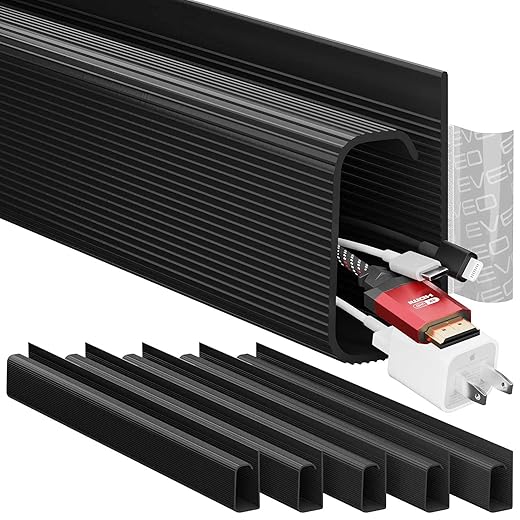
EVEO 6‑Pack Under‑Desk Raceway Kit
We like how the modular raceways balance capacity and a low‑profile look under a desk. The tool‑free, adhesive installation and non‑locking channel design make routine cable changes painless.
Purpose and design intent
This EVEO kit is aimed at people who want professional under‑desk wire concealment without drilling. The J‑channel raceways are long enough to run multiple cables while keeping them accessible for swaps or troubleshooting.
Features that matter
In day‑to‑day use the channels give a tidy, consistent look and keep wires tucked against the underside of the desk. We appreciated how the non‑locking design removes the friction of adding or removing a cable mid‑setup, which is helpful for hot‑desking or frequently changing peripherals.
Competitive context and caveats
Compared with adhesive raceways from other brands, EVEO balances capacity and ease of use. The main limitation is adhesive performance on rough or chalky surfaces; in those cases double‑sided mounting tape or discreet screws will be a better long‑term choice. If aesthetics are the priority, painting or choosing a color that matches your desk can reduce the utilitarian look.
15.7‑Inch No‑Drill Clamp Cable Tray
We liked the no‑drill clamp mounting that accommodates glass or thin desktops, and the curved hollow design that holds power strips snugly. It’s a practical, renter‑friendly option that tames most under‑desk messes.
Product positioning and strengths
This 15.7‑inch clamp tray is built for people who want a secure under‑desk shelf without screws. The adjustable clamps and silicone pads mean it can be used on glass, wood, and many other surfaces without damage—handy for rented offices or tempered glass desks.
What to expect in daily use
The tray handles a typical monitor/charger/power strip setup well and keeps everything off the floor where it’s safer and easier to access. We recommend supplementing the included straps with higher quality Velcro for a neater result.
Where it fits in the market
This is an economical, renter‑friendly alternative to screw‑mounted trays when you need a mid‑capacity solution. If you have exceptionally heavy power supplies or oversized bricks, confirm the clamp pressure and contact surface before purchase—but for most setups this is a dependable, no‑permanent‑modification answer to cable clutter.
YECAYE 94‑Inch J‑Channel Raceway Set
We appreciate the long‑run coverage and flame‑retardant PVC construction for safety. The outward‑facing opening reduces frustration when adding or removing cables in a busy workstation.
Design intent and scope
This YECAYE kit is focused on people who need continuous, long runs of cable concealment—ideal for desks pulled from a wall or long conference tables. Six 15.7‑inch J‑channels provide nearly eight feet of hidden routing with a user‑friendly profile.
Practical features we like
For everyday office use the channels reduce both visible clutter and trip risks. We found them particularly useful behind standing desks where cable length and routing paths change as the desk moves.
Limitations and market fit
The biggest practical caveat is adhesion on non‑smooth surfaces: for textured paint, brick, or aged plaster you’ll likely need stronger mounting tape or screws. Aesthetically, the match with higher‑end furniture is mixed—if finish is critical, consider painting the channels to match or running them out of sight where possible.
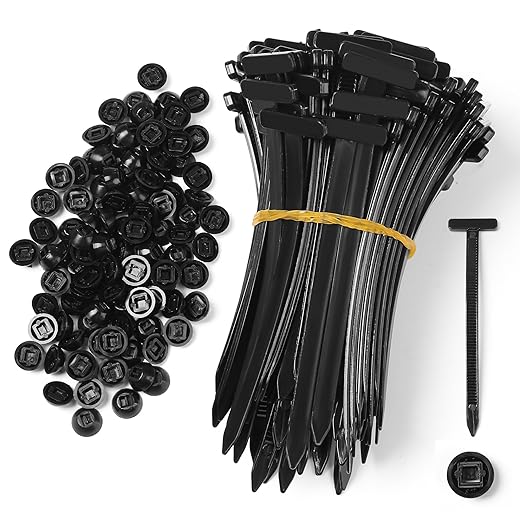
100‑Pack Nylon Universal Cable Tie Buckles
We appreciated how these snap‑fit buckles handle quick field fixes and permanent cable runs alike. Their UV‑resistant nylon construction stands up well to outdoor and engine‑bay conditions.
Intended use and value proposition
These nylon ties with snap‑in buckles are built as a multipurpose fastening system—useful in automotive trim work, workshop builds, or when you need to replace a missing plastic clip. The fastening mechanism is quick and tool‑free, so they’re particularly handy for field repairs.
Material and performance notes
In practice they’re a great complement to an electronics or car maintenance kit. We keep a small assortment in a drawer for ad‑hoc harnessing and to replace brittle OEM clips during trim removal or reassembly.
Real‑world caveats
While strong and versatile, they’re not a refined finish for visible consumer cable runs—these are functional fasteners rather than aesthetic hardware. Additionally, we’d prefer resealable packaging that separates heads and tails to make deployment faster on the job.
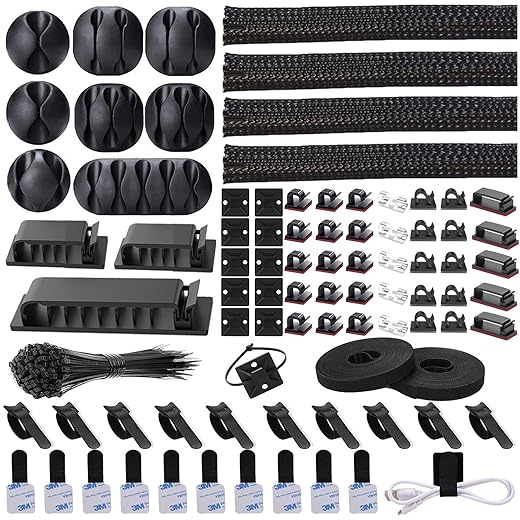
192‑Piece All‑In‑One Cable Kit
We found this kit to be a pragmatic, budget‑friendly way to tackle everyday desk and AV cabling. It covers nearly every small use case from clips to sleeves, making it an easy first stop for decluttering.
What it is and who it's for
We view this as the grab‑bag solution for someone starting a cable management project who doesn’t want to buy single‑purpose items. The 192 pieces cover sleeves, clips, ties, mounts, and straps so you can mix and match solutions across a desk, TV stand, or behind a media cabinet.
Key features and practical use
We appreciate the breadth of parts: the braided sleeve is the most immediately useful item for bundling monitor/USB power runs, while clips and adhesive mounts keep individual lines reachable. The included straps and ties mean you can prototype different layouts before committing to a permanent installation.
Limitations and real‑world considerations
We suggest taking care with surface prep before applying adhesive clips: adhesion and longevity vary by surface and climate. Some of the smallest plastic clips feel inexpensive and may not survive heavy, repeated adjustments. In short, this kit is an economical way to solve many common problems, but for heavy‑duty or long‑term, load‑bearing uses, we’d supplement with higher‑quality mounts or a metal tray.
120‑Pack Adhesive Cable Wire Clips
We see this as a bulk option for routing many short runs—holiday lights, Ethernet drops, or car installations. The PA66 nylon and adhesive combo is versatile, though not always a permanent mounting on all surfaces.
Bulk routing solution
This 120‑piece kit is designed for users who have many short routing points to address—installing holiday lights, running Ethernet along baseboards, or tidying up TV and speaker runs. The large quantity makes it easy to place multiple anchor points and maintain consistent spacing.
Materials and expectations
In our experience they do an excellent job for light duty routing, especially where you want many discreet anchors rather than a few high‑capacity mounts. They’re a practical choice for installers and homeowners who need to dot multiple routing points quickly.
Practical caveats
For under‑desk power or heavy transformers, we’d recommend more robust mounts or a tray. Adhesion is the frequent point of failure—clean, dry surfaces will perform best, and for textured paint or stone you’ll need stronger tapes or screw‑in options.
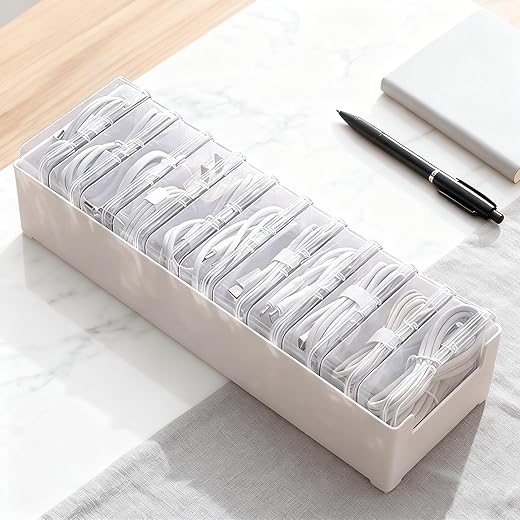
11‑Compartment Transparent Cable Storage
We think this is a simple, visual solution for storing spare cables, adapters, and small accessories. The transparent compartments make finding the right lead fast, but the plastic is somewhat thin so treat stacked weight cautiously.
Who it helps and why
This clear 11‑box unit is a pragmatic way to corral spare chargers, USB cables, dongles, and tiny accessories that otherwise sit in a messy drawer. For people who keep multiple device cables around, the visual layout saves time when you’re looking for the right connector.
Useful details and performance
In our testing the organizer simplifies the small item retrieval process: label a few compartments and you’ll quickly eliminate rummaging. It’s a better alternative to shoeboxes for keeping similar items separated and visible.
Limitations in practice
The trade‑off here is durability and capacity. The boxes are best for single or small bundles of cables; thicker power bricks or wound, long cables will either not fit well or stress the plastic. If you plan to store heavier adapters, look for thicker‑walled storage or a dedicated cable spool.
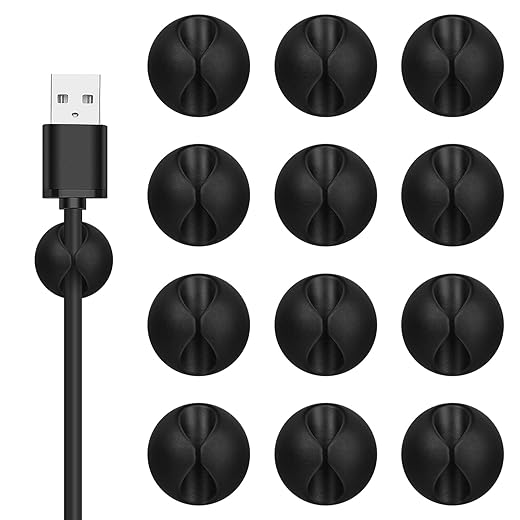
12‑Pack Black Adhesive Cord Clips
We find these clips useful for lightweight routing tasks—phones, mice, or thin USB leads. Adhesive reliability is mixed, and heavy or tugged cables may eventually dislodge them.
What these do well
These small adhesive cord clips are the fastest way to anchor a cable to the edge of a desk, the underside of a shelf, or along a nightstand. They’re ideal for preventing phone chargers or short peripheral leads from sliding off a surface.
Build and application notes
They’re a low‑commitment option for tidying visible leads and creating anchor points close to your devices. We like using a few of them to route a mouse cable or keep a phone charger in one spot.
Downsides to be aware of
Adhesion is the biggest variable: clean, non‑porous surfaces work best, but textured or painted surfaces may cause early failures. If you need a robust, permanent hold—especially for heavier power adapters—consider mounting clips with screws or using stronger 3M‑grade adhesives instead.
Final Thoughts
We recommend two clear directions depending on what you need on and under the desk.
If you want a third option for a low-profile, design-minded desk where frequent cable changes are routine, consider the EVEO 6-Pack Under-Desk Raceway Kit (8.5/10). Its modular raceways keep visible runs tidy and make re-routing simple without tools — a better fit for office setups that prioritize a slim under-desk silhouette over a hidden power bin.
Why this matters now: desks and peripherals are evolving — smaller PCs, multi-monitor arms, and power-hungry chargers mean both heat and cable volume have grown. Choosing a solution that matches your load (ventilated tray vs. sealed tray) and mounting surface (clamp, adhesive, J-channel) saves time and avoids repeat fixes. We prioritized products that balance design, installation friction, and everyday usability — the things that actually improve our desks for months, not just the unboxing video.

Chris is the founder and lead editor of OptionCutter LLC, where he oversees in-depth buying guides, product reviews, and comparison content designed to help readers make informed purchasing decisions. His editorial approach centers on structured research, real-world use cases, performance benchmarks, and transparent evaluation criteria rather than surface-level summaries. Through OptionCutter’s blog content, he focuses on breaking down complex product categories into clear recommendations, practical advice, and decision frameworks that prioritize accuracy, usability, and long-term value for shoppers.