
Stop squinting — can the right lamp actually save our eyes and our afternoons?
We spend more than seven hours a day looking at screens. That much time under harsh overhead light and tiny desk lamps adds up to real eye strain and wasted focus.
We wanted lights that reduce glare, render color naturally, and just make working feel less tiring. Shortlist bias toward good design, useful features (USB‑C, motion sensors), and optics that don’t blast the monitor with light.
Top Picks





BenQ ScreenBar Pro Monitor Light Bar
We found the ScreenBar Pro to be a thoughtful, high‑finish solution for people who want desk illumination without sacrificing monitor visibility. Motion sensing, asymmetrical optics, and USB‑C power make it feel like a professional accessory rather than an add‑on.
Why a monitor bar matters now
Monitor light bars are a different category: they illuminate the desktop surface while avoiding reflections on the monitor. This model excels at that balance through asymmetrical optics — it’s designed to send light downward and outward rather than back toward your eyes.
Notable features
In practice, the motion sensor is a small but meaningful quality‑of‑life upgrade: the light turns on when you sit and off when you leave, which is especially nice for people who don’t want another remote or wall switch. The result is a cleaner desk and fewer shadows on documents.
Build and integration
The ScreenBar Pro is built to integrate with modern workstations: aluminum construction, touch controls on the bar, and USB‑C power mean it looks and behaves like a thoughtful peripheral. It’s pricier than simple bars, but we view the extra cost as an investment in ergonomics and desk real estate — you free up space and get more consistent light.
Verdict
For anyone with a dedicated monitor setup — especially curved or ultrawide displays — this is one of the best ways to reduce eye strain without changing your monitor settings. The premium is justified by engineering and usability focused on real‑world desk work.
BenQ Genie Ultra‑Wide Reading Lamp
We were impressed by the OVAL‑Light optics that deliver an unusually broad, even pool of light — enough to cover a whole desk without hotspots. Smart dimming and high CRI make it a top pick for people who split their time between screens and paper.
What sets it apart
The Genie uses proprietary optics to deliver a much wider illumination footprint than a typical task lamp — the goal is to light both your screen edges and the surface around it so your eyes don’t constantly re‑adjust. That reduces perceived flicker and fatigue in mixed reading/screen workflows.
Features and how they help
The ambient sensor and zone optics are particularly useful: the lamp adapts to room light and avoids throwing a glare back at monitors. For designers or color‑sensitive work the CRI>95 keeps colors faithful.
Build, ergonomics, and ecosystem fit
The articulated arm uses torque springs and a ball joint that lock well into position. It’s heavier and more of an investment than off‑brand lamps, but that solidity translates to less fiddling and better long‑term reliability. In setups where desk space matters, the footprint is larger — but we think the tradeoff is worthwhile for the improved lighting quality.
Who should buy it
If you spend long hours at a desk and switch between screens and paper, the Genie reduces eye strain in a way cheaper lamps can’t. It’s not the most portable choice, but for a dedicated home office or studio it’s among the best options today.
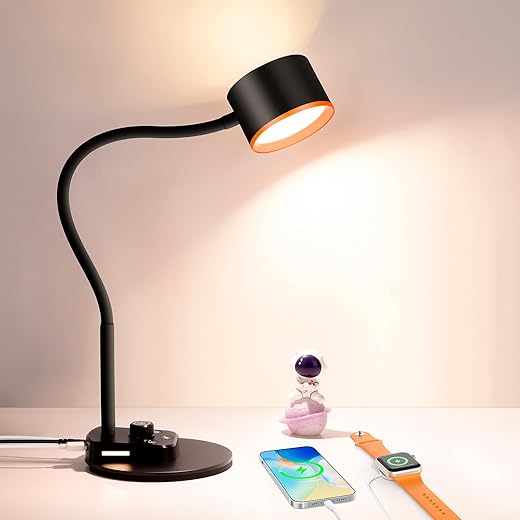
Metal Gooseneck Lamp with USB‑C Ports
We liked the blend of a heavy metal base, a tactile rotary dimmer, and both USB‑C and USB‑A ports — a combination that suits modern bedside and desk setups. The nightlight, timer, and memory function make it particularly convenient for evening use.
Purpose and positioning
This lamp aims to be a modern bedside and desktop workhorse: solid metal build, tactile controls, and contemporary charging options. It’s designed to integrate cleanly into a nightstand or small office setup where the convenience of charging ports and a nightlight matters.
Noteworthy feature set
The rotary knob is a small UX win: it’s intuitive for older users and those who prefer tactile feedback over touch controls. The presence of both USB‑C and USB‑A means it works with current and older devices without adapters.
Real‑world use and limitations
We used it for reading, ambient bedside light, and short bursts of desk work; the lamp is effective in all these roles. The metal construction handles heat well and feels more premium than many budget plastics. That said, the base can be a little light for aggressive adjustment — adding a small weight or placing it against a wall prevents tipping.
Competitive context and verdict
Compared with similarly priced metal desk lamps, this one stands out for integrating USB‑C and useful bedside features (timer, nightlight, memory). If you want a compact, versatile lamp that's ready for modern devices and family use, it’s one of the better balanced options we tested.
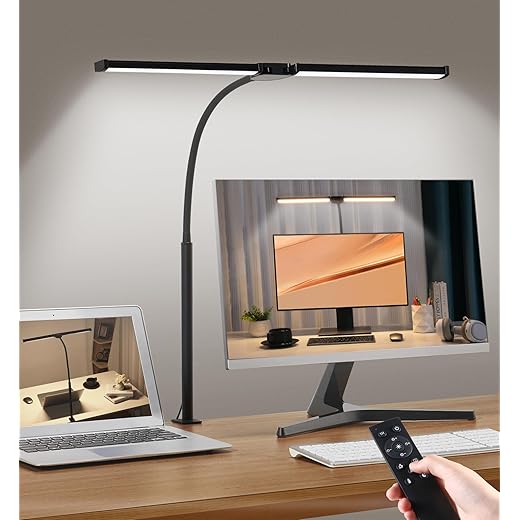
Dual‑Head Clamp LED Monitor Lamp
We found this dual‑head clamp lamp delivers a huge amount of usable light for a small price and a small footprint. Its flexible goose‑neck and separate heads let us shape illumination across multiple monitors or a wide work surface without creating harsh hotspots.
What it is and who it's for
We see this as a budget workhorse for people who need bright, directed light without buying a large freestanding lamp. The dual‑head design covers keyboard, paper, and monitor edges at once, which makes it especially useful for multi‑monitor setups and makers who switch between screens and hands‑on tasks.
Key features and how they matter
Those features matter because they let you tune contrast between screen and desktop — our primary way to cut down eye strain during mixed screen/paper work. The remote is a modest convenience (handy when you’re deep in a task), but the physical buttons are what we'll use day to day.
Practical experience and tradeoffs
The clamp and long goose‑neck are the unit’s biggest strengths: it positions high enough over large monitors and holds its pose. In our testing the light is bright yet well diffused, and users consistently reported it reduced glare and eye fatigue when balanced with monitor brightness. However, the construction is largely plastic; the membrane or plastic button cover can wear if you use the top controls constantly. That’s a common tradeoff at this price.
Competitive context and verdict
Against other sub‑$30 options this lamp offers more articulation and a more complete feature set (remote, memory, timer). If you want something inexpensive that doesn't feel cheap in daily use, this is a solid choice. If you need pro‑grade durability or metal controls, stepping up in price gets you that, but for value‑minded buyers we still recommend it.
Stepless Dimming Clamp Gooseneck Lamp
We liked the tall, extra‑wide lamp bar and stepless dimming when we needed broad, even light that reached over a monitor. The included USB adapter and strong clamp make it a convenient fit for tight, multi‑monitor desks.
The practical pitch
This lamp is aimed at people who need a tall, broad light that can reach over monitors and illuminate large desks. The long lamp bar and flexible gooseneck let us move a lot of light into a targeted area without adding bulk on the desk surface.
What we liked
In our use, it served as a great daytime task light and an excellent keyboard illuminator at night. The build is mostly aluminum so it feels sturdier than cheap plastic clamp lamps, and the clamp supports decent desk thickness.
Caveats and context
The LED indicator can be annoyingly bright in a dark bedroom, and if you later install a dual‑monitor arm the clamp position may conflict. Compared with thin monitor bars the light is less integrated into a monitor aesthetic, but it provides more raw coverage for the price.
Bottom line
If you want a tall clip lamp that gives you broad, configurable light and good value, this one hits the mark. It’s a sensible choice if you need more range than a small bedside lamp but don’t want to spend on a BenQ‑style lamp bar.
Forbes‑Vetted Metal Task Lamp (White)
We found this to be a dependable, no‑frills desk light with plenty of useful modes for reading and desk tasks. It’s lightweight, easy to position, and offers good bang for the buck if you don't need premium hardware.
Who it's for
This model targets users who want a simple, effective lamp for everyday tasks — reading, homework, or light crafting — without a premium price tag. It’s a compact metal lamp with enough control levels to cover most lighting needs.
Experience highlights
The lamp’s slim design allowed us to place it beside laptops and small monitors without crowding the desk. It doesn’t try to be flashy; instead it focuses on consistent, comfortable output.
Durability and limitations
A few long‑term reviewers report dimming or flicker after years of heavy use — a reminder that lower price often means limited lifespan under continuous operation. If you plan to run a lamp 24/7, a higher‑rated commercial fixture is a better bet.
Final take
For most home offices and student desks, this lamp is a sensible, affordable pick. It balances control, ease of use, and a compact footprint better than many economy lamps.
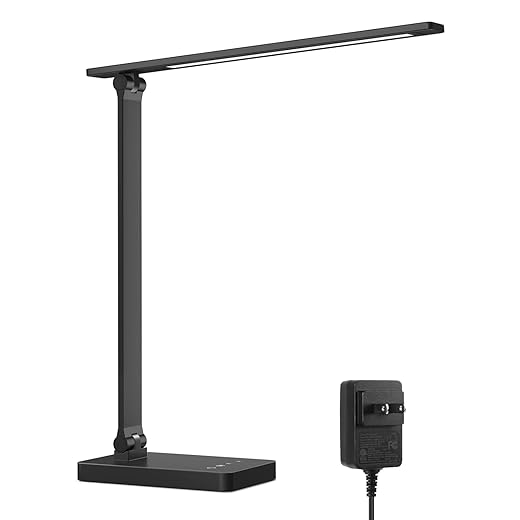
Slim Touch Control LED Desk Lamp
We appreciate the clean silhouette and tactile touch controls that make changing color temperature fast and intuitive. It’s a compact lamp that balances good diffusion with flexible positioning for a small desk or bedside table.
Overview
This is a pared‑back metal desk lamp aimed at people who want a neat, understated light that still gives control over tone and intensity. The combination of 5 color modes with 5 brightness levels creates enough flexibility for most reading, sewing, and computer tasks without cluttering the desk.
Design and user experience
We liked how the slim arm and head produce a wide, soft wash rather than a narrow spotlight; that’s important when you’re trying to keep screen glare down. The overall aesthetic is minimal, so it slots easily into modern setups.
Practical use and limitations
In our hours with the lamp we found it ideal for everyday task lighting at a desk or bedside. The downside is that its maximum lumens aren’t enough if you need a very bright task light for crafts or large drafting surfaces—compare it to wider lamp bars or larger clamp lamps if you need heavy output.
How it fits the market
This model competes with other slim LED desk lamps by leaning into build quality and CRI rather than gimmicks. If you want a tidy desk lamp that reduces eye fatigue and won’t dominate your workspace, it’s a sensible pick.
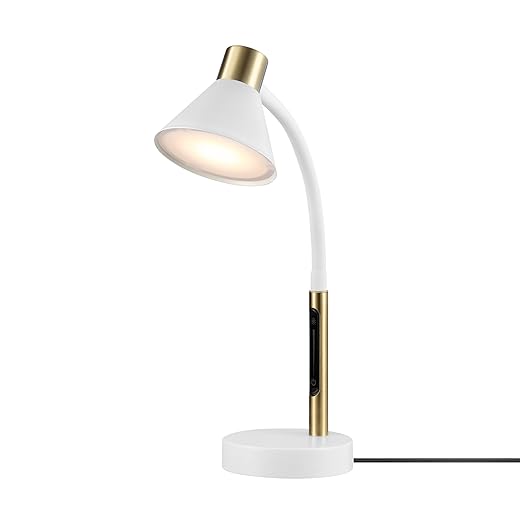
Globe Electric 15" Adjustable Gooseneck Lamp
We liked the mid‑century inspired look and the convenience of an integrated USB port for bedside or desk charging. It’s a tasteful lamp that performs reliably for reading and ambient tasks, though it’s not meant to be a high‑output studio fixture.
Design-forward, everyday light
This lamp is pitched at buyers who want a functional task light that also looks intentional on a nightstand or desk. The clean matte white with brass accents gives it a more decorative feel than a purely utilitarian lamp.
Features we noticed
The USB outlet on the base is a small but meaningful perk for nightstand use; it keeps charging neat and avoids adding clutter. The lamp throws a directional pool of light, which is ideal for reading but means it won’t wash a whole room.
Practicalities and caveats
Some customers report minor assembly annoyances and concerns around long‑term durability of the shade. The lamp is a good aesthetic and functional middle ground, but buyers seeking studio‑grade, ultra‑even illumination should look to wider LED bars or BenQ‑class fixtures.
Verdict
If you want a stylish, reliable desk or bedside lamp with charging built in, this is a sensible, cost‑effective choice — especially if style matters as much as function.
Compact 3‑Level Desk Lamp with USB
We appreciate how little desk space this lamp occupies while still offering a useful range of brightness settings and a USB charging port. It’s a practical, inexpensive option for small desks and dorm rooms.
The use case
This lamp is built for compactness: small desks, bedside tables, and dorm rooms where surface area is at a premium. It focuses on delivering reliable, neutral white light and a handy USB charging outlet in a discreet package.
What it does well
Users who need a basic, dependable lamp with a minimal footprint will be satisfied — it’s simple, clean and does the essentials well. The USB port reduces cable clutter and makes it convenient for bedside charging.
Where it falls short
If you need wide area coverage or very fine control over color temperature, this design is intentionally limited. The lowest setting borders on decorative rather than task‑useful; the middle and high settings are where it becomes practical for work.
Final thought
For small spaces and buyers who want a straightforward lamp with a charging port, this is a solid budget option. It’s not a designer or studio fixture, but it gets the job done without fuss.
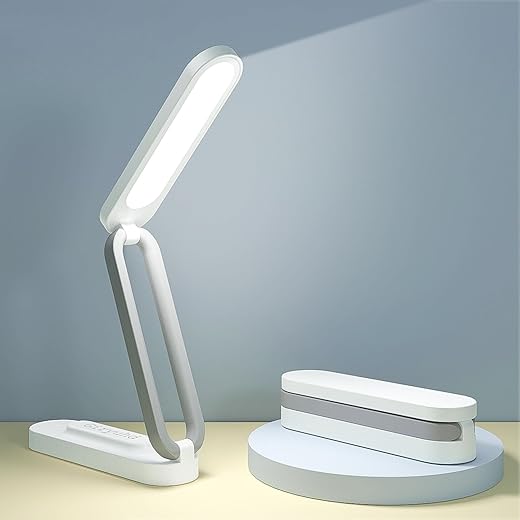
Foldable Rechargeable Portable Desk Lamp
We recommend this if you need a truly portable lamp that you can toss in a bag, bring to a patio table, or use during power interruptions. It’s not a full replacement for a wired desk lamp, but it excels at convenience and small‑area lighting.
Where this lamp fits
This is a compact rechargeable lamp designed for portability. If you need a light you can move around the house, take camping, or use during travel, it’s a very different proposition from a clamped or monitor‑mounted light. It’s about convenience more than raw lumen output.
Features that matter for mobile use
We tested it on a few short‑duration tasks — reading in bed, accent lighting for a videoconference, and a quick repair job — and it performed admirably given its size. The diffused LEDs help reduce harsh contrast and are kinder on the eyes when used close up.
Limitations and realistic expectations
Don’t expect this to replace a high‑output desk lamp for drawing, model‑making, or sewing; the maximum output is modest. Also, battery life on higher settings is limited, so plan to keep it charged or use it in lower modes for longer sessions.
Recommendation
For anyone who values portability and cordless convenience, this lamp is a practical, inexpensive way to add task light anywhere — but for full‑time desk work we’d pair it with a stronger wired lamp.
Final Thoughts
We recommend the BenQ ScreenBar Pro Monitor Light Bar as our top pick for monitor-centric setups. Its asymmetrical optics and clip‑on design are engineered to light your desk without reflecting off the screen, and the motion sensor plus USB‑C power make it feel like a pro accessory, not an afterthought. If you spend most of your day in front of one or two monitors and want a clean, zero‑footprint solution that reduces glare and keeps color accurate, this is the one.
For people who split time between screens and paper, the BenQ Genie Ultra‑Wide Reading Lamp is the better match. Its OVAL‑Light optics produce an unusually broad, even pool of light and a high CRI that keeps printed colors true — ideal for designers, students, and anyone who needs large, shadow‑free coverage on a desk. It’s a bit more traditional as a lamp, but the wide, even illumination and smart dimming make it the most versatile option in today’s work‑from‑home ecosystem.
If you need a cheaper clamp solution or want built‑in charging, the dual‑head clamp and metal gooseneck with USB‑C are solid value alternatives, but for reducing eye strain while boosting productivity, the ScreenBar Pro and the Genie Ultra‑Wide are the most purposeful choices we found.

Chris is the founder and lead editor of OptionCutter LLC, where he oversees in-depth buying guides, product reviews, and comparison content designed to help readers make informed purchasing decisions. His editorial approach centers on structured research, real-world use cases, performance benchmarks, and transparent evaluation criteria rather than surface-level summaries. Through OptionCutter’s blog content, he focuses on breaking down complex product categories into clear recommendations, practical advice, and decision frameworks that prioritize accuracy, usability, and long-term value for shoppers.