



Why where you put the router still matters
We treat the router like background plumbing. We shove it in a closet, hide it behind a TV, or accept the corner the ISP picked. That casual choice still changes everything.
Placement affects real-world speed, reliability, and the value of features we pay for. Advertised router megabits mean little if walls, interference, and antenna orientation cut performance. Modern routers are also hubs in a broader ecosystem — mesh nodes, smart‑home bridges, and cloud services — so location influences more than raw throughput.
In this article we explain what changed, why it matters for our homes today, and how we test placement in our how-to guidesnt to judge real user experience.
We give clear, practical Wi‑Fi placement fixes you can use today.

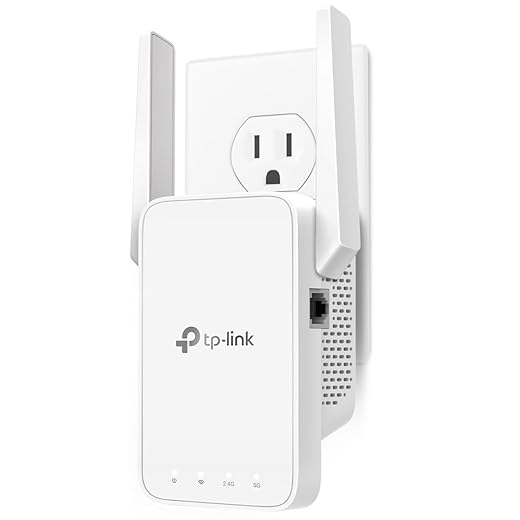


Best Spot for Your Wi-Fi Router: Quick Tips for Stronger Coverage
How placement affects real-world performance — beyond advertised speeds
Signals don’t obey marketing
We’ll start with a deceptively simple question: why does moving a router a few feet change everything? Radio waves interact with our homes in ways that lab specs gloss over. Drywall is mostly invisible; brick, concrete, and metal studs are not. Glass with low‑E coating, tiled bathrooms, and water (hello, fish tanks and people) soak up or reflect signals. Every floor slab and closet door is another sales‑chart point lost in the real world.
What that actually breaks for us
When a wave is attenuated or scattered, the router and device compensate by slowing modulation, retransmitting packets, or switching bands. For users that translates into:
Peak gigabit numbers published in reviews assume a clear line of sight and a single client. In our homes, Wi‑Fi is a shared medium: dozens of devices contend for airtime. That means a router’s headline throughput can evaporate when multiple phones, TVs, cameras, and assistants are active.
Practical realities: frequency, congestion, and layout
Higher frequencies (5 GHz and 6 GHz bands) give capacity but have shorter range and worse penetration. 2.4GHz reaches further but is crowded and slow. Your layout decides which tradeoff matters: an open-plan loft leans toward 5GHz, a two‑story brick house favors strategic placement or wired backhaul.
We’ve seen inexpensive routers struggle in real homes while pricier mesh systems succeed — not necessarily because of raw speed, but because of smarter radios, better antenna placement, and options like wired backhaul or dedicated mesh channels. Examples: an Asus RT‑AX86U in a central hall will outperform the same router hidden in a utility closet; a Google Nest or Netgear Orbi mesh with a wired node beats an isolated high‑end router for multiroom coverage.
Quick, actionable steps you can use now
Next, we’ll look at why routers are no longer just radios — design, software, and ecosystems now matter as much as raw signal strength.
Design and ecosystem: why routers aren’t just radios anymore
Routers as furniture and fashion
Design has stopped being an afterthought. Manufacturers now compete on router looks and size as much as on specs. Slim, white towers and fabric‑wrapped cubes are sold to live visibly on a shelf or coffee table, not crammed into a closet. That’s deliberate: visible placement improves signal, but it’s also a UX play — happier customers, fewer support calls. We’ve seen reviewers and readers alike move a node from a hidden cabinet to an open shelf and get instant, measurable gains — but that tradeoff isn’t just about range anymore.
ISP gateways vs. consumer design
Contrast that with ISP‑supplied gateways. Those go where the fiber or coax enters the house: basements, utility closets, or behind the washer. ISPs prioritize wiring access and cost, not aesthetics. The result: the nicest consumer router often competes with a function‑first gateway that’s poorly sited. That divergence matters: hiding a gateway reduces its effective coverage, and trying to centralize a consumer router without addressing the incoming wire often forces ugly compromises in cable routing or power availability.
Extra radios, heat, and placement constraints
Modern routers pack more than Wi‑Fi radios: Bluetooth for setup, Thread or Zigbee for smart‑home hubs, and dedicated mesh backhaul radios. Those extras change where a unit should live. Enclosing a router in a cabinet can trap heat and reduce the lifespan or throttle throughput; it can also muffle Bluetooth range or congest coexistence bands used by your smart sensors. We’ve had a smart‑home rollout fail because the hub sat behind a TV — the Zigbee mesh never formed reliably.
Mesh changes the calculus — but backhaul rules
Mesh systems let us distribute small nodes where coverage is needed, which makes hiding easier. But backhaul — the link between nodes — is the real decision point:
Choose a mesh with a dedicated backhaul radio or plan for cabling if you want both tidy aesthetics and reliable coverage.
Ecosystems and the “cost” of hiding hardware
App‑centric features — parental controls, QoS, cloud management, and paid subscriptions — create an expected interaction model. Hiding a unit adds friction: less reliable local voice setup, weaker Bluetooth pairing, and occasional need to physically reboot. If you prize frictionless smart‑home integration, a visible, accessible node is worth the compromise.
Next, we’ll dig into how radio choices and growing congestion reshape these practical placement trade‑offs.
Frequencies, interference, and the new realities of radio congestion
How the bands behave in real homes
We’ll keep this simple: 2.4 GHz gets farther and goes through walls better; 5 GHz gives higher peak speeds but shorter range; 6 GHz (Wi‑Fi 6E) is the newest mid‑band — very fast, very clean, and very short‑range. In practice that means a 6 GHz‑only client is extremely sensitive to where you put the access point. Put a 6E router behind a TV or in a closet and you’ll lose almost all its advantage.
Why neighbor networks and household gadgets matter more now
Two forces have changed the playing field: many more Wi‑Fi radios nearby, and more always‑on, latency‑sensitive traffic (video calls, cloud gaming, upstream IoT telemetry). Co‑channel interference (many routers using the same channel) and adjacent‑channel bleed (wide channels overlapping neighbors) are the big killers.
Common real‑world culprits
Modern features — how they help, and how placement still matters
Beamforming and MU‑MIMO aim beams at clients and let multiple devices share airtime, but they need clear geometry and client support (older phones won’t benefit). Band steering moves devices to 5/6 GHz automatically — great, unless that 5 GHz node is down a hallway two rooms away. Wider channels (80/160 MHz) boost throughput but magnify interference; 160 MHz is fantastic in a suburban house with clean air (we’ve seen great results with an Asus RT‑AX86U or the Netgear Nighthawk family), disastrous in a crowded apartment.
Practical tips from the field
Regulatory quirks that affect placement
Not all countries allow the same 6 GHz channels or power levels; some 5 GHz bands require radar‑avoidance (DFS) and can cause automatic channel changes. That means “best channel” today might be unusable tomorrow — another reason to avoid relying solely on wide, crowded channels and to favor placement strategies that give consistent signal rather than chasing peak numbers.
Practical placement strategies: how we place routers and nodes in real homes
This is the moment we stop theorizing and get our hands dirty. Below are the rules we follow, the trade-offs we make when real life — wiring, pets, and design taste — pushes back, and the quick tests we run to know we improved things.
Quick rules of thumb (do these first)
Single‑router homes: one-and-done placement
Pick the highest, most central usable spot. If that conflicts with aesthetics or existing wiring, prioritize the living spaces you use most for streaming and calls. If you can’t run Ethernet and the router must live in a basement or utility closet, use a wired alternative rather than rely on weak upstairs Wi‑Fi: run cable, use a point‑to‑point wireless bridge, or try powerline for short hops.
We’ve seen the TL‑PA9020P make a basement‑to‑main‑floor hop work well in older houses where trenching was impossible — but performance varies with wiring quality.
Mesh homes: how many nodes and where to put them
Start with 2–3 nodes for a typical two‑story house; add nodes for long wings or multiple detached structures. Place nodes roughly halfway between the main unit and the dead zone, but shift them toward open spaces or stairwells for better propagation. Prioritize Ethernet backhaul for one or two nodes (the primary and the node serving many wired devices). If your mesh has a dedicated backhaul radio (Netgear Orbi, select ASUS systems), use it — but wired backhaul is still best.
Problem spots: basements, thick walls, detached workshops
Practical details most guides miss
Keep routers ventilated and off heat sources; cable‑manage with short patch leads so ports stay usable. If you must hide hardware, use ventilated enclosures and leave at least an inch around the chassis. We test placements with quick heatmaps (NetSpot or HeatMapper), throughput spot checks (Speedtest or iPerf), and latency pings while doing a “walk test” — baseline, move the device, retest. Small moves yield big wins; the data tells us where to compromise.
Choosing and future-proofing hardware based on where you’ll put it
Placement and hardware choice are inseparable. Before you click “buy,” think about where the unit will live for the next five years — and pick gear that matches that plan.
Upgrade vs. mesh vs. ISP gateway: how we choose
If you can put one box in a central, elevated spot and run a few Ethernet drops, a high‑end single router (ASUS RT‑AX88U, Netgear Nighthawk AX12) gives the best raw performance and features. If the house is split across floors, has long wings, or you can run Ethernet between floors, a wired‑backhaul mesh (Ubiquiti UniFi APs or an Orbi/ASUS mesh with Ethernet) gives seamless coverage and future flexibility. If you’re stuck with the ISP’s gateway in a closet and can’t rehouse it, ask for an upgrade (DOCSIS 3.1 or Fiber ONT) — then add your own router or APs downstream.
When to insist on wired backhaul
Always choose wired backhaul when you can. It turns each node into a full‑speed access point, reducing the need for bulky radios or proprietary backhaul bands. We’ve seen wired meshes (UniFi + switches) outperform even top consumer tri‑band systems in multi‑story homes.
Antenna gain and hidden installs
If you insist on hiding hardware in a cabinet or behind drywall, antenna gain matters. External‑antenna units (TP‑Link Archer AX73, older Asus models) let you angle radios toward living areas. For truly hidden installs, use ceiling/flush APs (Ubiquiti UniFi AC Pro, EnGenius ECW230) designed for in‑room mounting — they sacrifice decorative appeal for propagation and cooling.
Aesthetics vs. utility: what we trade
Pretty units (Google Nest Wifi, Eero) blend into living rooms but often have fewer ports, limited cooling, or cloud‑only controls. Rack‑mount or utility‑room gear (UniFi Dream Machine Pro, MikroTik) gives manageability, local logging, and upgrade headroom — but you must accept a less visible location and wire runs. We prefer to hide the outlet and show the APs where people live.
Software, updates, and privacy that matter in the long run
Check vendor firmware cadence and management model. Devices with strong local management (UniFi, advanced ASUS) give us control and privacy; cloud‑managed systems (Eero, Orbi) simplify updates and parental controls but can hide diagnostics. For future proofing, prioritize vendors who patch quickly and support emerging standards (Wi‑Fi 6/6E, WPA3).
Quick decision matrix
Next, we’ll pull this all together into a short checklist you can follow to get the router where it belongs.
A short checklist to get the router where it belongs
We recommend: start by elevating and centering the router, away from metal and microwave-heavy kitchens; switch antennas to vertical, disable auto-channel only if you can test, and test signal strength in problem rooms with a phone app or laptop (record dBm and throughput before/after). Try a mesh node or wired backhaul before replacing the gateway. Measure improvement with a simple speedtest at multiple locations and a heatmap app; if coverage gains are modest (<20–30%) or congestion persists, consider upgrading to a modern tri‑band mesh or running ethernet to key rooms. Small placement changes usually deliver the best ROI, but pairing them with ecosystem-minded hardware makes the network feel seamless for years.
Frequently asked questions
What is the main point of “Why Your Wi‑Fi Router Is in the Wrong Place”?
This piece explains where why your wi‑fi router is in the wrong place matters in real buying decisions—not just headline specs. We focus on trade-offs, who benefits most, and what to verify before you spend.
Who should read this why your wi‑fi router is in the wrong place guide?
Read it if you are actively shopping, upgrading, or trying to separate marketing claims from day-to-day use. Skip it if you already own the gear and are not planning a change this season.
What changed recently around why your wi‑fi router is in the wrong place?
Prices, firmware, and feature tiers shift quickly in this category. We call out what is new enough to affect your decision and what is incremental hype you can safely ignore.
How should I use this editorial when buying?
Treat it as context before you compare models: note the risks and priorities here, then cross-check specs and current pricing on the picks that match how you actually use the product.
What is easy to get wrong about why your wi‑fi router is in the wrong place?
Buyers often overweight one spec—brightness, speed, or brand—and underweight fit for their room, ecosystem, or warranty support. We flag the mismatch we see most often in reader questions.
Where should I go next after reading?
Use the related comparisons and top picks linked near the end of this article for model-level shortlists, then confirm return policies and compatibility with the devices you already own.

Iqra Jumar is Option Cutter's editorial writer. She writes practical editorials and buyer guides that focus on real-world upgrades—better Wi‑Fi, cleaner cable setups, smarter streaming, and everyday fixes—not spec-sheet noise alone. Her work helps readers decide what to change now, what to skip, and why.









