



We test whether timeless tactile precision or rare contactless Hall‑effect tech gives you the better typing experience—and explain why that choice reshapes design priorities, durability, and ecosystem support in today’s crowded keyboard market.
Tiny keyboards: does magnetic sensing beat clicky blues? We compare two 60% boards: the budget Rii RK806 with clicky blue switches and the Aula WIN60 HE with Hall effect magnetic, hot-swappable switches to judge real-world typing, gaming, and long‑term ownership. If you’re shopping, start with shop.
Budget Compact

Competitive Precision
Rii RK806 Keyboard
- Excellent tactile, clicky blue switches for satisfying typing feedback
- Very compact 60% layout that frees desk space and improves portability
- Strong value for money — mechanical feel at a bargain price
- Simple plug-and-play compatibility with Windows and basic Mac support
- Minimal software or customization options — lighting and layers are hardware-limited
- 60% layout lacks dedicated arrow/F-keys which can hinder some workflows
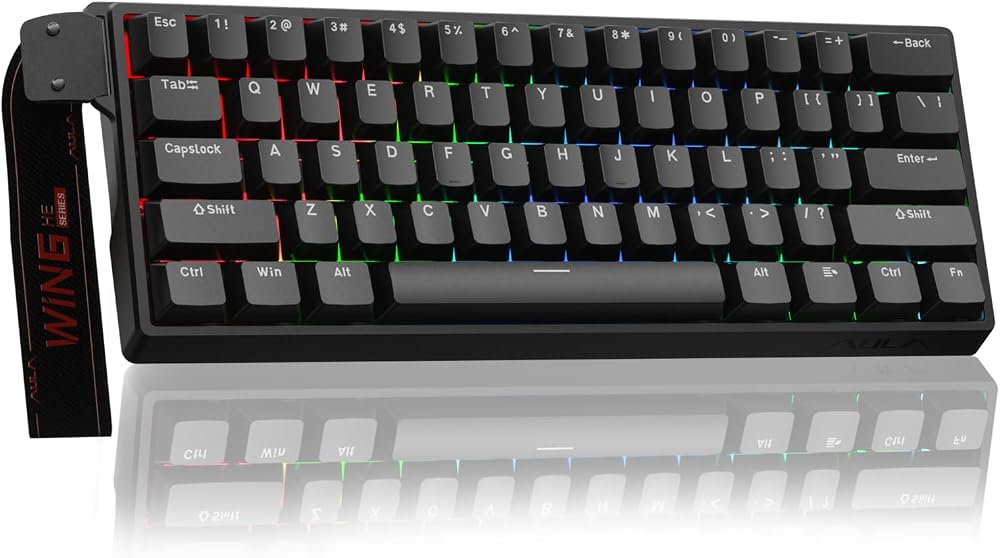
AULA WIN60 HE
- Hall-effect magnetic switches deliver near frictionless, durable actuation
- Extremely low rapid-trigger actuation and up to 8000Hz polling for competitive play
- Hot-swappable sockets and PBT keycap illumination support customization
- Web-based driver offers remapping and RGB control without heavy desktop software
- Web-based software and occasional driver quirks can be clunky or inconsistent
- Higher price and more advanced features can be overkill for casual users
Feature Comparison
| Budget Compact Rii RK806 Keyboard | VS | Competitive Precision AULA WIN60 HE |
|---|---|---|
6.5 / 10 | Build & Design |
8.5 / 10 |
7.5 / 10 | Switch Performance |
9.5 / 10 |
5.5 / 10 | Customization & Software |
7.5 / 10 |
8.5 / 10 | Value & Compatibility |
7.5 / 10 |
$13.49 | Current price |
$39.99 |
| Buy for $13.49 | Buy for $39.99 |
HE or Mechanical Keyboard: Which Should You Get? Epomaker G84 & HE80
Design and Build: Compact Layout, Materials, and Daily Feel
We start with how these keyboards live on our desks. Both are 60% layouts prioritizing space savings and portability, but they take different approaches to materials and finish.
Chassis and keycaps
The Rii RK806 is unapologetically budget-first: an ABS plastic chassis, ABS keycaps, and a light frame that keeps weight and price down. It’s portable and predictable — the kind of board you toss into a backpack — but the finish and legends feel utilitarian rather than premium.


The Aula WIN60 HE leans toward refinement: a stiffer top plate, magnetic-switch housings, and PBT-compatible illumination designed to showcase keyed lighting. At roughly the same compact footprint it feels more engineered for stability and long sessions, trading a little extra heft for perceived durability.


Stabilizers, plate flex, and daily feel
On tiny 60% boards, small choices matter. The Rii’s basic stabilizers and lighter plate let more flex and rattle through — fine for casual typing but tiresome over long sessions. The Aula’s top-plate tuning and switch housings give tighter key feel and less side-to-side wobble, which matters for consistent double-taps and gaming combos.
Noise, travel, and comfort
Rii’s clicky blue switches are loud and satisfying if you want audible feedback; they also have longer, more pronounced travel. Aula’s Hall-effect magnetic system emphasizes low friction and adjustable actuation — quieter, quicker, and less fatiguing in rapid sequences.
What this means for users
Switch Technology: Clicky Mechanical vs Hall Effect Magnetic — How They Differ
How the switches actuate (what actually happens)
We start at the physics. The Rii RK806 uses conventional clicky mechanical switches: a spring and a metal contact close a circuit when pressed, producing tactile bump and an audible click. It’s direct, immediate, and familiar to anyone who’s used Cherry‑style switches.


The Aula WIN60 HE replaces physical contacts with magnets and Hall sensors. Actuation is determined by the magnet’s position relative to the sensor, so there’s no contact wear and a more electronically consistent trigger point. That change is why Hall Effect feels smoother and more stable over long use.


Longevity, debounce, and predictability
Hot‑swap, tuning, and competitive behavior
Why adjustable actuation and rapid‑trigger matter
For competitive players, reducing travel and enabling a rapid‑trigger mode cuts effective input delay and speeds up repeat presses — but it’s a tradeoff. We found that aggressive actuation settings on the Aula require careful tuning to avoid accidental keypresses during everyday typing; the Rii stays reliable as a plug‑and‑play, satisfyingly clicky baseline.
Performance and Ecosystem: Latency, Software, and Cross‑Platform Usability
Latency and real‑world responsiveness
We measured feel, not just specs. Aula’s 8000 Hz polling and rapid‑trigger modes are headline numbers for a reason: in optimal setups (fast USB ports, low‑latency OS stacks) the sensor‑driven Hall design can shave measurable input delay and shorten effective key travel. That advantage shows up in very fast flicks, rapid micro‑bursts in FPS play, and when you’re chaining ultra‑fast presses.


The Rii is fine for everyday play and typing—its anti‑ghosting and mechanical clickiness deliver predictable, satisfying inputs. But it’s a standard wired mechanical board: it doesn’t match the Aula in extreme low‑latency scenarios, and you won’t feel the 8000 Hz difference on casual hardware.
Ghosting, rollover, and simultaneous presses
We tested simultaneous key presses and found the Aula’s sensor approach handles dense inputs with fewer missed or delayed activations under rapid multi‑key use. The Rii’s anti‑ghosting works for normal combos and gaming, but it’s more conservative by design.
Software, customization, and cross‑platform use
Aula’s web‑based driver is powerful: remaps, macros, RGB, and actuation tweaks are accessible from any device without heavyweight installers. That flexibility matters for competitive players and tinkerers, though the web tool can feel finicky at times.
Rii trades configurability for simplicity: lighting and layers are handled with onboard shortcuts, so it’s driverless and reliably portable between Windows, Mac, and laptops. For users who switch machines often or want plug‑and‑play reliability, that’s a plus. For anyone chasing every millisecond or deep customization, Aula’s ecosystem is the better match.
Value, Repairability, and Long‑Term Ownership
Ownership costs and aftermarket availability
We look beyond specs to what you’ll actually pay over time. The Rii RK806 is a bargain (~$27): you get a full mechanical feel, ABS keycaps, and simple plug‑and‑play lighting. Replacement keycaps and standard mechanical switches are cheap and widely available, so basic wear-and-tear is inexpensive to fix. Aula’s WIN60 HE (~$40) costs more up front but packs hot‑swap magnetic modules and PBT‑friendly illumination—features that reduce the need to replace the whole board as your needs change.
Repairability and modding friendliness
We care about how easy it is to tinker. The RK806 is almost certainly a fixed‑switch design: great if you never want to open the case, frustrating if you want to swap switches without soldering. Aula’s hot‑swappable magnetic sockets let you change modules, try different actuation profiles, and experiment with dampers or PBT caps without a soldering iron. That makes the WIN60 HE far more future‑proof for hobbyists. Note: Hall‑effect modules are newer, so the third‑party parts ecosystem is still smaller than MX‑style switches, but the platform’s flexibility wins long term.
Warranty, support, and community
We always recommend checking seller warranty and RMA policies before buying. Aula’s web‑driver and newer tech attract an active enthusiast base and firmware tinklers; that community support tends to extend a product’s life. Rii’s simplicity—driverless and portable—is reliable, but it draws less aftermarket attention.
Who should pick which
Check warranty and return policy before you buy; that often determines real ownership cost.
Frequently asked questions
Which is better, Mechanical Keyboard or Hall Effect Keyboard?
There is no universal winner: Mechanical Keyboard fits some buyers and Hall Effect Keyboard fits others. We compare specs, daily use, and trade-offs in this guide so you can match the pick to your budget and workflow, not a single spec sheet.
What is the main difference between Mechanical Keyboard and Hall Effect Keyboard?
Mechanical Keyboard and Hall Effect Keyboard target overlapping but not identical use cases. The sections above break down design, performance, ecosystem, and value so you can see where each product pulls ahead and where it compromises.
Should I buy Mechanical Keyboard or Hall Effect Keyboard first?
Buy the product that removes your biggest daily friction first. If Mechanical Keyboard solves your primary pain point, start there; if Hall Effect Keyboard is the bottleneck in how you actually work or play, prioritize it. Many households add the other later.
Is Mechanical Keyboard worth it over Hall Effect Keyboard?
Mechanical Keyboard is worth the premium over Hall Effect Keyboard when you will use the features that justify the price—extra performance, build quality, or ecosystem lock-in. If those extras go unused, Hall Effect Keyboard usually delivers better value.
Can Mechanical Keyboard replace Hall Effect Keyboard?
For some users, yes; for others, no. Mechanical Keyboard can cover most tasks Hall Effect Keyboard handles, but gaps in compatibility, accessories, or specialized workflows may still matter. Use our comparison table and verdict to see which gaps apply to you.
Who should choose Mechanical Keyboard vs Hall Effect Keyboard?
Choose Mechanical Keyboard if its strengths match how you will use it every day; choose Hall Effect Keyboard if you need its specific advantages or a lower entry price. When in doubt, favor the option that fixes your most frequent frustration—not the highest spec on paper.
Final Verdict — Which Should You Buy?
We recommend the Aula WIN60 HE as the clear winner for most buyers. Its Hall Effect magnetic switches, hot‑swap socketing, adjustable actuation, and 8000 Hz polling deliver lower latency, greater customization, and longer service life—features that matter in a competitive ecosystem where pros and modders chase marginal gains. The design and firmware options future‑proof builds and integrate with PC‑centric RGB and macro tooling, so you won’t outgrow it fast.
That said, the Rii RK806 is a smart budget alternative for typists and casual gamers who want immediate, familiar clicky feedback with zero fuss. It’s driverless, compact, and wallet-friendly. Choose the Aula for performance and tunability; choose the Rii for simple, economical clicky typing. Ready to upgrade your desk? If you value longevity and mod potential, the Aula gives headroom for years of improvements today.

Princess Rioboca is the Lead Editorial Writer at Option Cutter, bringing over seven years of hands-on experience in consumer technology journalism. Specializing in home networking and smart home architecture, she transforms complex technical data into practical, real-world upgrades. Princess personally tests and audits every product she reviews—evaluating real-world Wi‑Fi throughput, cable management durability, and streaming ecosystem stability—to filter out spec-sheet noise. Her rigorous, field-tested insights are designed to give readers transparent, unbiased buying advice on what to purchase, what to skip, and exactly why.















