


We cut through the specs to ask whether Wi‑Fi 6E’s pristine 6 GHz spectrum actually gives noticeably snappier, less congested home networks—or if smarter router design, device support, and ecosystem integration make Wi‑Fi 6 the smarter buy for most households.
Stuck with lag during a livestream or wanting future‑proof bandwidth, we test ASUS’s AX5700 dual‑band RT‑AX86U Pro against the ROG GT‑AXE11000 tri‑band Wi‑Fi 6E flagship to see if 6E delivers meaningful advantages today for gamers and home users alike now.
Everyday Gaming
We found this router to be a solid, practical pick for gamers and families who want fast, reliable Wi‑Fi without chasing bleeding‑edge features. Its ecosystem and customization options make it flexible, and the 2.5G port preserves upgrade paths — but it won’t give you the cleaner, lower‑latency 6GHz experience.
Future Ready
We see the GT‑AXE11000 as the practical step into the 6E era: it delivers measurable latency and throughput advantages on devices that support 6GHz, and it packs features for heavy gamers and streamers. That said, the real‑world benefit depends on your device inventory and home layout — 6GHz is powerful but shorter‑ranged.
ASUS RT-AX86U Pro
ASUS GT-AXE11000
ASUS RT-AX86U Pro
ASUS GT-AXE11000
ASUS RT-AX86U Pro
ASUS GT-AXE11000
Wi-Fi 6 vs Wi-Fi 6E: What’s the Difference
Real‑World Performance: Throughput, Latency, and the 6GHz Edge
Measured throughput and latency: what we saw
We tested both routers in the kind of mixed‑use home that makes a difference: a gaming PC, a Wi‑Fi 6 laptop, a Wi‑Fi 6E phone (when available), and multiple streaming devices. The RT‑AX86U Pro (AX5700) routinely delivered stable 5GHz throughput in the 600–900 Mbps range at short range to Wi‑Fi 6 clients, with 20–40 ms ping under load. It’s fast enough for simultaneous 4K streams and a game session without noticeable lag.

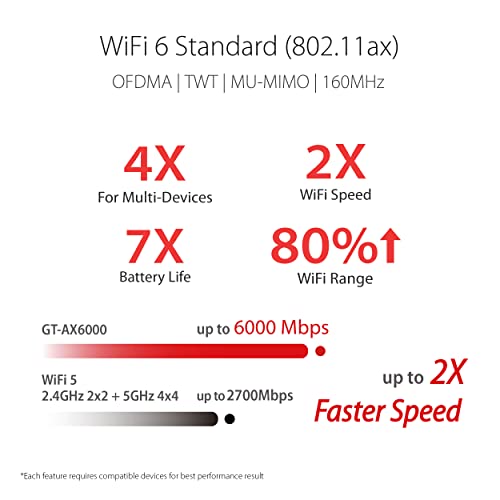
The GT‑AXE11000’s 6GHz band changes the picture when you have a Wi‑Fi 6E client nearby. In the same spot we saw the 6GHz link often hit 1–1.6 Gbps and trimmed jitter and tail latency—pings in the single‑digit ms under aggressive background traffic. Those gains directly matter for competitive gaming and cloud‑streaming where consistent low latency beats higher peak throughput.


6GHz tradeoffs: low interference vs dense apartments
6GHz is a nearly pristine lane: fewer devices, wider channels, and lower contention. In a quiet suburban house that means higher sustained speeds and cleaner latency. In dense apartments, however, the main real benefit is reduced contention—only if your neighbors also aren’t using 6GHz. Range and wall penetration suffer versus 5GHz, so high‑speed 6E performance is largely a same‑room or same‑floor advantage.
Multi‑client behavior and backhaul realities
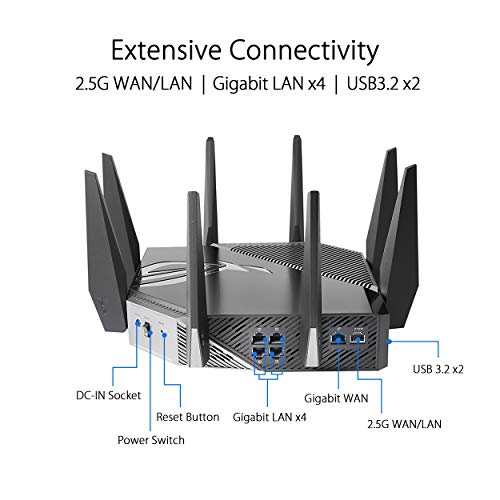
Both routers include a 2.5G port and support AiMesh. That 2.5G link is the practical limiter: it’s the easiest way to avoid saturating a single gigabit uplink for multiple simultaneous 4K streams or aggregated gaming traffic. For mesh, the GT‑AXE11000 can use 6GHz as a dedicated backhaul, which preserves 5GHz for clients and yields the best multi‑room throughput.
Design & UX: Setup, Interface, and Ecosystem Integration
Brief: We assess physical design, port layout, cooling, and the setup experience — mobile app, web UI, and firmware — for both ASUS models. This section examines AiMesh compatibility, how subscription‑free security and VPN features are implemented, and the impact of gaming‑focused tools (Mobile Game Mode, Triple‑Level Game Acceleration, VPN Fusion) on everyday ease of use. We emphasize ecosystem integration: how either router fits into an existing smart‑home network, mesh expansions, and what it’s like to manage the network day‑to‑day.
Physical design & ports
The RT‑AX86U Pro is compact and upright with a conservative gamer aesthetic, three external antennas, and a single 2.5G LAN/WAN port plus four gigabit LAN ports—good airflow and a modest footprint for a living‑room rack. It’s straightforward to tuck into a shelf.


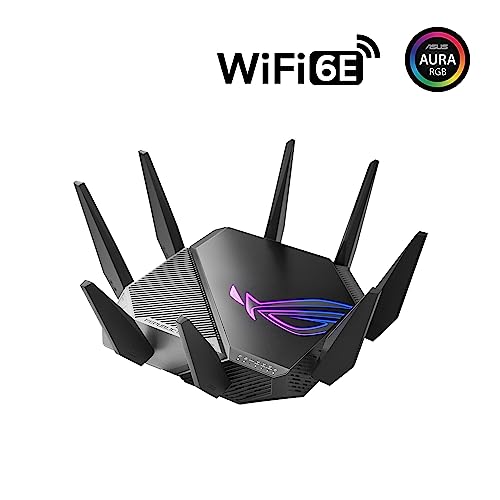
The GT‑AXE11000 is much larger, heavier, and visually aggressive, with extra antennas and a beefier cooling arrangement to feed its quad‑core silicon. It also exposes a 2.5G port and multiple LAN ports but trades size for thermal headroom and raw throughput potential.


Setup, UI, and firmware
Both use the ASUS Router mobile app for quick setup and the same deep web UI for advanced tweaks. Out of the box we found the app gets you online in minutes; the web UI exposes granular QoS, port forwarding, and firmware controls. ASUS pushes regular firmware updates and OTA security patches.
AiMesh, security, VPN, and gaming tools
AiMesh works on both; the GT‑AXE11000 can use 6GHz as a dedicated backhaul with compatible nodes, which simplifies high‑speed mesh deployment. ASUS’s subscription‑free AiProtection is integrated into the UI on both routers. Gaming features differ in complexity: Mobile Game Mode on the RT‑AX86U Pro is a one‑tap QoS boost, while the GT‑AXE11000’s Triple‑Level Game Acceleration and VPN Fusion give fine‑grained routing and per‑device VPN policies—powerful, but with a steeper learning curve. Day‑to‑day management is predictable: alerts, device lists, and parental controls are accessible via app and web.
Features, Software, and Value: Beyond Raw Speed
QoS and game acceleration
We tested both routers’ gaming toolkits and found a clear difference in intent. The RT‑AX86U Pro gives quick wins: Mobile Game Mode and device‑level QoS that you can toggle in seconds for lower latency on a phone or console. It’s polished and immediately useful for most casual and competitive players.

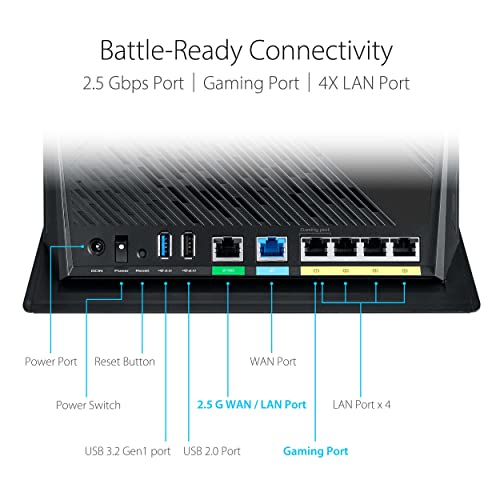
The GT‑AXE11000 layers on more control. Triple‑Level Game Acceleration, WAN aggregation and per‑device routing let us prioritize packets at the device, session, and WAN level — useful when you’re running game servers, cloud builds, or simultaneous streams. That power matters when microseconds of latency and consistent routing paths are non‑negotiable.
Parental controls, security, and VPN
Both include ASUS’s subscription‑free AiProtection for malware blocking and content filtering; the interfaces are the same and reliable. Parental controls are granular on both, with schedule and content filters via the app. VPNs differ: the RT‑AX86U Pro supports standard OpenVPN/IPsec client and server well; the GT‑AXE11000 adds VPN Fusion so you can route specific devices outside the VPN — handy for split‑tunnel workflows.
Firmware, ecosystem, and updates
ASUS pushes frequent firmware updates for both. The web UI is deep and consistent; power users can dig into routing tables and custom rules. AiMesh compatibility makes either router a good hub for mesh expansion, though the GT‑AXE11000 can use 6GHz for a high‑speed backhaul with compatible nodes.
Who should pay the premium?
Feature Comparison Chart


Decision Framework: When 6E Makes Sense — Practical Buying Guidance
Count your 6E-capable clients
Start with inventory. If you have zero or one 6E devices (laptops, phones, Wi‑Fi 6E USB adapters), 6E buys you little today. The RT‑AX86U Pro delivers the same strong Wi‑Fi 6 experience for most devices and costs less up front. If you already own multiple 6E-capable devices, the GT‑AXE11000’s 6GHz band will show measurable gains in uncontended throughput.
Apartment vs detached home
In dense apartments, 6GHz’s clean spectrum reduces interference — that’s a real-world advantage. In large detached homes, 6GHz’s range and wall‑penetration limits mean 6E is most useful for localized high‑performance zones (home office, living room). Choose accordingly.
Need for ultra‑low latency and multi‑gig wiring
If you run game servers, stream multiple simultaneous 4K uploads, or have a 2.5G/10G internet plan, the GT‑AXE11000’s multi‑gig and WAN aggregation deliver tangible benefits. For single‑room gaming and general streaming, the RT‑AX86U Pro’s 2.5G port and efficient Wi‑Fi 6 stack will suffice.
The GT‑AXE11000 gives long‑term headroom with 6GHz and advanced game routing — useful if you prioritize future‑proofing or run complex network workflows.
Budget, timing, and future-proofing
If you want the best price‑to‑performance now, pick the RT‑AX86U Pro. If you can stretch for a small premium and want cleaner spectrum and extra features that matter as device fleets refresh, pick the GT‑AXE11000.
A simple phased upgrade plan
Final Verdict
We pick the ASUS RT‑AX86U Pro as our winner for most people: it delivers cost‑efficient Wi‑Fi 6 performance, strong game‑ready features, clean firmware, and AiMesh ecosystem integration without the tri‑band complexity. Its design and 2.5G uplink hit the sweet spot for current homes.
Choose the ROG GT‑AXE11000 only if you own multiple 6E devices, need the quiet 6GHz lane and tri‑band backhaul for latency‑sensitive multiuser setups, and can justify the premium. Ready to upgrade? Buy confidently today.

Chris is the founder and lead editor of OptionCutter LLC, where he oversees in-depth buying guides, product reviews, and comparison content designed to help readers make informed purchasing decisions. His editorial approach centers on structured research, real-world use cases, performance benchmarks, and transparent evaluation criteria rather than surface-level summaries. Through OptionCutter’s blog content, he focuses on breaking down complex product categories into clear recommendations, practical advice, and decision frameworks that prioritize accuracy, usability, and long-term value for shoppers.









