



Why a pricey TV doesn’t guarantee a great picture
We’ve all been seduced by specs and showroom demos, then gone home and felt underwhelmed. Spending big on a 4K TV doesn’t automatically mean better viewing — marketing loves bright numbers in our editorials, not real rooms. We explain how specs, showroom lighting, and expectations conspire to disappoint.
We walk through six reasons: why raw numbers don’t tell the whole story; how room and viewing conditions often beat peak performance; why content and source are the weakest link; how software, processing, and tuning shape what we see; how design and audio trade-offs compromise picture; and what we can do when buying and setting up a TV. We focus on user experience, ecosystem fit, and what matters in market.



Are OLED TVs Worth It? A Crisp Look at OLED
Specs don’t tell the whole story
We unpack the headline numbers — pixel count, peak-nit HDR brightness claims, and refresh-rate marketing — and show why they’re often poor predictors of how a set will look in your living room.
Why headline numbers lie
Pixel count is mostly solved: display resolution on a 55‑inch looks fine from normal seating distances, so buying a higher resolution to “fix” softness usually isn’t necessary. Peak-nits are easy to inflate with tiny test windows; a TV can hit 1,500 nits on a small spec chart and still wash out highlights in real scenes because it can’t sustain that output across a full screen. Manufacturers pick lab-friendly scenes to score well on spec sheets — it’s marketing, not lived experience.
Panel tech and local dimming matter more than a single number
Two TVs with identical peak brightness can look wildly different. Why? Native contrast, panel type (OLED vs VA vs IPS), and the local-dimming implementation — zone count and algorithm — determine how deep blacks and highlight pop actually appear. An OLED like an LG C3 will render inky blacks even at modest nits; a Mini‑LED Samsung QN90C can hit high brightness but show “blooming” around bright objects if dimming zones are coarse.
Refresh rates and the motion marketing
“120Hz” is often true for panel refresh, but that doesn’t guarantee better motion clarity. Processing, frame interpolation, and response time matter. A fast panel with poor dejudder can look worse than a 60Hz set with solid motion processing. For gamers, look past the number: check VRR, low input lag, and real-world tested fps handling.
How to read specs practically
These are the things that actually translate into better in-room performance, not the glossiest number on the box.
Room and viewing conditions beat raw performance
Ambient light and reflections
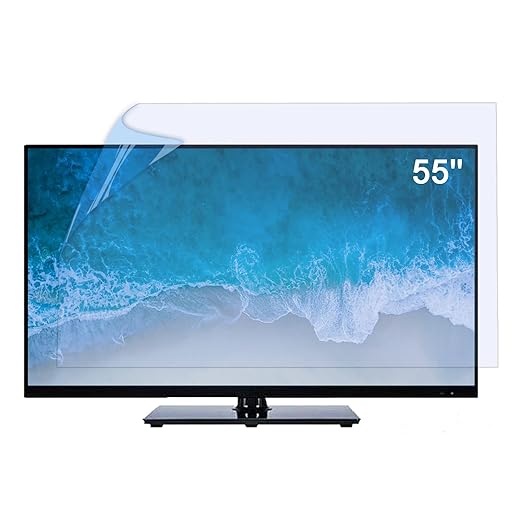
A TV that pops under store spotlights can look flat at home if sunlight or warm lamps wash out contrast. We’ve watched bright OLED demos in retail aisles surrender their punch in living rooms with south-facing windows. Control is everything: blackout curtains, dimmable lamps, or repositioning the set make bigger visible differences than a few extra nits on the spec sheet. For stubborn glare, a physical matte shield helps.
Viewing distance and angle matter more than resolution claims
How close you sit changes perceived sharpness and contrast. For a 55‑inch 4K set we usually recommend roughly 4–6.5 feet for most viewers; for 65‑inch, push toward 5–8.5 feet. Panel technology changes the rules: IPS panels keep color at wide off-axis angles but look gray in dark rooms; VA panels deliver better contrast straight on but lose blacks if you’re seated off-center; OLEDs (LG C3, Sony A80L) maintain blacks and color across wider seats. Match seating layout to the panel, not to showroom bragging points.
Room layout, ergonomics, and simple fixes
Position the TV so windows aren’t directly opposite bright highlights; use lamps behind seating instead of overhead lighting; add a 6,500K bias light behind the set to improve perceived black level. Small moves yield big returns: tilt a wall mount to reduce ceiling reflections, lower screen brightness from store levels, and prefer the TV’s “Movie” or “Filmmaker” mode over flashy demo presets.
Why calibration beats incremental specs
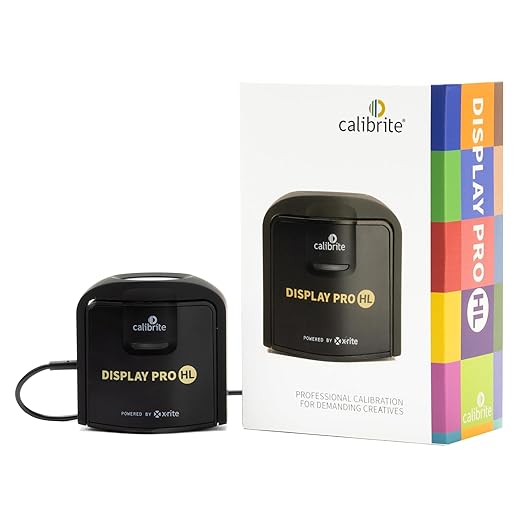
A professional or even DIY calibration (adjusting white point, gamma, and contrast for your room) realigns a $1,500 set with reality far more than chasing slightly higher peak brightness. In the next section we’ll look at how software processing and factory tuning interact with these room choices — and why the TV’s brain often matters as much as its panel.
Content and source limitations: the weakest link
Streams and broadcasts often choke a great panel
We’ve sat in living rooms with $2,000 OLEDs where Netflix’s 4K feed looked softer and flatter than a Blu‑ray disc. That’s not the TV — it’s the pipeline. Streaming services balance quality against bandwidth, so aggressive compression, single‑pass encodes, or older codecs can smear fine detail and crush shadow nuance. Live sports and broadcast HD are often lower‑bitrate by design, and satellite/cable boxes may deliver legacy 1080i that your TV must deinterlace and upscale.
Device ecosystems change everything
Different sources do very different jobs. Consoles and 4K UHD discs give you the cleanest, highest‑bitrate signal. Premium streaming apps on Apple TV 4K (2022) or Nvidia Shield Pro tend to preserve HDR and higher bitrates better than budget sticks. Conversely, some ISPs or set‑top boxes transcode streams server‑side, so even a “4K” channel can be compromised.
Upscaling and passthrough: who should do the work?
Not all scalers are equal. Many TV upscalers now rival standalone devices, but cheaper streaming sticks and cable boxes can introduce halos or oversharpening. Our practical rule: let the best scaler in your chain do the job — usually the TV or a high‑end streamer. Confirm your AV receiver and source device support correct HDR passthrough (Dolby Vision, HDR10+) and set HDMI inputs to “enhanced” or “4K HDR” if available.
Quick, actionable checks
Small fixes here — the right streamer, connection, and passthrough settings — often unlock the picture your expensive panel was built to show.
Software, processing, and tuning: the invisible side
What the TV actually does to the image
When we talk about picture quality, the panel is only half the story—software does the other half. Motion interpolation, noise reduction, edge sharpening, and color profiles can rescue a compressed stream or turn a pristine 4K movie into something that looks overcooked. For example, Samsung and TCL sets often ship with punchy color and aggressive sharpening to wow buyers in showrooms, while Sony and Panasonic historically aim for more natural, film‑like rendering. The difference isn’t hardware as much as default tuning and processing chips.
Why firmware and app partners matter
Firmware updates can improve tone mapping or fix HDR passthrough; they can also add new image modes that change everything overnight. Streaming apps are another wildcard: the Netflix app built into a TV may use different HDR metadata or bitrates than the same app on an Apple TV or Shield. That’s why two TVs with near-identical panels look very different in the living room—one is doing heavy temporal noise reduction, the other is prioritizing shadow detail.
What we can do right now
These software decisions are an ongoing part of owning a TV—what looks great today can change with the next update or streaming partner tweak, so we treat tuning and firmware as part of the long‑term purchase equation.
Design trade-offs: size, aesthetics, and audio that compromise picture
Thin is trendy — and limiting
Manufacturers know shoppers want TVs that disappear on the wall. Ultra‑thin cabinets and razor bezels sell, but they also limit space for heatsinks, backlight hardware, and even circuit routing. That matters because sustained peak brightness and long‑term reliability depend on thermal headroom; in practice, some dead‑quiet “wallpaper” designs end up with more aggressive brightness throttling or conservative local‑dimming behavior to avoid heat issues.

Edge‑lit vs. full‑array: the visible compromise
To hit sleek profiles, many LCDs use edge lighting instead of a full‑array local‑dimming (FALD) backlight. Edge‑lit panels are thinner and cheaper, but they struggle with uniform blacks and create haloing around bright objects. If you’re someone who notices blooming on star fields or credits, that choice will be obvious in the living room — even if the spec sheet shows a high nits number.
Stands, mounts, and viewing geometry
Low‑profile stands and near‑bezelless designs look great in photos but often force the panel to sit lower or higher than optimal. That matters for OLEDs and VA‑based LCDs, where off‑axis contrast drops. We’ve moved sets slightly on their stands and seen side‑by‑side differences simply from changing tilt or height.
Integrated audio that dictates placement
Built‑in soundbars and chip‑thin speakers tidy the setup but can force the TV to be mounted higher or use a sill‑hugging stand to make room for the speaker’s acoustic path. The result: speakers that look neat on a spec sheet but push the screen out of our ideal viewing angle.
How to avoid the worst trade‑offs
Next we’ll turn these realities into concrete buying and setup steps you can use right away.
What we can actually do: buying, setup, and practical fixes
What to prioritize when shopping
We start with the practical filter that saves time and money: prefer panel type and features that match what you actually watch. If deep blacks matter, target OLED or VA‑based LCDs with full‑array local dimming. Look for accessible calibration options (Filmmaker/ISF modes, white‑balance controls) and hardware codec support for HEVC/AV1, Dolby Vision, and HDR10+. Those codecs matter because a TV that can’t decode the stream forces the device to tone‑map awkwardly.
In‑store and at‑home tests
In the store, check real content: bring a phone with clips (HDR and SDR) and view from your typical sofa distance and angle. Watch a dark scene for blooming, a bright HDR scene for clipping, and check motion with sports clips. At home, repeat the same clips from your streaming device and console to compare.

Quick setup checklist (do these first)
Ecosystem choices that matter
Pick a streamer that decodes modern codecs in hardware (Apple TV 4K, Nvidia Shield, recent Roku/Chromecast models) and a console with 4K/120Hz passthrough (PS5/Xbox Series X) for gaming. For audio, a midrange AVR (Denon/Marantz) or a soundbar with eARC preserves Dolby formats—don’t route everything through a cheap TV app.
Upgrade trade‑offs
Small upgrades—better streamer, bias lighting, blackout curtains, professional calibration—often deliver bigger perceptual gains than one model year of panel spec increases. Spend where the bottleneck actually is.
With those steps in place, we’re ready to wrap up what this all means for buying and living with a high‑end TV.
A better picture is usually a systems problem, not a single part
We’ve shown that expensive panels can disappoint because marketing, room conditions, source limitations, software tuning, and design trade‑offs all conspire against quality. That mix matters in today’s market: manufacturers push specs while living rooms set real limits, so the raw panel is only one player.
Solving it isn’t always about buying a pricier TV. We get wins by matching sources, fixing room light and reflections, choosing cabling and settings, and accepting design compromises. Treat buys and setups as system design problems—when everything aligns, midrange TVs can look outstanding.
Frequently asked questions
What is the main point of “Why Your Expensive TV Still Doesn’t Look That Good”?
This piece explains where why your expensive tv still doesn’t look that good matters in real buying decisions—not just headline specs. We focus on trade-offs, who benefits most, and what to verify before you spend.
Who should read this why your expensive tv still doesn’t look that good guide?
Read it if you are actively shopping, upgrading, or trying to separate marketing claims from day-to-day use. Skip it if you already own the gear and are not planning a change this season.
What changed recently around why your expensive tv still doesn’t look that good?
Prices, firmware, and feature tiers shift quickly in this category. We call out what is new enough to affect your decision and what is incremental hype you can safely ignore.
How should I use this editorial when buying?
Treat it as context before you compare models: note the risks and priorities here, then cross-check specs and current pricing on the picks that match how you actually use the product.
What is easy to get wrong about why your expensive tv still doesn’t look that good?
Buyers often overweight one spec—brightness, speed, or brand—and underweight fit for their room, ecosystem, or warranty support. We flag the mismatch we see most often in reader questions.
Where should I go next after reading?
Use the related comparisons and top picks linked near the end of this article for model-level shortlists, then confirm return policies and compatibility with the devices you already own.

Iqra Jumar is Option Cutter's editorial writer. She writes practical editorials and buyer guides that focus on real-world upgrades—better Wi‑Fi, cleaner cable setups, smarter streaming, and everyday fixes—not spec-sheet noise alone. Her work helps readers decide what to change now, what to skip, and why.









