



Can a pad actually change how you play? Spoiler: yes — sometimes dramatically.
Controllers still matter. We lose track of time when the feel, feedback, and layout just click. A good controller can improve precision, comfort, and immersion in ways a mouse and keyboard can’t always match.
We tested for design, ecosystem integration in our Top Picks, latency, and software. We looked at how those factors change real play — aiming, combos, long sessions, and cross‑device use. Our focus was on user experience, not specs on paper.
Top Picks



Xbox Elite Series 2 Core — Black
We view it as the most flexible Xbox-flavored controller for PC players who want pro-level tweaks. Its hardware and software customization make small changes that have outsized effects on precision and comfort.
What sets this apart
We think the Elite Series 2 Core is the natural pick if you want to make the controller feel personally tuned. From adjustable-tension thumbsticks to hair‑trigger locks, the hardware offers tactile and functional adjustments that help in shooters, racing titles, and competitive fighters. It’s far more than cosmetic: these are changes that change performance.
How its features translate to real use
That on‑controller profile switching is particularly useful for PC players who split time between genres — you can keep a low‑deadzone profile for aim-focused shooters and a different setup for platformers without fiddling in software. The metal shafts and higher‑grade components also generally feel more durable and less prone to drift over time.
Tradeoffs and context
The big tradeoff here is cost: if you only play casually, the premium features aren’t strictly necessary. Also, as with many high‑end peripherals, secondhand or return‑policy issues sometimes surface in user reports — something to watch if buying from third‑party sellers. Still, for dedicated PC or hybrid competitive players, the Elite’s customization is a genuine advantage that we think justifies the price for serious users.
Thrustmaster ESWAP X2 PRO Controller for Xbox/PC
We rate it highly for players focused on fighting games and aim‑sensitive titles thanks to mechanical buttons and a purpose‑built D‑pad. Its modular approach lets us tune input and stick behavior to our playstyle.
Why the ESWAP X2 PRO matters
We consider the ESWAP X2 PRO a precision tool rather than a casual gamepad. Thrustmaster designed it around responsiveness — mechanical buttons with extremely short activation distances and a D‑pad tuned with fighting‑game specialists. For players who care about frame‑sized advantages in inputs, those hardware choices are meaningful.
Feature set and real-world impact
Those mechanical switches and modular sticks deliver consistency and a sharper on‑screen translation of finger motion. The result is fewer missed inputs and more reliable combos in fighting titles, and finer aim adjustments in competitive shooters. The removable modules let us replace parts or fine‑tune for different genres without buying another pad.
Who benefits and what to expect
If you play fighting games, speed‑dependent shooters, or prioritize absolute input fidelity, this is one of the most compelling controllers available for PC and Xbox. It’s not the cheapest option and it leans wired, but that tradeoff is intentional: Thrustmaster prioritized latency and control over portability.
PlayStation DualSense Wireless Controller Midnight Black
We appreciate how its haptics and adaptive triggers create a different layer of immersion not often felt on PC. While some features are more effective on a native platform, the controller still elevates many PC and mobile experiences.
How it fits into a PC setup
We consider this controller when immersion is a priority. Sony’s DualSense popularized high‑fidelity haptics and adaptive triggers — feedback systems that can communicate subtle in‑game states through resistance and vibration. On native PlayStation titles the effect is most pronounced, but many PC ports and newer titles increasingly expose haptic data which makes the DualSense valuable for the right games.
Notable hardware and everyday benefits
For PC players, the benefits vary by game and driver support. Some Windows titles read the DualSense as a generic controller without full haptic/adaptive integration, so the feature set can feel inconsistent. That said, for compatible titles and streaming setups it’s an excellent way to add a sensory dimension to gameplay.
Who should buy it and why
If you prioritize immersion or frequently switch between console and PC, this controller is a fine pick. If you only use it for generic PC titles with limited haptic support, you’ll still get a very comfortable, well‑made pad — but the headline features won’t always be fully utilized.
8BitDo Pro 2 Bluetooth Controller Gray Edition
We like it for players who need a single controller to span Switch, PC, Steam Deck, and mobile. Its Hall‑effect sticks and extensive software customization make it a practical, budget-friendly alternative to first‑party options.
Why we recommend the Pro 2
We see 8BitDo’s Pro 2 as the Swiss Army knife of controllers for people who hop between platforms. It’s got the layout and feel most players understand, but adds modern conveniences: Hall‑effect (magnetic) joysticks to limit drift, a physical mode switch for different device stacks, and an approachable software suite for remapping and macros.
Practical features that matter in daily use
In practice, that means we can pick the pad up and play older platformers accurately, then flip to a low‑deadzone fighting setup for a modern fighter on the same controller. The removable battery pack and ability to use AA cells as a fallback is a thoughtful touch for portable or travel setups.
Limitations and who this appeals to
Power users who rely on native Xbox input mapping for some PC titles may have to lean on the software to get parity, and you’ll occasionally trade a little polish compared with first‑party pads. But for the price and cross‑compatibility, it’s a top recommendation for anyone who needs a single controller across devices or who plays both retro and modern titles.
Xbox Wireless Controller (2025) Carbon Black
We find it to be a comfortable, no-nonsense controller that covers nearly every device a casual or serious PC player will own. It balances modern ergonomics, solid battery life, and broad compatibility without overcomplicating the experience.
Why we recommend it
We see this update as Microsoft refining the core Xbox pad for a broader audience. The 2025 Carbon Black refresh keeps the comfortable shape most players expect while adding pragmatic improvements — a hybrid D‑pad for tighter inputs, textured triggers and back-case grips, and the convenience of a Share button. For PC gamers who want plug‑and‑play simplicity or wireless versatility, it’s an easy choice.
Key features and how they help gamers
These choices reflect what matter wave. The hybrid D‑pad and tactile triggers matter when precision inputs change outcomes in platformers and fighting games, and USB‑C is simply more convenient than older micro‑USB solutions. We also appreciate the Share button for PC capture workflows — it keeps screenshots and short clips one button away.
Limitations and practical considerations
Despite being a solid all‑rounder, there are a few compromises. Some users report creaking around the grip under firm squeeze, which speaks to occasional build variability. The controller still uses AA batteries by default, which keeps cost down and flexibility up, but it’s less elegant than integrated rechargeable systems. For most PC users we recommend pairing via bluetooth stack or USB‑C for minimal latency; for competitive players, Xbox Wireless (where supported) or wired USB‑C gives the most consistent result.
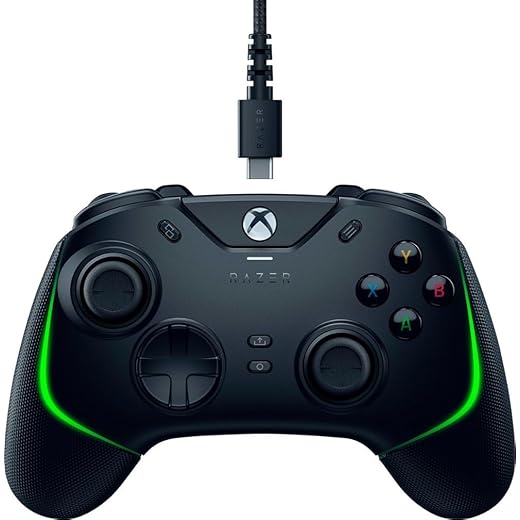
Razer Wolverine V2 Chroma Wired Controller (Renewed)
We like the wired approach for competitive players who want the lowest latency and mechanical-style buttons. However, recurring durability complaints in user reports reduce our enthusiasm for recommending refurbished units without solid seller warranties.
What we like about the Wolverine V2
We appreciate its focus on responsiveness. The wired connection plus Razer’s mechanical‑style action buttons gives very direct feedback that a lot of competitive and action‑game players prefer. The WV2’s light weight and tactile switches make quick repeated inputs feel precise and satisfying in fast genres.
Features that impact gameplay
The trigger stop and remappable controls are the kinds of features that let a single button press shave milliseconds off a competitive input, which matters in tight online play. We also like the cable design that makes the controller simple to use with laptops and desktops without worrying about batteries.
Practical caveats and buying advice
Our main reservations come from user reports: several buyers of renewed units noted failures in bumpers, sticks, or connection that required Razer support — which is patchy if the seller wasn’t authorized. If you pursue this controller, buy from a reputable retailer or opt for a warranty. For those who want wired precision and don’t mind the refurb angle, it can still be a great value.
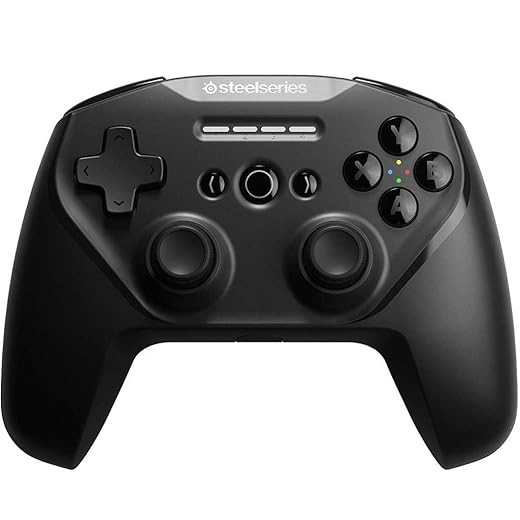
Stratus Duo Wireless Controller for Windows/Android/VR
We see it as a solid, inexpensive way to get a console‑style experience on laptops, phones, and VR. It’s lightweight and versatile, though longevity and stick durability are mixed in community reports.
Where the Stratus Duo fits
We recommend the Stratus Duo when you want a flexible wireless controller without a big investment. SteelSeries designed it to be lightweight and easy to pair: use Bluetooth for mobile devices, or the included 2.4 GHz dongle for low‑latency PC play. For people who travel or game on phones and Steam Decks, that flexibility matters.
Real‑world strengths and limitations
It’s particularly useful for users who don’t need paddles or pro customization but want consistent input for indie titles, platformers, and many Steam games. The tradeoffs are typical for the price: some users report stick drift after extended use, and the lack of modern convenience features like USB‑C is noticeable in 2025.
Practical advice
We’d advise buyers to accept this as a budget wireless option: it’s light, comfortable for smaller hands, and works across devices, but if you’re a heavy daily user or competitive player, investing in a higher‑end pad will repay itself in durability and finer controls.
Logitech G F310 Wired Gamepad Blue/Black
We think it’s the sensible choice when you simply need a reliable, no-frills wired controller for PC. It won’t wow with features, but it’s durable, widely compatible, and plug‑and‑play friendly for many games.
Where it makes sense
We view the Logitech G F310 as a practical, low‑cost entry into controller gaming on PC. It’s plug‑and‑play for most titles, durable enough for years of casual use, and it gives a familiar console‑style layout without the premium price. For people who only occasionally need a gamepad or need a dependable spare, it’s hard to beat for the money.
Feature highlights and everyday use
Because it’s wired there’s minimal latency and no battery maintenance, which is a practical advantage for desktop setups. The layout maps well to modern PC games that expect an Xbox‑style controller, making it a good fit for indie titles, emulators, and older games.
Limitations to be aware of
This controller intentionally skips premium features: you won’t get vibration, wireless convenience, or advanced customization out of the box. The D‑pad is serviceable for many genres but lacks the precision fighting‑game players demand. For the price though, it remains one of the most reliable and straightforward wired controllers we’ve seen for PC.
Final Thoughts
We keep coming back to one clear leader for PC players who want the most control over performance: the Xbox Elite Series 2 Core — Black. Its combination of hardware and software customization delivers the kind of incremental tweaks that matter in serious play. On Windows, Xbox input is native and reliable, the customization tooling is mature, and the controller’s ergonomics let us play long sessions without fatigue. If you compete in shooters, fighters, or just want pro‑level tweakability that translates to better consistency, this is the pick.
For anyone who needs one controller to rule multiple devices — Steam Deck, Switch, PC, and mobile — we recommend the 8BitDo Pro 2 (Gray). It packs Hall‑effect sticks and deep software remapping into a compact, affordable package. It won’t beat a dedicated pro pad in niche competitive edge, but its versatility and cross‑platform support make it the practical, everyday choice for most modern setups.
If you want the most immersive haptics and adaptive trigger feel on PC titles that support it, the DualSense is an interesting alternative — but for pure PC competitive tuning choose the Elite; for multi‑device value choose the 8BitDo Pro 2.
Frequently asked questions
How did we pick these pc controllers for gaming options?
We shortlist models that balance performance, reliability, and value for typical buyers—not just the highest spec sheet. Hands-on notes, owner feedback, and return/warranty policies all feed the ranking.
Which pc controllers for gaming pick is best for most people?
Start with our top overall choice if you want the safest balance of price and features. Move up or down the list only when a specific need—budget, ecosystem, or a must-have feature—clearly applies to you.
Do prices on this pc controllers for gaming list change often?
Yes. Retailers run frequent promos, so use the live price buttons on this page and compare shipping and return windows before checkout—the best deal is not always the lowest sticker price.
Should I buy the cheapest pc controllers for gaming on the list?
Only if the trade-offs fit your use case. The budget pick can be excellent value, but check what you give up in build quality, software support, or key features you will use every week.
What if none of these pc controllers for gaming picks fit?
Use the comparison and guide links on this page to narrow by size, platform, or feature, then revisit the list with your must-haves written down—forcing a mismatch creates more returns than savings.
How often is this pc controllers for gaming roundup updated?
We refresh rankings when major models launch or pricing shifts enough to change the value story. Check the publish date at the top and compare current specs if you are reading months later.

Princess Rioboca is the Lead Editorial Writer at Option Cutter, bringing over seven years of hands-on experience in consumer technology journalism. Specializing in home networking and smart home architecture, she transforms complex technical data into practical, real-world upgrades. Princess personally tests and audits every product she reviews—evaluating real-world Wi‑Fi throughput, cable management durability, and streaming ecosystem stability—to filter out spec-sheet noise. Her rigorous, field-tested insights are designed to give readers transparent, unbiased buying advice on what to purchase, what to skip, and exactly why.














