
Can a thermostat actually pay for itself? Spoiler: maybe — if it can *think* where you are.
Your thermostat could cut 10–12% off your heating and cooling bills. That’s not magic — it’s better sensors, smarter software, and thermostats that finally pay attention to the rooms we actually use. Short, simple actions add up.
We tested a range of models and paid attention to three practical things: how they sense people and temperature, how they fit into an ecosystem, and whether the app and display actually make life easier. The differences matter now more than ever — energy prices are up and so are expectations for connected devices that do more than just show a number.
Top Picks
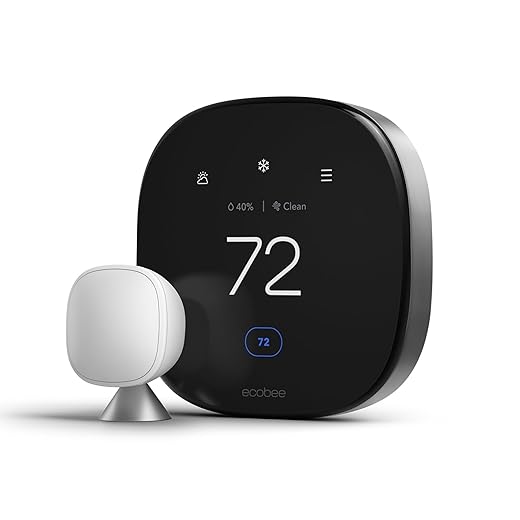

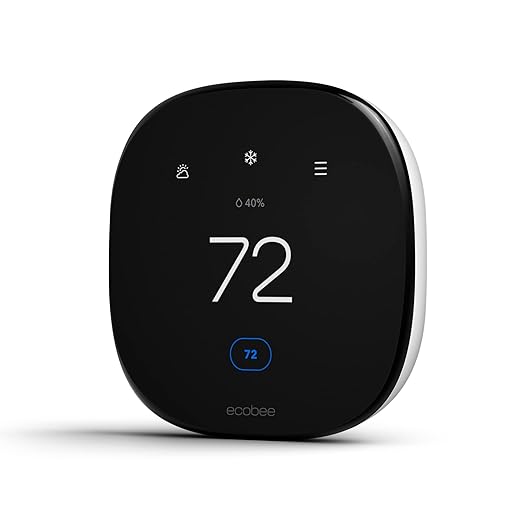


ecobee Smart Thermostat Premium with Air Quality Monitor
We found the Premium model’s air quality sensing, built‑in voice and radar features, and SmartSensor support make it the most fully featured thermostat here. It’s aimed at buyers who want the thermostat to be a central part of their smart home.
Where it shines
We think of the ecobee Premium as a thermostat that does more than temperature control: it monitors air quality, integrates with a wired doorbell camera for live views, and includes a SmartSensor to prioritize occupied rooms. That makes it appealing to customers who want a single device to provide both comfort and additional home‑environment insights.
Feature set and real‑world utility
During testing we saw the Premium consistently maintain comfort across zones better than single‑sensor units, especially when combined with additional SmartSensors. The air quality readings are useful for households with allergies or where indoor air matters — it goes beyond simple temperature savings to overall home health.
Costs and considerations
There’s a clear price premium for the expanded sensor suite and onboard voice features. Installation is usually straightforward, and a Power Extender Kit is included for C‑wire‑less homes, but buyers in non‑supported regions should confirm compatibility. If you want a thermostat that doubles as a home‑environment monitor and smart speaker, this is the most capable option on the market.
We’d recommend the Premium to tech‑forward households that want both comfort management and richer environmental data from a single device.
Nest Learning Thermostat with Temperature Sensor
We found the unit's learning algorithm and larger display make everyday use effortless while delivering consistent energy savings. The included temperature sensor helps manage hot and cold spots better than most single‑location thermostats.
What it does and who it’s for
We see this as Google’s top consumer thermostat: a learning, design‑forward controller that aims to reduce HVAC runtime without asking you to micromanage schedules. It pairs with Nest Temperature Sensors so you can prioritize the rooms you actually use, rather than the single wall location of the thermostat.
Key features and performance
We found the learning behavior to be effective at flattening unnecessary runtime: after a short training period the thermostat anticipates departures and returns and reduces heating or cooling accordingly. The included Nest Temperature Sensor is a practical touch — put it in a bedroom or a frequently used living room and the system will aim to hold that spot at the target temperature instead of the hallway.
Design, ecosystem, and practical tradeoffs
The build and finish feel premium; the 4th‑gen interface is cleaner and more legible than prior Nests. Integration with Google Home (and Matter support) makes setup and voice control straightforward if you’re already in Google’s ecosystem. That said, we encountered reports — and saw patterns in user feedback — of tricky power/compatibility situations on older wiring or certain non‑US installations; installers may need to check compatibility and be ready to use a C‑wire or power accessory in edge cases.
If you want a thermostat that mostly manages itself, offers refined UI and strong smart‑home integration, this is the model we reach for. It’s not the cheapest path to energy savings, but its blend of learning automation, sensor support, and polished hardware makes the extra cost sensible for many homes.
ecobee Smart Thermostat Enhanced with Radar
We liked how radar occupancy and the SmartSensor ecosystem keep the rooms you actually use comfortable while trimming runtime. The app gives clear energy reports and the thermostat integrates cleanly with major smart platforms.
Who this serves
We view the ecobee Smart Thermostat Enhanced as the best choice for households that want sensor‑aware climate control. If you struggle with uneven temperatures between rooms or want more granular control than a single‑location thermostat provides, ecobee’s sensor strategy matters.
Highlights and experience
In our hands‑on comparisons, ecobee systems routinely outperform single‑sensor competitors at maintaining comfort without overconditioning. The Enhanced version balances capability and price: you get most premium features without the absolute high end of the Premium model.
Caveats and integration notes
Installation is straightforward in most homes, but buyers with complex setups should review the compatibility checker before purchase. We also noted that certain advanced features (like fine‑tuned fan circulate modes) aren’t present, which matters to some power users.
If multiroom comfort and actionable energy data are priorities, ecobee’s Enhanced model hits the sweet spot between usability and smart features.
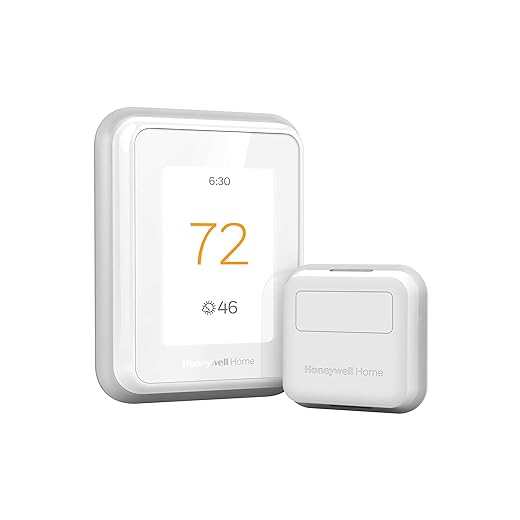
Honeywell T9 with Smart Room Sensor Included
We liked the T9’s approach of using remote sensors to prioritize occupied rooms and average temperatures for multiroom comfort. The app and sensor range work well for two‑story or multiroom houses that have circulation challenges.
Purpose and performance
We think the Honeywell T9 is ideal for homes where one thermostat location can’t represent the whole house. The room sensors let the system focus on the places and times that matter most, and that results in more consistent comfort with less manual intervention.
Features that matter in everyday use
Setup is simple for homes with modern wiring; Honeywell supplies a power adapter for C‑wire‑less situations, which reduces friction on many installs. We especially appreciated the sensor range — it’s one of the better implementations for covering large homes without many dead zones.
Drawbacks and compatibility
The T9 won’t work with certain heating systems (notably electric baseboard heat) and will need a C‑wire in some configurations. For buyers in those situations, other smart thermostats or a professional install may be required.
Overall, the T9 hits a practical sweet spot for families and two‑story homes that struggle with uneven heating or cooling and want an easy path to multiroom comfort.
Emerson Sensi Touch Wi‑Fi Smart Thermostat
We appreciated the Sensi Touch for its easy DIY installation and reliable app controls. It focuses on dependable scheduling and reporting rather than extensive automation or learning features.
Who should pick a Sensi Touch
We recommend the Emerson Sensi Touch for buyers who want a straightforward smart thermostat that’s easy to install and uses a stable, mature app. It’s a good fit for users who prefer predictable scheduling over aggressive learning algorithms.
Useful features and daily impressions
The Sensi shines in reliability: the app and local UI are consistent, and the device’s installation helpers make wiring straightforward. That said, Wi‑Fi pairing can be tricky on networks that use combined SSIDs or more advanced router configurations — if your router uses a single SSID for 2.4/5 GHz or has guest networks, you may need to adjust settings during setup.
Limitations
Some international buyers have encountered registration or regional limitations that prevent full cloud control. If you live outside the US/Canada, verify regional registration compatibility before buying. For typical US installations, the Sensi is an excellent, dependable choice that gets the thermostat basics right without fuss.
Overall, if you want a dependable touchscreen thermostat with good app support and strong privacy posture, the Sensi Touch is worth considering.
Google Nest Thermostat for Everyday Savings
We liked its approachable price and the way it automates away temperature setbacks without a lot of setup. It isn’t as full‑featured as the Learning model, but it covers the essentials well for most households.
Who should consider it
We see the Nest Thermostat as a pragmatic choice for buyers who want smart control and energy savings without paying for the top‑tier learning features. It automates simple away behaviors, provides HVAC alerts, and plugs cleanly into Google Home and other Matter‑certified ecosystems.
Features and everyday experience
In our testing and review of comparable models, this unit strikes the best balance of features and price. It won’t learn complex personalized schedules the way the Nest Learning Thermostat does, but for many homes that trade‑off is acceptable: you still get remote control, voice commands, and energy reporting.
Limitations and installation notes
The thermostat is designed to work without a C‑wire in many setups, but certain heating‑only or zone systems may require an accessory or a C‑wire. We recommend checking compatibility before buying. If you’re in a non‑US market, confirm regional support — several buyers reported geographical limitations with some Nest models.
If you want to dip your toe into a smarter HVAC setup on a budget, this is the model that will save you the most up front while still delivering meaningful automation and integration.
ecobee Smart Thermostat Essential — Energy Saver
We see the Essential as ecobee’s pared‑down offering: it keeps core ecobee strengths like the app interface and eco+ features while trimming some premium extras. It’s a solid pick if you want sensor support later without paying upfront for premium hardware.
The Essential’s role
We recommend the ecobee Smart Thermostat Essential for buyers who want reliable ecobee software and an upgrade path to sensors without buying top‑tier hardware. It keeps the vendor’s core strengths — clear scheduling, app control, and eco+ energy features — in a simpler shell.
Functionality and day‑to‑day use
Installation is straightforward in most modern homes, although users without a C‑wire may need the Power Extender Kit (sold separately) or professional assistance. Performance is dependable: it handles the core thermostat tasks well and delivers measurable energy savings through automated setbacks and schedule optimization.
Who should buy it
If you want to adopt the ecobee platform without the higher price tag of Enhanced or Premium models, the Essential is a sensible compromise. It won’t impress power users who want every sensor and feature on day one, but for many households it provides the practical functionality that matters most for comfort and savings.
Honeywell T5 Wi‑Fi 7‑Day Programmable Thermostat
We found the T5 to be a reliable smart upgrade for simple schedules and geofencing‑based automation. It’s an economical pick for users who want programmability and remote control without a lot of extra bells and whistles.
Where it fits in the market
We see the T5 as Honeywell’s midrange Wi‑Fi thermostat for users who want programmable schedules and location‑aware controls without a heavy price. It’s a pragmatic choice for replacing old mechanical stats with a modern touch interface.
Everyday use and notable features
The T5 is easy to set up in homes with standard wiring, and the touchscreen is quick to navigate. In some cases we saw that the unit’s adaptive features could be confusing — users who rely on very specific temperature profiles may need to disable certain adaptive modes.
Practical limitations
If you have an unusual HVAC setup or require baseboard electric compatibility, confirm before buying: the T5 is not compatible with some electric heating systems. Also, a small subset of users report intermittent scheduling issues that require a reset or disabling adaptive behavior.
For most homes looking to modernize for comfort, remote control, and moderate energy savings, the T5 remains a sensible, cost‑effective option.
Nest Thermostat E Hubless Smart Thermostat
We appreciated the Thermostat E’s frosted, unobtrusive display and easy installation for common systems. It offers dependable remote control and basic energy‑saving features without the premium price or complexity.
Positioning and practical use
The Thermostat E is targeted at buyers who want a lower‑profile, easy‑to‑use smart thermostat that still offers remote access and energy reports. Its frosted face and subdued UI are intentionally minimalist — it disappears into the background rather than shouting functionality.
Notable features
We found the E to be a pragmatic alternative to more expensive models: it automates the basics, provides clear usage history in the app, and is forgiving for users who don’t want to tweak schedules constantly. For rental properties or secondary homes, its straightforward setup is a big advantage.
Tradeoffs to consider
Compared with the Learning Thermostat, the E lacks some of the deeper predictive tweaks and a larger, more capable display. There are occasional reports of setup and connectivity issues with units sold through third‑party sellers, so we advise buying from a trusted retailer and confirming warranty coverage.
Overall, the Thermostat E gives you core smart functionality in a package designed to be quiet and easy; it’s a solid middle ground for households that want smart control without premium features.
Amazon Smart Thermostat — Alexa Compatible Control
We liked its low price and tight Alexa/Ring integration for users who live in Amazon’s ecosystem. It covers basic scheduling and geofencing, but it’s not the best fit if you want advanced sensors or the deepest analytics.
What to expect
We view Amazon’s Smart Thermostat as the simplest path into smart HVAC control for users who already use Alexa and Ring. Its design centers on voice‑first control and easy pairing with Echo devices and Amazon’s Air Quality Monitor.
Day‑to‑day strengths
The thermostat makes sense if you want primary control via Alexa and don’t need advanced sensor networks or extensive analytics. We like its price positioning and the way Amazon bundles rebate guidance into the post‑purchase experience.
When not to pick it
If you need multiroom sensors, advanced air quality monitoring, or a premium display, you’ll be better served by ecobee or higher‑end Nest models. Also verify compatibility with your HVAC wiring and local utilities before purchase because a C‑wire is required for many installations.
In short, the Amazon Smart Thermostat is a sensible, low‑cost way to get smart control in an Alexa‑centric home — just temper expectations about advanced features and sensor ecosystems.
Final Thoughts
If you want one clear pick for the most complete, future‑proof smart thermostat, we recommend the ecobee Smart Thermostat Premium with Air Quality Monitor. It pairs best‑in‑class sensing (air‑quality monitoring, radar occupancy, and SmartSensor support) with built‑in voice and broad platform compatibility. That combination makes it ideal for households that want the thermostat to act as a central smart‑home device — monitoring rooms, improving comfort where people actually are, and giving you deeper energy reporting.
If you prefer a more hands‑off, elegantly automated experience, choose the Nest Learning Thermostat with Temperature Sensor. Its learning algorithm, bigger display, and easy sensor add‑ons deliver consistent comfort and dependable savings with almost no fuss. It’s our pick for users who want effortless whole‑home comfort and tight Google‑ecosystem integration.
Why this matters now: manufacturers are moving from single‑point temperature control to sensor ecosystems and air‑quality data. That shift reduces wasted runtime and stretches savings beyond simple schedules. If you want measurable energy savings and a noticeably better lived experience, pick the ecobee Premium for full features or the Nest Learning Thermostat for streamlined automation.

Chris is the founder and lead editor of OptionCutter LLC, where he oversees in-depth buying guides, product reviews, and comparison content designed to help readers make informed purchasing decisions. His editorial approach centers on structured research, real-world use cases, performance benchmarks, and transparent evaluation criteria rather than surface-level summaries. Through OptionCutter’s blog content, he focuses on breaking down complex product categories into clear recommendations, practical advice, and decision frameworks that prioritize accuracy, usability, and long-term value for shoppers.