



We pit curved and flat displays against each other to show which one actually improves immersion, comfort, and competitive edge—and why your desk, peripherals, and game library should decide the winner.
We test the 37″ curved Samsung Odyssey G7 against the 27″ flat LG Ultragear to determine which design and features genuinely benefit modern gamers, balancing immersion, competitive performance, and ecosystem fit so we can recommend the best choice for you.
Immersive Focus

Competitive Edge
Samsung G7 37
- Immersive 1000R curvature that draws you into single‑player and cinematic moments
- True 4K resolution with VESA DisplayHDR 600 for deeper blacks and better highlights
- Low 1ms GtG and 165Hz refresh for smooth, responsive play on powerful GPUs
- Robust feature set (CoreSync lighting, Auto Source Switch+) and adjustable stand for comfort
- 165Hz ceiling is lower than top-tier competitive panels for esports players
- Larger footprint demands desk space and may not suit multi-monitor setups
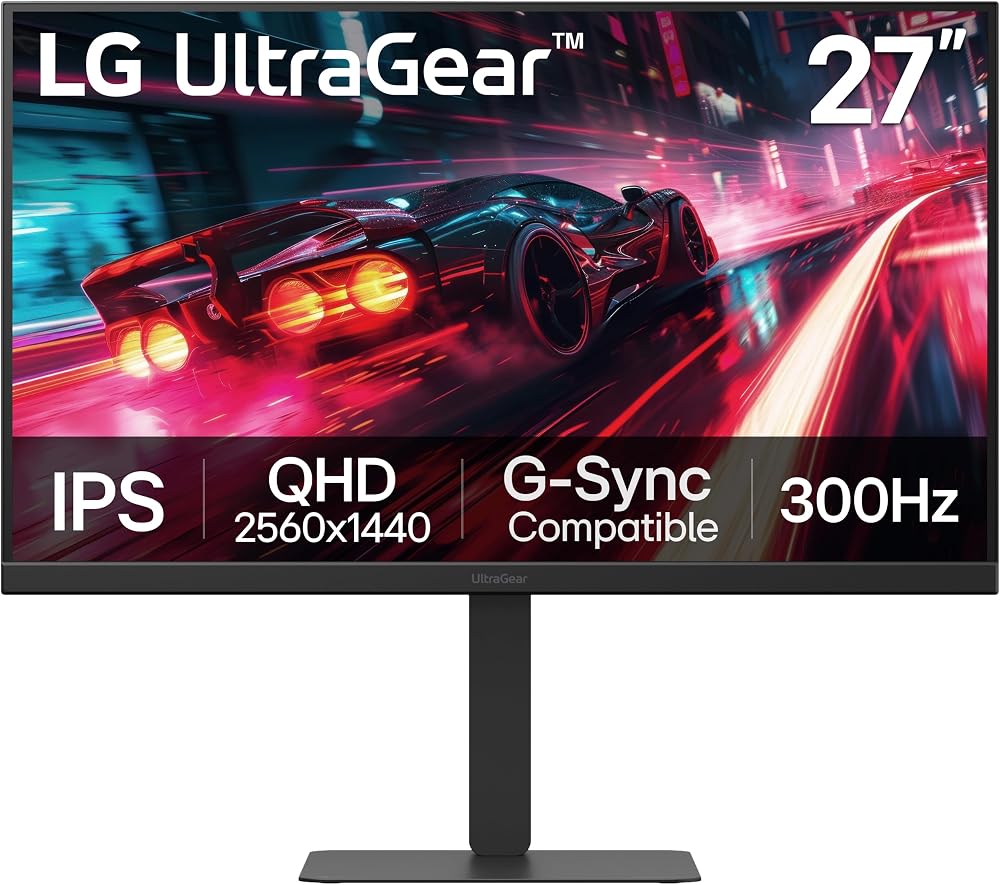
LG UltraGear 27
- Blistering 300Hz refresh and 1ms GtG ideal for competitive, high‑frame‑rate play
- QHD IPS panel with wide viewing angles and up to 95% DCI‑P3 for vivid colors
- Versatile connectivity (HDMI 2.1, DisplayPort 1.4, USB‑C with 15W PD) and pro‑level ergonomics
- HDR is modest (DisplayHDR 400) compared with higher‑end HDR panels
- OSD/menu and some build details draw mixed feedback from users
Feature Comparison
| Immersive Focus Samsung Odyssey G7 37-inch Curved Gaming Monitor | VS | Competitive Edge LG UltraGear 27G640A-B 27-inch 300Hz Gaming Monitor |
|---|---|---|
VA (curved) / CoreSync lighting | Panel Type |
IPS (flat) |
37 inches | Screen Size |
27 inches |
3840 x 2160 (4K UHD) | Resolution |
2560 x 1440 (QHD) |
1000R curved | Curvature |
Flat |
165Hz | Refresh Rate |
300Hz |
1ms (GtG) | Response Time (GtG) |
1ms (GtG) |
VESA DisplayHDR 600 | HDR Rating |
VESA DisplayHDR 400 |
Wide gamut; CoreSync support (16.7M colors) | Color Gamut |
Up to ~95% DCI‑P3 |
AMD FreeSync Premium Pro | Adaptive Sync |
NVIDIA G‑SYNC Compatible & AMD FreeSync Premium |
HDMI / DisplayPort / USB hub (Total USB ports: 3) | Ports |
HDMI 2.1 x2, DisplayPort 1.4, USB‑C (15W PD), USB hub |
None indicated | USB-C Power Delivery |
15W PD (USB‑C) |
Tilt & height adjustable | Stand Adjustability |
Tilt, height, swivel, pivot |
350 cd/m² typical / HDR peak higher (VESA 600) | Brightness (typical / peak) |
Typical (HDR peak ~400 cd/m²) |
Yes | VESA Mount |
Yes |
24.7 pounds | Weight |
12.1 pounds |
2025 | Release Year |
2025 |
$$$ | Price |
$$ |
Immersive single‑player, cinematic and AAA gaming | Typical Use |
Esports / competitive, high‑frame‑rate gaming |
$575.00 | Current price |
$249.99 |
| Buy for $575.00 | Buy for $249.99 |
Curved vs. Flat Gaming Monitors: Which Should You Pick?
Performance and Visuals: Pixel Density, Refresh, and Motion
Resolution and pixel density — clarity where it counts
We compare Samsung’s 37″ 4K (3840×2160) versus LG’s 27″ QHD (2560×1440). Because of the larger resolution on the Samsung, the pixel densities are closer than you might expect: roughly 119 PPI for the 37″ 4K and about 109 PPI for the 27″ QHD. That means the Odyssey G7 actually delivers a subtly crisper desktop image at normal seated distances, while the LG’s smaller screen still reads sharper when you sit very close.


Refresh rate, response, and perceived motion
300Hz versus 165Hz is a big practical difference for twitch shooters. We notice:
Both panels claim 1ms (GtG), but panel type matters: IPS (LG) gives more consistent pixel response and less overshoot; VA (curved Samsung) can show more smearing in dark transitions even with fast GtG numbers.


VRR, HDR, and real-world benefits
Adaptive sync helps both: LG’s G-Sync compatibility and FreeSync Premium target competitive stability; Samsung’s FreeSync Premium Pro leans into hdr, inc.. The HDR badges tell part of the story—DisplayHDR 600 on Samsung promises stronger highlights and deeper blacks versus HDR400 on LG—but tone-mapping, peak-nit distribution, and local dimming behavior determine how “HDR” actually looks. In short: Samsung’s curved VA feels more cinematic in single-player games; LG’s IPS and blistering 300Hz favor competitive consistency.
Market context and GPU/console reality
Design, Ergonomics, and Everyday Use: Curved Immersion vs Flat Practicality
Curved immersion and desk footprint (Samsung 37″)
With a 1000R wrap, the 37″ Odyssey G7 is built to draw us into single‑player and cockpit-style sims — the curve reduces eye travel and makes wide fields of view feel natural. That immersion comes with trade-offs: the 37″ footprint and deep curve demand a generous desk and a slightly longer, fixed viewing distance to avoid distortion at the edges. The VA panel gives strong native contrast and deep blacks, which amplifies cinematic scenes, but it’s also more prone to viewing‑angle shifts if you lean off axis.


Flat practicalities and adjustability (LG 27″)
The LG 27G640A-B is a workhorse for mixed use. Its flat 27″ IPS plane sits comfortably in multi-monitor arrays, and the fully adjustable stand (tilt/height/swivel/pivot) plus USB‑C (15W PD) make switching between work, streaming, and play painless. The smaller footprint is easier to center for esports rigs or cramped desks, and 300Hz responsiveness benefits high‑FPS competitive play.


Glare, viewing angles, and productivity
IPS on the LG keeps colors consistent across off‑angle viewing and is friendlier for split‑screen productivity and photo/video work. The Odyssey’s VA excels in deep blacks and hdr10+ highlights (DisplayHDR600), but color/brightness can shift at the edges — not ideal when you need uniform accuracy across a spreadsheet or multiple windows.
Build, ports, and long‑term comfort
Both feel solidly built; Samsung’s larger stand must be accounted for in cable routing, while LG’s USB‑C and HDMI 2.1 ports reduce desk clutter and simplify laptop/console hookups. In short: pick the Odyssey for immersive single‑player and cinematic setups; pick the LG for flexible, ergonomic, multi‑use desks.
Ecosystem and Compatibility: Ports, Consoles, and Adaptive Sync
Ports and real‑world hookups
We see the LG 27G640A-B as the more flexible hub: dual HDMI 2.1 and USB‑C (15W PD) make it easy to connect next‑gen consoles, newer GPUs, and laptops with a single cable. Its 300Hz mode is primarily a PC play — you’ll need DisplayPort 1.4 or HDMI 2.1 on your GPU to unlock it. The Samsung Odyssey G7’s strength is its 4K/165Hz and DisplayHDR600 — fantastic for PC sims — but you’ll want to verify whether its top refresh needs DP1.4 (with DSC) or HDMI2.1 on your system.
Adaptive sync and GPU interoperability
Both monitors support AMD FreeSync Premium (Samsung adds “Pro”), and LG explicitly lists G‑SYNC compatibility. In practice, AMD cards will work smoothly with either. NVIDIA cards usually enable VRR over DisplayPort broadly, and recent GeForce RTX series support HDMI VRR too — but HDMI VRR behavior can vary by driver and cable. For highest refresh and reliable VRR, use DisplayPort where possible on PC.
HDR, Windows, and consoles
HDR on Windows is still fiddly — enable “Use HDR” in Settings, keep drivers updated, and test per‑game HDR toggle; Windows tone mapping can crush contrast if misconfigured. On consoles, HDMI 2.1 monitors (LG) will deliver the cleanest 4K/120 HDR experience. Samsung’s DisplayHDR600 offers stronger highlights than HDR400 panels, but consoles won’t drive 4K at >120Hz anyway.
Practical tips and future‑proofing
The LG is the safer all‑round choice for mixed console/laptop/PC setups; the Samsung is more future‑oriented for high‑fidelity, GPU‑heavy PC gaming and cinematic immersion.
Value, Competitive Context, and Who Should Buy Which
Price‑to‑performance and market position
We see two clear value propositions. The LG 27″ UltraGear trades sheer scale for raw speed and connectivity: blistering 300Hz at QHD, HDMI 2.1 and USB‑C make it a high-value pick for competitive players and mixed laptop/console setups. The Samsung 37″ Odyssey G7 commands a premium for scale, 4K fidelity, and DisplayHDR600 — it’s priced for gamers who prioritize immersion and high dynamic range over peak refresh.
Typical buyer profiles
Trade‑offs you accept
Practical buying guidance
Frequently asked questions
Which is better, Curved or Flat Monitor?
There is no universal winner: Curved fits some buyers and Flat Monitor fits others. We compare specs, daily use, and trade-offs in this guide so you can match the pick to your budget and workflow, not a single spec sheet.
What is the main difference between Curved and Flat Monitor?
Curved and Flat Monitor target overlapping but not identical use cases. The sections above break down design, performance, ecosystem, and value so you can see where each product pulls ahead and where it compromises.
Should I buy Curved or Flat Monitor first?
Buy the product that removes your biggest daily friction first. If Curved solves your primary pain point, start there; if Flat Monitor is the bottleneck in how you actually work or play, prioritize it. Many households add the other later.
Is Curved worth it over Flat Monitor?
Curved is worth the premium over Flat Monitor when you will use the features that justify the price—extra performance, build quality, or ecosystem lock-in. If those extras go unused, Flat Monitor usually delivers better value.
Can Curved replace Flat Monitor?
For some users, yes; for others, no. Curved can cover most tasks Flat Monitor handles, but gaps in compatibility, accessories, or specialized workflows may still matter. Use our comparison table and verdict to see which gaps apply to you.
Who should choose Curved vs Flat Monitor?
Choose Curved if its strengths match how you will use it every day; choose Flat Monitor if you need its specific advantages or a lower entry price. When in doubt, favor the option that fixes your most frequent frustration—not the highest spec on paper.
Final Verdict: Match the Monitor to How You Play
We pick the LG 27G640A-B as the winner for the majority of competitive and mixed-use gamers: its 300Hz QHD IPS panel, NVIDIA G‑Sync/FreeSync support, HDMI 2.1 and USB‑C give consistent color, low-latency headroom, and seamless multi-device integration. That combination matters now because esports and high-frame-rate shooters reward frame delivery and ergonomic flexibility more than sheer screen real estate.
The Samsung 37″ Odyssey G7 is our recommendation when immersion, high contrast, and cinematic scale are your priority — provided you’ve got the GPU and desk space to drive 4K at speed. Want pro-level responsiveness or room-filling immersion? Choose the LG for competition, the Samsung for single-player spectacle. Which will you pick?

Princess Rioboca is the Lead Editorial Writer at Option Cutter, bringing over seven years of hands-on experience in consumer technology journalism. Specializing in home networking and smart home architecture, she transforms complex technical data into practical, real-world upgrades. Princess personally tests and audits every product she reviews—evaluating real-world Wi‑Fi throughput, cable management durability, and streaming ecosystem stability—to filter out spec-sheet noise. Her rigorous, field-tested insights are designed to give readers transparent, unbiased buying advice on what to purchase, what to skip, and exactly why.















