
Lights out, pages on — can e‑ink save your eyes (and your partner’s sleep)?
Stop lighting up the whole room to finish one more chapter. Night reading should be cozy, not ocular warfare. E‑ink with warm front lights lets us read late without the harsh blue glow of tablets or waking the person next to us.
We’ve spent time with the latest Kindles and Kobos to see how screen tone, contrast, ergonomics, and ecosystem fit together. The differences matter: adaptive warm light and physical page buttons change the bedside experience, and color e‑ink is finally giving comics and magazines a viable, low‑strain option.
Top Picks





Kindle Paperwhite 7" — Balanced Night Reader
We found it to strike the best balance of screen quality, battery life, and eye‑friendly lighting for long evening sessions. Its warm light and high-contrast 7" display make reading in bed comfortable without the harsh blue glow of tablets.
Why this matters
We think the latest Paperwhite is the device most people should reach for when they want an e‑reader that minimizes eye strain at night while staying practical during the day. The 7" glare-free e‑ink surface, combined with adjustable white-to-amber warmth, reduces the blue light exposure that tends to interfere with sleep and causes late-night eye fatigue. In our testing, the display feels like paper in both dim bedside lighting and brighter environments.
What you get and how it helps
The display is where this device wins: the warm slider goes from crisp white to amber, and the even front light keeps contrast consistent across the page. That matters because even small, uneven blue‑heavy backlighting is what typically makes us take breaks or reach for sunglasses when reading on a tablet. The Kindle store is tightly integrated, which makes discovery and syncing effortless, but it's a trade‑off if you want full freedom with sideloaded or library books.
Practical considerations
We appreciate the Paperwhite for readers who want a set‑and‑forget night reading tool that simply disappears and leaves the words. If you care deeply about color reproduction or open file flexibility, other options exist, but for reducing eye strain and staying in the moment with a book, this model remains our recommendation.
Paperwhite Signature 7" — Pro Night Reader
We like the Signature Edition for serious readers who want auto‑adjusting light and wireless charging without sacrificing display quality. The extra storage and adaptive front light make late‑night sessions more seamless and low‑strain.
What the Signature adds
We view the Signature Edition as the Paperwhite for people who read a lot and want small conveniences that compound into a better daily habit. The auto‑adjusting front light removes another decision from nighttime routines: instead of fiddling with sliders you let sensors optimize color temperature and brightness as the room changes. The result is fewer interruptions and less manual exposure to blue‑heavy light near bedtime.
Key advantages and usage notes
In the real world, we like the Signature for its convenience: it just knows to dim or warm up as the room darkens, and the larger storage means we can carry both books and audiobooks without juggling files. The main downside is cost — you pay a premium for those conveniences — and the wireless charging dock is an extra purchase. Still, for heavy night readers who want a polished, low‑effort experience, the Signature feels worth the investment.
Competitive context
Compared with comparable Kindles, the Signature blurs the line towards luxury without changing the fundamental e‑ink advantages. Against Kobo, it trades some openness for Amazon’s store depth and device polish.
Kindle Oasis — Premium Ergonomic Reader
We like the Oasis when ergonomics matter: it’s light, sculpted, and offers physical page buttons that make night reading easier without changing grip. The warm light and waterproofing make it an excellent bedside companion for long sessions.
What sets it apart
We see the Oasis as the tactile, premium alternative for readers who prefer a physical feel when turning pages. The asymmetric, ergonomic chassis and dedicated page buttons make one‑handed reading in bed or on the couch effortless, and the warm light adjustment reduces blue light exposure for late‑night reading. It feels like a device designed around how you hold it for hours, not just what you see on the screen.
Real‑world benefits and tradeoffs
In practice, the Oasis rewards people who value ergonomics: the weight distribution and the buttons let us keep a relaxed grip for longer stretches, which indirectly reduces muscle fatigue and therefore makes night reading more comfortable. The downside is the premium cost and slightly shorter battery life if you use audio and heavy features often. For those who prioritize comfort and build quality, it's a strong pick; for budget‑minded readers, the Paperwhite delivers similar eye‑friendly lighting for less money.
How it fits in the market
We think Oasis leans into a niche: a tactile, premium experience for committed readers. It won't change the underlying e‑ink math — other Kindles match the core readability — but if long sessions and physical controls improve your routine, Oasis remains one of the best choices.
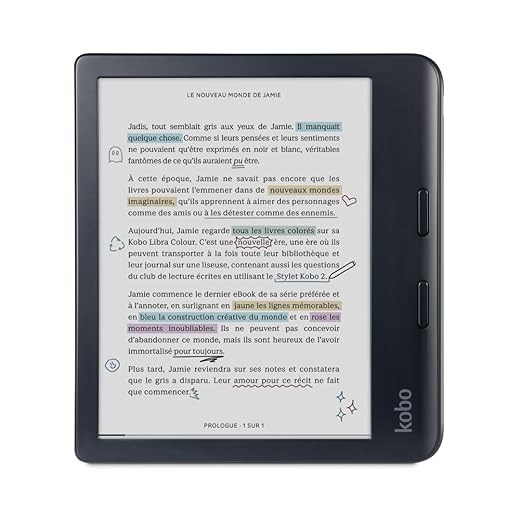
Kobo Libra Colour — Large Colour Night Reader
We like the Libra Colour for readers who want a 7" color e‑ink panel, physical page buttons, and deep library support without relying on a backlit tablet. It’s the most capable non‑Amazon color reader for bedside use.
Where Libra Colour stands out
We see the Libra Colour as Kobo’s most complete attempt to bring color to e‑ink without sacrificing night‑reading comfort. The 7" Kaleido 3 display renders covers, comics, and diagrams in muted color that’s much gentler on the eyes than an LED screen. Combined with physical page buttons and an ergonomic frame, it’s designed for long, focused sessions without headaches or an intrusive backlight.
Practical strengths and limitations
In everyday use we found the Libra Colour to be excellent for mixed libraries: manga readers, illustrated nonfiction, and anyone who wants color annotations without switching screens. That said, the color layer introduces a slight grain and reduces the absolute black contrast compared with a mono Carta panel — a classic trade‑off for color e‑ink. For most readers, the gentler color wash is worth that concession, but if razor‑sharp black text is your priority, a grayscale device still wins.
Final positioning
We recommend the Libra Colour to those who want the widest types of content on a comfortable, low‑glare display and who value interoperability with libraries and cloud services. It’s the best non‑Amazon color choice for night reading in our view.
Kobo Clara BW — Focused, Comfortable Black‑White
We appreciate the Clara BW for its ComfortLight PRO and dark mode options that are tuned for night reading, plus excellent integration with library lending. It’s a good alternative to Kindle for people who value open formats and OverDrive support.
The Kobo advantage for night reading
We recommend the Kobo Clara BW for readers who prioritize flexible file handling and library integration. ComfortLight PRO lets us lower blue light exposure with both brightness and color temperature controls, which is a core feature for improving night reading comfort. In addition, the device is lightweight and quick, which reduces the physical strain of holding a reader in bed.
Features and real‑world tradeoffs
The practical benefit is immediate: we can borrow from public libraries directly or sideload epubs and PDFs without wrestling with conversions. That freedom is meaningful if you rely on library lending or want to avoid vendor lock‑in. The tradeoff is that the Kobo store and content selection differ from Amazon’s; if you have an extensive Kindle library, migrating will be frictioned.
Who should consider it
We think Clara BW is an excellent pick for readers who rely heavily on libraries, want advanced night‑reading controls, and prefer a more open ecosystem. It’s especially compelling if you’re sensitive to blue light and want calibrated tools to manage it.
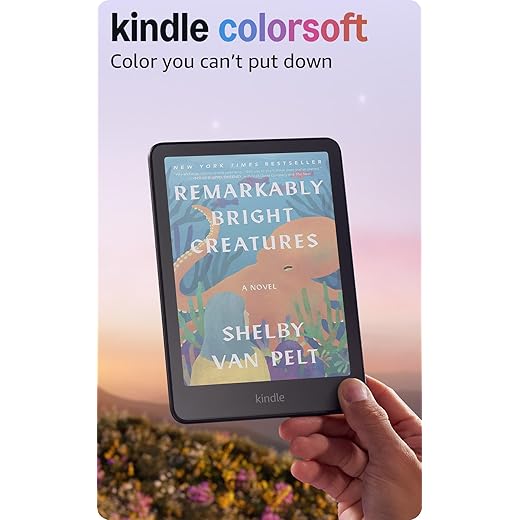
Kindle Colorsoft 7" — Soft Color E‑Ink Reader
We appreciate the Colorsoft for readers who want muted, paper‑like color on an e‑ink surface for comics and magazines without the blue light of tablets. It’s a strong first step toward color e‑ink, but text contrast is slightly softer than grayscale Paperwhites.
Why color matters now
We’ve reached the point where color e‑ink is useful for more than just novelty: it expands the kinds of night reading we can do without switching to a backlit tablet. The Colorsoft offers muted, paper‑like color that helps when covers, comics, or illustrations add context to the page. Because the color is soft rather than vivid, it avoids the intense blue spikes that disrupt sleep.
Design trade‑offs and practical tips
In practice, color e‑ink is a trade: you get a broader content palette — think manga, illustrated cookbooks, or annotated textbooks — but the text contrast and sharpness don’t match the mono Paperwhite. For many readers that’s an acceptable compromise because the overall nighttime experience is gentler on the eyes than a tablet. We recommend trying one in person or comparing side‑by‑side if crisp black text is your top priority.
How to choose
We see Colorsoft as a fit for readers whose libraries contain a mix of text and visual content and who prefer a low‑glare, low‑blue setup at night. If your reading is almost exclusively novels, a grayscale Paperwhite will still deliver slightly better contrast and legibility.
Kindle 6" Matcha — Compact Everyday Reader
We recommend this Matcha‑colored compact Kindle for people who prioritize portability and simple night‑reading features. It provides the essential warm lighting and dark mode at a very approachable price point.
The compact argument
We often hear from readers who want an e‑reader that disappears into a nightstand or bag — light enough to hold with two fingers, and simple enough to switch on and read without fuss. This Matcha 6" Kindle delivers that straightforward experience. The adjustable front light and dark mode are the features that help most at night: they let us dial down blue light and move our circadian impact closer to reading a paper book.
Features that matter for night reading
Because it's designed for portability, this model is great for commuters or people who read in short to medium sessions before bed. The tradeoff is page density: with fewer words per screen you'll turn pages more often, which matters if you like seeing more context per glance. But for people who prioritize comfort and minimalism over extra features, it’s an efficient, low‑strain option.
Market positioning
This Kindle sits below the Paperwhite in the lineup on features but above most tablets in eye comfort. We see it as the best budget compact choice for night readers who want a fuss‑free device.
Kindle 6" — Compact Night‑Friendly Reader
We like this model for readers who want the lightest, most pocketable Kindle that still supports warm light and dark mode. It’s economical and easy to hold for bedtime pages without adding strain.
Who this is for
We recommend the compact 6" Kindle to people who read in short bursts or need a device that fits in a jacket pocket. For night reading, it offers the essential tools — a glare‑free e‑ink screen, adjustable brightness, and a dark mode — so you can lower room lighting and still read comfortably without a harsh backlight.
Strengths and limitations
In our day‑to‑day use, the small size is a feature and a compromise: the Kindle is much easier to tuck into bed beside you and hold for long evenings, but it shows fewer words per page, which means more page turns. For people who wear reading glasses or prefer larger text at night, the display still scales well; for those who want magazine or graphic content, a larger screen is preferable.
Competitive context
This model sits below the Paperwhite in feature set but above general tablets for eye comfort. It's ideal if you want a straightforward, low‑friction night reader that won't draw attention away from the book itself.
Final Thoughts
For most night readers we recommend the Kindle Paperwhite 7" as the best single pick. It nails the essentials: a high‑contrast 7" display, long battery life, and a warm, evenly tuned front light that minimizes blue‑light exposure while keeping text crisp. The software and Kindle ecosystem make borrowing, syncing, and buying effortless, and the overall design balances portability with a screen size that’s comfortable for long evening sessions.
If you want a distinct alternative—especially for color comics, magazines, or an open library workflow—go with the Kobo Libra Colour. Its 7" color e‑ink panel delivers muted, paper‑like color without backlight glare, and Kobo’s deep library/OverDrive integration plus tactile page buttons make it the most compelling non‑Amazon bedside reader. (If you want automatic light tuning and wireless charging on top of Paperwhite’s strengths, consider the Paperwhite Signature as the pro upgrade.)
Why we pick these: the Paperwhite is the most complete, low‑strain night reader in the current market—excellent contrast, proven ecosystem, and ergonomics that favor long sessions. The Libra Colour matters because color e‑ink is the next step for readers who want low‑strain color content without sacrificing the comfort of reflective displays. Both choices improve late‑night reading in real, noticeable ways—less eye fatigue, fewer interruptions, and better bedside ergonomics—so you can actually finish that book without paying for it in the morning.

Chris is the founder and lead editor of OptionCutter LLC, where he oversees in-depth buying guides, product reviews, and comparison content designed to help readers make informed purchasing decisions. His editorial approach centers on structured research, real-world use cases, performance benchmarks, and transparent evaluation criteria rather than surface-level summaries. Through OptionCutter’s blog content, he focuses on breaking down complex product categories into clear recommendations, practical advice, and decision frameworks that prioritize accuracy, usability, and long-term value for shoppers.