


When the Wi‑Fi Works All Day but Stumbles at Night
Ever notice how our home network hums through work and school but becomes painfully slow after sunset? This isn’t a single bug. It’s the result of overlapping technical and human behaviors—more devices waking, radio conditions changing, ISP economics, and routers making automatic choices.
We explore what actually changes after sundown and why those changes matter for streaming, gaming, and remote work. We’ll focus on user experience and design: which failures are systemic and which are fixable without chasing bars.
Our goal is practical: prioritize fixes that improve real performance, and separate marketing claims from what helps in a crowded home at night. We’ll also compare products, plans, and provider trade‑offs.

Peak‑time congestion: more users, more demand, same pipe
What contention actually means for us
When everyone comes home and fires up Netflix, Stadia, Zoom, and cloud backups, the aggregate demand on the “last mile” and on neighborhood aggregation points spikes. That’s contention: many users share finite upstream and peering capacity. In practical terms, a household trying to run two 4K streams (~25 Mbps each), a game session, and an automatic laptop backup can easily exceed the bandwidth that was provisioned for “typical” evening use.
How ISPs design the shared network
ISPs balance cost and capacity by oversubscribing links: each fiber or cable node serves dozens or hundreds of homes, and peering/upstream links are sized for average, not peak, use. Cable/DOCSIS networks are especially visible here because multiple homes share the same node; fiber-to-the-home reduces local sharing but peering and backbone links can still bottleneck. ISPs also advertise burst speeds (short-lived boosts) that mask how sustained throughput behaves under load. The result: marketed Mbps often represent best-case bursts, not sustained performance under contention.
Why strong Wi‑Fi bars don’t guarantee smooth video
A strong Wi‑Fi signal only tells us the radio link between device and router is good. It says nothing about whether the ISP’s upstream is queuing packets. When the ISP link is congested, queues form and latency (bufferbloat) spikes—so video buffers and games stutter even while speedtest results look fine (many speedtests hit a nearby CDN node inside the ISP, not the congested peering point). A better test: measure latency or run a download while pinging a public server; if pings jump during the transfer, you’re seeing bufferbloat/congestion.
Modern traffic makes peaks worse
Automatic OS updates, cloud sync (Dropbox/OneDrive), and smart‑home backups run in the evening by default. Simultaneous 4K streams and big uploads are the new normal, not outliers; they turn short spikes into sustained load, exposing limits in cheap shared plans.

Actionable steps we recommend right away
Next, we’ll look at an equally invisible adversary: radio interference from your neighbors and devices—and how it interacts with the congestion issues above.
Radio interference and the invisible neighborhood battle
The RF layer: what actually changes at night
When everyone comes home, the radio environment gets noisier in ways a speed test doesn’t show. In dense housing we routinely see 20–40 SSIDs fighting over the 2.4 GHz spectrum — and that band only has three non‑overlapping channels (1, 6, 11). The practical result: more retries, higher latency, and choppy video or voice even if “signal bars” look full. 5 GHz and 6 GHz offer more spectrum, but they aren’t a magic fix unless both your router and devices support them (Wi‑Fi 6E is still spotty in the device ecosystem).
Why router “helpful” features sometimes hurt
Router makers try to be clever: auto channel selection, adaptive transmit power, and automatic switching away from DFS (Dynamic Frequency Selection) channels when radar is detected. Those choices are good in principle, but in a crowded setting they can worsen UX:
We’ve seen home networks where nightly IoT activity combined with a microwave’s 2.4 GHz noise produces precisely the environment that triggers oscillations in the router’s auto‑behavior.
Co‑existing devices adding noise
Common culprits:
Practical checks and UX‑focused fixes
These steps aren’t about chasing Mbps — they’re about reducing the mid‑session drops and latency spikes that ruin our evenings.
Router and firmware behavior: automation that backfires
When the router tries to “just work” — and doesn’t
Routers today try to be invisible. That’s great for setup, terrible for debugging. Band steering, auto channel selection, power‑saving transmit adjustments, scheduled reboots, and nightly firmware pushes are all intended to keep things optimal without user input. In practice, those automatic moves often occur during prime‑time streaming or video calls — exactly when we notice them. We’ve seen Eero and Google Nest push silent updates that temporarily change SSIDs, and ISP‑issued Arris or Technicolor gateways perform reboots or lock down advanced settings so you can’t stop them.
Which automations usually help — and which usually hurt
A quick, practical rubric based on our testing and field reports:
Practical steps you can do in 10–20 minutes
Next, we’ll look at how network topology and device behavior amplify these software choices — and why where you put hardware matters just as much as how it’s configured.
Topology and device behavior: how home network design amplifies problems
Treat the home as a single system
When we step back, home networking behaves less like a collection of gadgets and more like a single plumbing system. A single bottleneck—an overloaded mesh backhaul, a weak access point in the living room, or a cluster of devices anchored to 2.4 GHz—can set the performance ceiling for everything else. In our testing, a house with gigabit internet but a wireless‑only mesh backhaul often delivered worse evening performance than a modest router with a wired backbone.
Wired backhaul versus wireless hops
If you can, give your mesh nodes a wire. Ethernet backhaul transforms node-to-node traffic from “shared-air contention” to dedicated pipe, eliminating one common single point of failure. For small networks, a simple, inexpensive switch does the job without fuss.
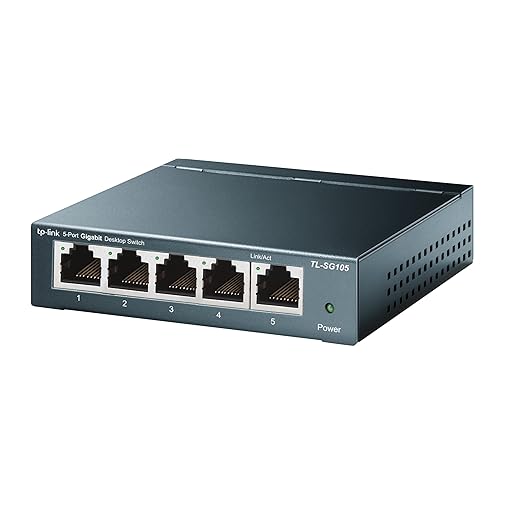
Mesh systems that rely on wireless backhaul—especially tri-band systems that reuse the same radios for client and backhaul—are convenient, but they trade off throughput when many devices are active. Models that explicitly support wired backhaul (Eero Pro 6, Netgear Orbi RBK series, Asus ZenWiFi) will let you decouple client traffic from node synchronization.
Device behavior matters as much as placement
We regularly see phones, game consoles, TVs, and NAS drives all doing heavy work at the same time: OS updates, photo cloud syncs, and overnight backups. Those background jobs are often scheduled by vendors for “after hours,” which collides with our prime‑time streaming. Cheap IoT devices that only speak 2.4 GHz (smart plugs, bulbs) can also drag down airtime because they’re slower and chatty.
Practical topology fixes that usually help first
For UX and product designers
Vendors should expose clear controls: let users schedule updates, surface device‑level bandwidth usage, and provide simple QoS presets. Better coordination between ecosystems—phones, consoles, cloud services—could stagger heavy syncs across devices rather than dumping everything at 2 a.m. That’s not just a technical win; it’s a better night‑time user experience.
Next, we’ll explore what the market currently offers and which purchases actually move the needle versus those that are mostly marketing.
What the market offers and what actually helps: product and provider choices
What the tech promises — and what we actually get
Vendors sell features: Wi‑Fi 6/6E boasts OFDMA, TWT, and better MU‑MIMO; mesh systems promise seamless roaming; ISPs push faster tiers. Those specs matter, but only if the whole chain supports them. OFDMA helps when dozens of clients and APs negotiate sub‑slots; TWT matters if phones and sensors use it. In mixed fleets of old phones, consoles, and smart bulbs, the headline wins shrink. In short: specs are necessary but not sufficient.
Product picks and who they help
Tradeoffs that actually matter
Decision heuristics — what we try, in order
With that map of products and tradeoffs, we can now pull together practical fixes to smooth our evenings.
Practical fixes that make our evenings smoother
We recommend a compact checklist: first distinguish ISP congestion from local RF by testing speeds at different times and directly wired to the modem; then prefer topology fixes — wired backhaul, access‑point placement, split SSIDs for 2.4/5GHz — before buying more radios. Turn off or schedule router automations and large uploads during prime time. Choose hardware that matches your ecosystem and setup‑tolerance: mesh for convenience, APs for control.
Why this matters now: markets push radios and subscription features, but better evenings usually come from reducing competing work and smarter tradeoffs. Follow our troubleshooting sequence (isolate ISP → isolate RF → optimize topology → tweak firmware → upgrade) before spending on new hardware. Good evening connectivity.

Chris is the founder and lead editor of OptionCutter LLC, where he oversees in-depth buying guides, product reviews, and comparison content designed to help readers make informed purchasing decisions. His editorial approach centers on structured research, real-world use cases, performance benchmarks, and transparent evaluation criteria rather than surface-level summaries. Through OptionCutter’s blog content, he focuses on breaking down complex product categories into clear recommendations, practical advice, and decision frameworks that prioritize accuracy, usability, and long-term value for shoppers.







