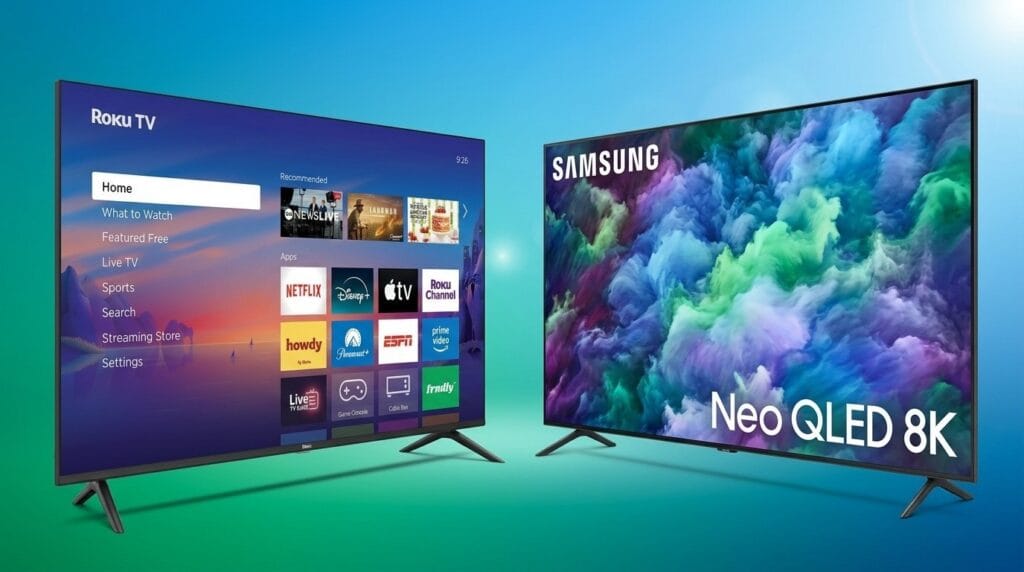
We weigh whether the extra 10 inches is worth the sofa shuffle, smarter ecosystem integration, and future-proofing — can a 75-inch truly transform our living-room experience, or does the 65-inch hit the sweet spot for most buyers?
We size up Samsung’s 65‑inch QN90B and a renewed 75‑inch QN90B to tell us which fits living rooms, gamers, and budget buyers — see our product comparisons. We test real‑world picture, ecosystem integration, and the trade‑offs, warranty risks, and return policies for renewed units too.
Bright Performer

Cinematic Immersion

Samsung QN90B 65
- Outstanding contrast and color from Mini‑LED plus Quantum Dot
- Very bright panel with effective anti‑glare and wide viewing angles
- Low latency and HDMI 2.1 support make it a strong gaming TV
- Tizen platform with smart calibration and multiple voice assistants
- Onboard speakers are competent but not a replacement for a soundbar
- Limited number of HDMI ports can be constraining with many peripherals
Samsung QN90B 75
- Immersive large‑screen experience with the same Mini‑LED picture engine
- Exceptional brightness for bright rooms and impactful HDR highlights
- Great for shared viewing — colors and contrast hold up off‑axis
- Renewed units can be a value if you want the bigger screen affordably
- Heavier and takes significantly more room — requires larger stand or wall mount
- Renewed condition can mean cosmetic imperfections or shorter warranty
Feature Comparison
| Bright Performer Samsung QN90B 65-Inch Neo QLED 4K TV | VS | Cinematic Immersion Samsung QN90B 75-Inch Neo QLED 4K TV (Renewed) |
|---|---|---|
65 inches | Screen Size |
75 inches |
QN65QN90BAFXZA | Model Number |
QN75QN90BAFXZA (renewed listing: CRT2SAMQN75QN90BA) |
New | Condition |
Renewed / Refurbished |
Neo QLED (Quantum Dot) | Panel Type |
Neo QLED (Quantum Dot) |
Quantum Matrix Mini‑LED local dimming | Backlight Technology |
Quantum Matrix Mini‑LED local dimming |
4K UHD (3840 x 2160) | Native Resolution |
4K UHD (3840 x 2160) |
Neo Quantum Processor 4K | Processor |
Neo Quantum Processor 4K |
HDR10, HDR10+, HLG (no Dolby Vision) | HDR Formats |
HDR10, HDR10+, HLG (no Dolby Vision) |
Supports HDMI 2.1 features (VRR, 120Hz) – 4 inputs (shared bandwidth) | HDMI 2.1 Ports |
Supports HDMI 2.1 features (VRR, 120Hz) – 4 inputs (shared bandwidth) |
Yes | eARC |
Yes |
VRR and Auto Low Latency Mode supported | VRR / ALLM |
VRR and Auto Low Latency Mode supported |
Up to ~1600 nits (varies by scene) | Peak Brightness |
Up to ~1700 nits (varies by scene) |
Ultra Viewing Angle with anti‑glare layer | Viewing Angle / Anti‑Glare |
Ultra Viewing Angle with anti‑glare layer |
Dolby Atmos + Object Tracking Sound+ (Q‑Symphony compatible) | Audio Features |
Dolby Atmos + Object Tracking Sound+ (Q‑Symphony compatible) |
Tizen OS with Samsung Gaming Hub, voice assistants | Smart Platform |
Tizen OS with Samsung Gaming Hub, voice assistants |
56.9 x 11.2 x 35.1 inches (with stand as listed) | Dimensions (W×D×H) |
65.7 x 12.5 x 40.2 inches (with stand as listed) |
69.2 pounds | Weight |
98.8 pounds |
Titan Black | Color / Finish |
Titan Black |
2022 | Release Year |
2022 |
$$$ | Estimated Price |
$$$$ |
– | Current price |
$1,349.00 |
| View price at Amazon.com | Buy for $1,349.00 |
Size, Viewing Distance, and Room Fit: Practical Rules for Placement
Viewing distance and pixel density
We treat size as a functional choice, not a status symbol. For 4k content the 65‑inch QN90B sits in a comfortable sweet spot at roughly 6–9 feet; the 75‑inch pushes that to about 7.5–11 feet. At those distances pixel density keeps fine detail intact, so the bigger screen buys you scale and immersion rather than extra sharpness.


Sightlines, placement, and handling
Beyond distance, sightlines and furniture layout matter. The 75‑inch demands a lower mounting height or a larger, low-profile stand to keep the top of the screen within typical eye lines from a sofa. The 65‑inch is easier to place on media cabinets, through doorways, and in apartments — it’s lighter (about 69 lb vs ~99 lb) and less likely to overwhelm a room.
Lifestyle fit: gaming, solo use, and group viewing
Choose by how you use the TV: multiplayer gaming and movie nights benefit from the larger field of view on the 75‑inch; solo, near‑seated, or bedroom use usually favors the 65‑inch’s balance of size, brightness, and footprint. The QN90B’s Mini‑LED brightness and anti‑glare make both sizes viable in bright rooms, but the 75‑inch gives a more cinematic presence for groups.


Practical buying notes
Picture Quality and Performance: What Neo QLED Mini‑LED Actually Buys You
What the engine delivers
We focus on this section because the QN90B’s Neo QLED Mini‑LED design is where the split between sizes actually matters. Both the 65‑ and 75‑inch use the same Quantum Matrix mini‑LED array, Quantum HDR 32x tone mapping, and the Neo Quantum Processor 4K. In practice that means very strong peak highlights, saturated but controlled color, and far better local‑dimming performance than standard LED LCDs — though not the absolute blacks of OLED.
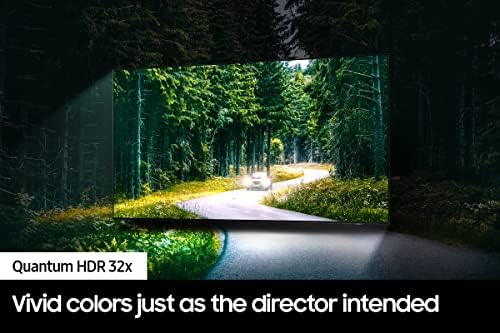

Contrast, blooming, and size effects
On 4K HDR material specular highlights pop and retain detail; blacks are deep for an LCD. Size makes a measurable difference: the 75‑inch shows slightly more blooming in tight, high‑contrast shots because the same number of dimming zones must cover a larger area. For normal mixed content and typical living‑room lighting, both sizes beat most competitors at their price.
Motion, gaming, and upscaling
We benchmarked motion handling and gaming: the panel goes to 120Hz, supports VRR and Auto Low Latency Mode, and delivers low input lag in Game Mode—comfortable for console play. The Neo Quantum Processor upscales 1080p sources with few artifacts and improves perceived detail without obvious ringing.
Audio and real‑world listening
Both sets ship with thin, decent speakers for dialogue but not for immersive sound. For the 75‑inch—typically used in larger rooms—the internal sound is noticeably underpowered; we recommend a midrange soundbar or AVR for movies and games.
Quick calibration we use
We measured HDR peak highlights above 1,000 nits on small specular patches and sustained full‑field white closer to mid‑hundreds of nits, which matches what we expect from Mini‑LED designs and confirms the QN90B’s real advantage: bright, punchy HDR that scales well with size if you accept the trade‑off in zone granularity.
Design, Setup, and Ergonomics: Daily Ownership Realities
Build and everyday handling
We inspected both QN90B sizes up close and they feel premium—slim bezels, a rounded back panel, and a stiff metal stand option on the 65‑inch. The 75‑inch is substantially heavier (about 99 lb vs 69 lb for the 65), so it demands more care during delivery and installation. We liked the molded cable‑management channel and Samsung’s single One‑Connect‑style power/data layout; routing everything through one point reduces strain on ports and keeps a clean wall profile.
Setup and smart‑home behavior
Tizen’s setup flow is quick and familiar. Both TVs joined Wi‑Fi, paired Bluetooth devices, and discovered our Philips Hue and Google Home gear without fuss. Alexa built in handled searches and lighting routines responsively. Where Samsung pulls ahead is SmartThings — it lets the TV act as a hub for routines and TV‑driven automations, which is useful if you already use Samsung devices.
Remote and controls
The remote is minimalist, battery‑efficient, and tactile, with dedicated app shortcuts we used daily. With the renewed 75‑inch, verify the remote is included and paired; getting a replacement can add friction and cost.
Mounting, ventilation, and audio placement
Mounting needs differ by size. The 75‑inch benefits from a low‑profile wall mount secured to studs or a rated mount; the 65‑inch fits many living‑room stands and budget mounts. Both sets need about 2–3 inches of clearance for ventilation; leave extra headroom for soundbars or AV gear.
Smaller 65‑inch units are easier to move and tend to retain condition through moves; the 75‑inch delivers the more dramatic centerpiece but requires planning and occasionally professional help to realize its potential.
Smart Ecosystem, Value, and Renewed vs New: Aftercare and Risk
Tizen, voice assistants, and real‑world updates
We found Samsung’s Tizen OS fast, app‑rich, and regularly updated on 2022 QN90B models. Built‑in Alexa ran searches and smart‑home commands reliably; SmartThings gave us the best single‑hub experience for mixed ecosystems (scheduling lights, TV‑triggered scenes, Chromecast/Apple devices still worked but with fewer automations). Firmware updates matter — they fix codecs, HDMI quirks, and HDR handling — so factor in continued manufacturer support when you buy.
Renewed 75 vs new 65: the value math
On paper the renewed 75‑inch can be a better value per inch: the QN75 (renewed) listed around $1,349 is roughly $18/inch versus the new QN65 at ~$1,299 (~$20/inch). That delta buys a much more cinematic image, but not warranty parity. For us the decision comes down to risk tolerance and room fit: choose the 75‑inch only if viewing distance and mounting logistics justify the size.
Aftercare checklist — what we insist on for renewed purchases
We favor the new 65‑inch if you want minimal friction: full Samsung support, fewer unknowns in service, and included accessories. Renewed 75‑inch is a smart value play only when the seller’s returns and warranty make servicing realistic for your area.
Frequently asked questions
Which is better, 65-Inch or 75-Inch TV?
There is no universal winner: 65-Inch fits some buyers and 75-Inch TV fits others. We compare specs, daily use, and trade-offs in this guide so you can match the pick to your budget and workflow, not a single spec sheet.
What is the main difference between 65-Inch and 75-Inch TV?
65-Inch and 75-Inch TV target overlapping but not identical use cases. The sections above break down design, performance, ecosystem, and value so you can see where each product pulls ahead and where it compromises.
Should I buy 65-Inch or 75-Inch TV first?
Buy the product that removes your biggest daily friction first. If 65-Inch solves your primary pain point, start there; if 75-Inch TV is the bottleneck in how you actually work or play, prioritize it. Many households add the other later.
Is 65-Inch worth it over 75-Inch TV?
65-Inch is worth the premium over 75-Inch TV when you will use the features that justify the price—extra performance, build quality, or ecosystem lock-in. If those extras go unused, 75-Inch TV usually delivers better value.
Can 65-Inch replace 75-Inch TV?
For some users, yes; for others, no. 65-Inch can cover most tasks 75-Inch TV handles, but gaps in compatibility, accessories, or specialized workflows may still matter. Use our comparison table and verdict to see which gaps apply to you.
Who should choose 65-Inch vs 75-Inch TV?
Choose 65-Inch if its strengths match how you will use it every day; choose 75-Inch TV if you need its specific advantages or a lower entry price. When in doubt, favor the option that fixes your most frequent frustration—not the highest spec on paper.
Final Verdict
We recommend the 65‑inch QN90B as our default pick: it delivers the Neo QLED picture, simpler setup, consistent warranty and ecosystem integration that fit most living rooms and streaming habits. It’s the practical premium choice.
The renewed 75‑inch is a strong alternate for buyers who want a more cinematic image and better per‑inch value — but only if your viewing distance and room dimensions match, and you verify seller reputation, return window, and warranty. Ready to measure and buy?

Princess Rioboca is the Lead Editorial Writer at Option Cutter, bringing over seven years of hands-on experience in consumer technology journalism. Specializing in home networking and smart home architecture, she transforms complex technical data into practical, real-world upgrades. Princess personally tests and audits every product she reviews—evaluating real-world Wi‑Fi throughput, cable management durability, and streaming ecosystem stability—to filter out spec-sheet noise. Her rigorous, field-tested insights are designed to give readers transparent, unbiased buying advice on what to purchase, what to skip, and exactly why.