



Tired of sounding like a drumline? We have curated a list of what are the best quiet keyboards for work and your home office—while keeping your coworkers happy.
Typing should not be noisy. We’ve all frozen mid-sentence to avoid embarrassing keyboard percussion during a call.
We tested a range of quiet keyboards for design, typing feel, battery life, and ecosystem integration. Our aim: find boards that deliver real silence without sacrificing comfort or productivity.
Top 8 Quiet Keyboards Comparison – Rated
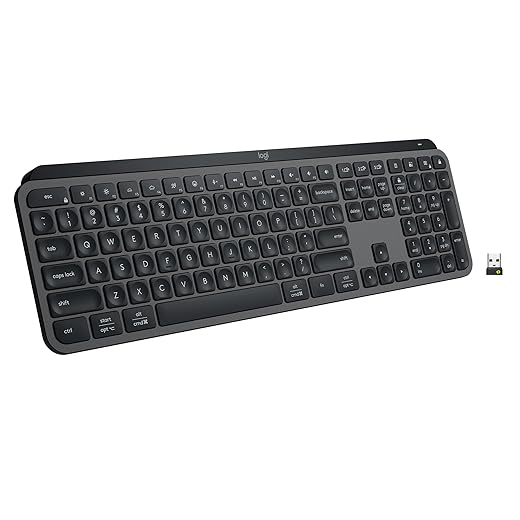



MX Keys S — Quiet Low‑Profile Wireless
We found it delivers a laptop‑like, whisper‑quiet typing feel with thoughtful software integration that saves time. It's a strong pick for people who switch between machines and want adaptive backlighting and long battery life.
Why we like it
We think this keyboard nails the balance between a refined typing experience and modern workflow features. The low‑profile keycaps are sculpted to match fingertip curvature, producing a fast, precise stroke that stays quiet even at speed. The sense of quality comes from the weight and the subtle aluminum frame, which makes the device feel like a proper desktop tool rather than a plastic accessory.
Key features and integration
The smart actions and backlighting are what push it past a “nice” keyboard to a workflow tool: macros, shortcuts, and lighting settings are configurable in Options+, and we appreciated how those automations shave seconds off repetitive tasks. In mixed‑OS setups the keyboard is broadly compatible, though features like Smart Actions are limited to Windows and macOS where the app runs.
What to consider
The typing feel and software ecosystem justify the price for people who type for hours and rely on cross‑device workflows, but not everyone will need that level of polish. Battery life is excellent in our experience, but when you do run low you’ll want USB‑C handy for a quick top‑up. Also, FileVault and some full‑disk encryption scenarios on macOS can complicate bluetooth stack.
Who should buy it
If you want a near‑silent, premium wireless keyboard with sensible software customization and multi‑device support, this model is among the best. It’s particularly compelling for creators and knowledge workers who alternate between machines and value a quiet, consistent typing surface.
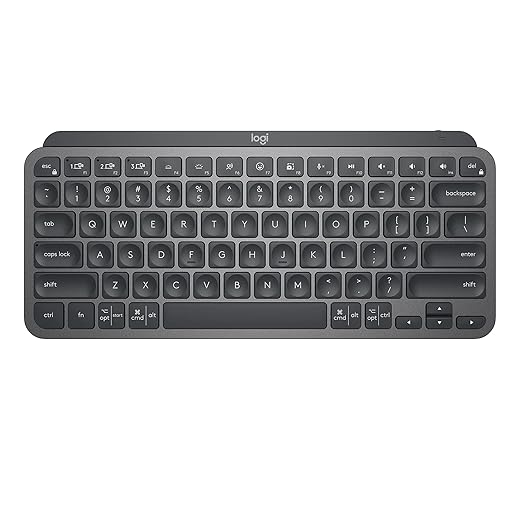
MX Keys Mini — Compact Quiet Backlit Keyboard
We like this for people who want a premium, compact board that keeps noise down without sacrificing typing quality. Its smart keys and Flow compatibility make it a productivity pick for creators and remote workers who move between devices.
Where it sits in the market
The mini version trims the MX Keys experience into a compact keyboard footprint without stripping the core typing experience. We see it as the right choice for people who want premium feels and quiet operation but don’t need a numpad. Compared with cheap compact boards, this one brings better key shaping and a far more consistent low‑noise profile.
Design, features, and ecosystem
We particularly liked how the smart keys change day‑to‑day workflows: a dedicated dictation key reduces friction for voice‑to‑text tasks, and Flow enables dragging files between machines when paired with a Flow‑enabled mouse. The Logi Options+ software brings per‑app customization, but core typing works out of the box on most OSes.
Practical trade‑offs
Going compact means losing dedicated function clusters and the numpad, so heavy spreadsheet users may find it limiting. The white backlight is intentionally neutral, but in some desk setups (monitor light bars, for instance) the adaptive illumination can behave oddly. Still, for writers, coders, and people with multiple devices, the keyboard is a strong, low‑noise performer.
Bottom line
We recommend it when desk real estate and quiet operation matter and you don’t need a full‑size layout. It’s one of the better compact keyboards for sustained, comfortable, and unobtrusive typing.
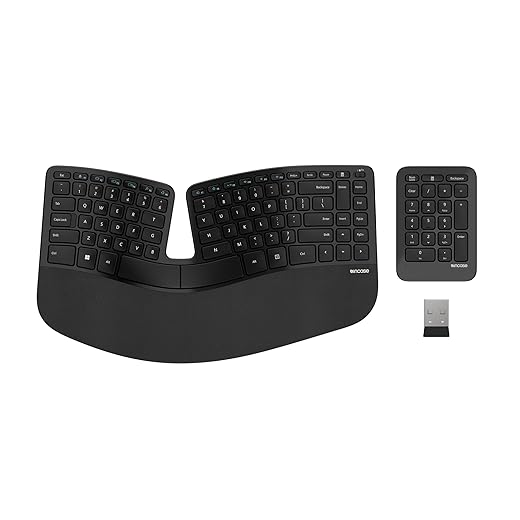
Sculpt Ergonomic — Split Layout With Palm Rest
We appreciate the sculpted, split layout that promotes a neutral wrist position and reduces strain over long sessions. It’s aimed at people seeking long‑term comfort more than gaming precision or compact portability.
Ergonomics first
This ergonomic keyboard is clearly designed with ergonomics as the top priority. The domed, split keyset encourages a natural hand posture and the generous palm rest stabilizes the wrists during long typing sessions. For people who’ve used former Microsoft Sculpt models, this feels familiar—and for those moving from a traditional board, there’s an adjustment curve that pays off in comfort.
Features that matter to us
We tested the feel and found it generally comfortable, though we saw reports of variability between units: some reviewers encountered firmer key action that required returning for replacement. Build quality is solid overall, and the inclusion of a separate numpad keeps the main footprint more compact while preserving productivity features.
Who benefits and what to watch for
If reducing wrist strain is your primary concern, this split keyboard is among the best mainstream options. It competes with pricier split mechanical and fully customizable ergonomic boards by offering a familiar Microsoft‑style layout and integrated wrist support. If you’re coming from a flat, standard keyboard, plan on a couple of weeks to adapt — that learning curve is normal for split designs.
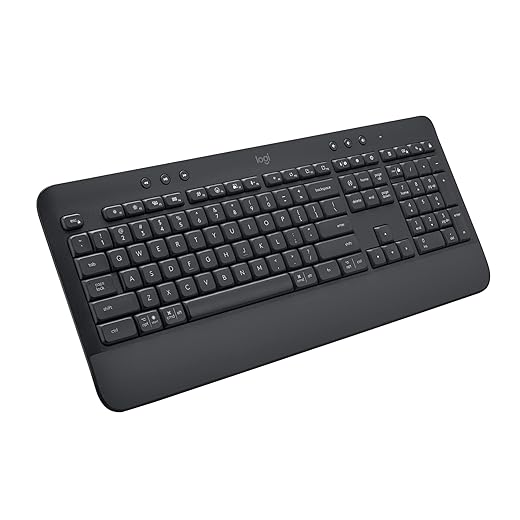
Signature K650 — Cushioned Quiet Wireless Keyboard
We found it to be a comfortable, quiet full‑size keyboard with a soft palm rest that eases wrist strain during long typing sessions. It’s an approachable choice for office users who want long battery life and reliable wireless connectivity.
Design and daily experience
This keyboard targets office users who want an easy‑to‑use, comfortable desk keyboard without complicated setup. The deep‑cushioned palm rest is the headline: it changes long‑session typing from a grind to something noticeably less fatiguing. Keys are soft and quiet, prioritizing comfort over a firm, mechanical feel.
Connectivity and ecosystem advantages
We liked the flexibility of Logi Bolt as it provides a more secure and stable connection in busy wireless environments, while bluetooth low energy beacon. The keyboard also pairs well with Logi Options+ on supported systems for basic customization, though it doesn’t have the macro depth of MX series keyboards.
Who should consider it
If you want a quiet, comfortable keyboard for the office or home workstation with simple connectivity and exceptional battery life, this is a top‑tier mainstream choice. It’s not for users who need backlighting or heavy customization, but for most knowledge‑workers it’s a very sensible, low‑noise daily driver.
K780 — Multi‑Device Full‑Size Keyboard
We found it to be a reliable, quiet, full‑size option with a built‑in stand for phones and tablets. It’s a practical pick for users who need stable cross‑device typing without bells and whistles.
What it delivers
The K780 is a workhorse: a full‑size keyboard that’s built to be used across a computer, tablet, and phone. The standout feature is the simple cross‑device switching—three easy‑switch buttons let us jump between machines quickly—and the built‑in cradle keeps a phone or tablet angled for reference or quick replies.
Practical design and everyday use
In daily use it’s unglamorous but dependable. Typing is quiet and comfortable; the keys have enough travel for long sessions without the mechanical clack. We also appreciate that it includes a Unifying receiver for machines without bluetooth mesh networking.
Competitive context and considerations
At its price point it competes with a lot of compact and tenkeyless boards. Its advantage is the full‑size layout and multi‑device ergonomics—features many lower‑cost boards skip. It lacks software customization and rechargeable power, so if you prefer programmable keys or USB‑C charging, there are more modern alternatives. For the user who wants reliability, cross‑device convenience, and a built‑in phone stand, it’s a solid, quiet choice.
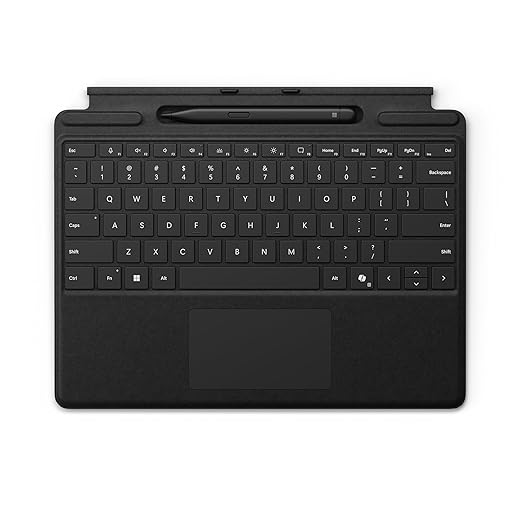
Surface Pro Keyboard — Slim Alcantara, Copilot Key
We think it’s the most cohesive keyboard option for Surface owners who want a slim, cover‑style typing experience with integrated Copilot and pen storage. It favors portability and integration over deep customization or mechanical typing feedback.
Built around the Surface experience
This keyboard is clearly tailored to Surface hardware: it clips to the device, provides pen storage, and exposes a Copilot key for one‑tap access to Microsoft’s assistant. The result is a laptop‑like experience that’s optimized for mobility and tight hardware integration rather than desktop ergonomics.
Design and day‑to‑day use
In practice we like that it transforms a tablet into a practical productivity machine without much fuss. The keys provide satisfying travel for a slim keyboard, and the trackpad is responsive enough for cursor work when a mouse isn’t handy. That said, Alcantara requires some care: it looks premium but can collect oils and grime over long use.
Trade‑offs and buyer guidance
This is the right pick if you own a compatible Surface and want the tightest possible hardware and software integration. If you primarily work at a desktop or need the quietest, most tactile typing surface, a purpose‑built desktop keyboard will still outperform it. For on‑the‑go Surface users, though, the convenience and Copilot shortcut are compelling.
Perixx PERIBOARD‑512B — Wired Split Ergonomic Keyboard
We think it’s an accessible entry to split‑keyboard ergonomics with a tactile membrane feel that reminds us of brown switches. It’s best for users committed to an ergonomic layout and who prefer a wired connection.
Practical ergonomics without the premium price
This wired split keyboard gives you a traditional ergonomic curve and stepped rows at a fraction of the cost of boutique ergonomic mechanical boards. We like that it offers true separation between left and right clusters to reduce ulnar deviation and encourage a neutral forearm position, which is the main reason people choose split layouts.
Key characteristics and how it feels
In daily typing, the keys feel punchy — closer to a tactile membrane or brown switch than a laptop scissor mechanism. That gives good feedback for touch typists but also means more audible sound than ultra‑quiet scissor keyboards. We noted some users reported a short adaptation window, but most become comfortable within one to two weeks.
Where it fits in the ecosystem
If you want ergonomics and wired reliability without spending a lot, this model sits in a niche of affordable split keyboards that actually deliver usable posture benefits. It won’t satisfy someone chasing premium mechanical switches or full programmability, but for everyday office typing and reduced wrist strain, it’s a pragmatic pick.
Large Print Backlit — Silent Full‑Size Keyboard
We found it to be a pragmatic choice for users who need large, high‑contrast keys and quiet, near‑laptop typing on a budget. It won’t replace premium boards for long typing sessions, but it’s surprisingly capable for the price.
Who this keyboard is for
This model targets users who need accessible, readable keys and a quiet, laptop‑style typing feel without spending much. We think it’s ideal for caregivers, older users, or anyone with reduced vision who still wants a wireless keyboard that behaves like a normal desktop board.
Practical features that punch above the price
In everyday use we appreciated the comfortable wrist rest and the backlight memory—small touches that make the keyboard feel more polished than its price suggests. Setup is straightforward: plug the USB receiver into a spare port and the keyboard usually springs to life. The scissor‑switch action is quiet and forgiving, which suits late‑night work or shared spaces.
Limitations and value context
Don’t expect premium switch feel or tight software integration; the build is plastic and you’ll notice trade‑offs in key stability. Some units arrived with dongle compatibility issues according to user reports, so check return windows if yours behaves oddly out of the box. For the price, however, it’s hard to beat as a quiet, readable keyboard for general home or office use.
Final Thoughts
Our top pick is the MX Keys S — Quiet Low-Profile Wireless. It blends a laptop-like, whisper-quiet typing feel with thoughtful software integration (Logitech Flow-style multi-device switching), adaptive backlighting, and long battery life. For heavy typists and people who hop between machines all day, it reduces noise while speeding up workflows—exactly what hybrid workers and multitaskers need right now.
If desk space or portability matters more, we recommend the MX Keys Mini — Compact Quiet Backlit Keyboard. It keeps the premium, quiet typing experience in a smaller footprint, with smart keys and multi-device support that suit creators and remote workers who move between laptop, tablet, and phone.
For those who prioritize wrist health over compactness, the Sculpt Ergonomic remains the best pick for sustained comfort. Budget-minded multi-device typists should consider the K780 for reliable quiet typing with a built-in device stand. We picked these winners in our product comparisons because they match modern workflows: quieter homes and open offices, more device switching, and a premium typing feel without the mechanical clack that used to be the only option.
Frequently asked questions
We shortlist models that balance performance, reliability, and value for typical buyers—not just the highest spec sheet. Hands-on notes, owner feedback, and return/warranty policies all feed the ranking.
Start with our top overall choice if you want the safest balance of price and features. Move up or down the list only when a specific need—budget, ecosystem, or a must-have feature—clearly applies to you.
Yes. Retailers run frequent promos, so use the live price buttons on this page and compare shipping and return windows before checkout—the best deal is not always the lowest sticker price.
Only if the trade-offs fit your use case. The budget pick can be excellent value, but check what you give up in build quality, software support, or key features you will use every week.
Use the comparison and guide links on this page to narrow by size, platform, or feature, then revisit the list with your must-haves written down—forcing a mismatch creates more returns than savings.
We refresh rankings when major models launch or pricing shifts enough to change the value story. Check the publish date at the top and compare current specs if you are reading months later.

Princess Rioboca is the Lead Editorial Writer at Option Cutter, bringing over seven years of hands-on experience in consumer technology journalism. Specializing in home networking and smart home architecture, she transforms complex technical data into practical, real-world upgrades. Princess personally tests and audits every product she reviews—evaluating real-world Wi‑Fi throughput, cable management durability, and streaming ecosystem stability—to filter out spec-sheet noise. Her rigorous, field-tested insights are designed to give readers transparent, unbiased buying advice on what to purchase, what to skip, and exactly why.














