



Why one upgrade makes the rest of your smart home far more reliable
We start with a simple claim: fix the network and control layer, and most smart home problems disappear. We have seen rooms full of devices behave like a haunted house until the router or hub is sensible. The single biggest upgrade is not a new camera or bulb; it is a resilient, local-first network and controller.
Why does this matter today? Modern devices talk over Wi‑Fi, Zigbee, Thread, and new standards like Matter. That diversity is powerful but fragile. When connectivity, backhaul, or cloud bridges fail, automations break and user trust evaporates. We will show how a stable foundation beats chasing features and give steps to migrate.

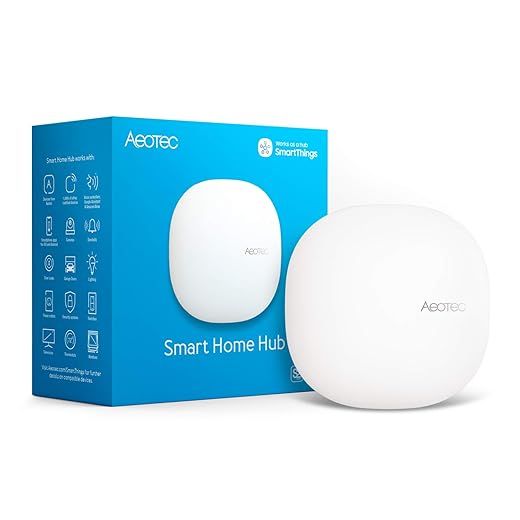

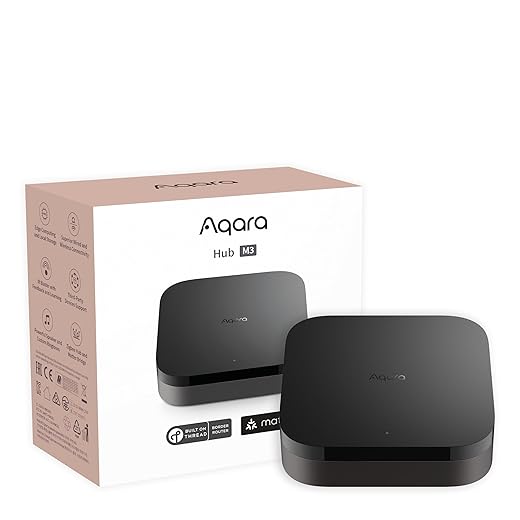
How Firmware Upgrades Boost Your Smart Lights’ Network Stability
Start by diagnosing what’s actually breaking: common failure modes and root causes
We want to be surgical about fixes. Before buying gear, we diagnose where instability shows up in the user experience — lost automations, delayed responses, or devices that flicker “offline.” Those symptoms map to different root causes and very different (often cheaper) fixes.
User-facing symptoms and what they usually mean
Quick diagnostic checklist (what to run right now)
Simple metrics to collect (makes the problem obvious)
How to interpret results — quick rules
This practical diagnosis keeps us from “throwing hardware” at symptoms. With data in hand, we can choose the upgrade that actually improves reliability — which is where we head next into network design and wired backhaul.
Build a resilient network foundation: wired backhaul, mesh placement, and segmented traffic
We treat the network as the house’s plumbing: if it’s leaky or clogged, everything downstream misbehaves. Here we walk through the practical design choices that turn flaky smart-home setups into dependable ones.
Wired backhaul: why it matters and how to do it
A wired backbone—running Ethernet (Cat5e/Cat6) between rooms and access points—changes the UX immediately. Latency drops, roaming handoffs are cleaner, and Wi‑Fi airtime isn’t consumed by AP-to‑AP hops. In real homes we measured automation delays drop from 300–800 ms to sub‑100 ms when key APs moved to wired backhaul.
How to start
Note: unmanaged switches like the TP‑Link above are cheap and fine for basic backbones. For VLANs or QoS you’ll want a managed switch or a router with VLAN support.
Mesh placement and AP choice
Not all mesh Wi‑Fi are created equal. Consumer all‑in‑one gateways (Eero, Google Nest, Netgear Orbi) are easy but often lock you into limited controls. Prosumer gear (Ubiquiti UniFi, TP‑Link Omada, ASUS AiMesh) gives more tweakability and better support for wired backhaul.
Placement tips
Segmented traffic: VLANs, SSIDs, and QoS in plain English
Think “blast radius.” If a smart plug goes rogue, it shouldn’t take our phones and cameras with it. VLANs (virtual LANs) let us carve the single physical network into isolated lanes: one for phones, one for IoT, one for guests. Practically:
Small investments in a capable router/switch plus properly placed APs typically beat buying “better” smart bulbs or plugs. The next section looks at which controllers and protocols best exploit this more reliable foundation.
Choose the right controller and protocols: local control, Thread/Matter, and dedicated hubs
When the network is reliable, the control plane becomes the single biggest source of flakiness: cloud timeouts, flaky bridges, or a single vendor gateway going offline can make whole rooms stop listening. We look at what’s changing (and why it matters), then give practical guidance on which routes actually improve day‑to‑day reliability.
Why local control matters
local automation isn’t a niche geek preference — it’s lower latency, higher reliability, and fewer single points of failure. When automations run on‑site, a door sensor can trigger a light in tens of milliseconds instead of waiting for a cloud round trip. For privacy‑minded users, it also removes dependence on vendor backends that can change or disappear.
Thread and Matter: the practical shift
Thread mesh, IPv6 mesh for devices like sensors and bulbs; Matter is the application layer that lets devices talk across vendors over IP (Wi‑Fi or Thread). Together they mean devices can interoperate locally without fragile cloud bridges. The catch: Thread needs a border router — a local device that bridges Thread to your home IP network.
Controller options: the trade-offs
How to choose, fast
Quick, actionable checks
Standards momentum is real: as Thread + Matter mature and more voice gateways act as border routers, picking a local‑capable controller today keeps us flexible and less dependent on any single vendor tomorrow.
A practical, phased upgrade plan: what to replace first and how to migrate safely
We want this upgrade to feel like a weekend project, not a home renovation. Below is the playbook we use: small, reversible steps, quick tests, and a strict “critical automations stay put until proven” rule.
Phase 0 — Prep and backups
Start with an inventory and a snapshot.
These two things save hours if rollback is necessary.
Phase 1 — Add the new network layer with minimal disruption
Introduce wired APs or a mesh with wired backhaul in parallel.

Validate coverage with a simple walk test: stream a 4K clip and watch for buffering, then ping your controller from multiple rooms. If coverage and latency look good, promote the new AP to primary.
Phase 2 — Add a Thread/Matter border router and test local control
Bring in a border router (HomePod mini, Nest device, or Aqara Hub M200). Attach it to the new network and let it form a Thread partition.
Why this order? Thread benefits are immediate for low‑power sensors; getting them onto a stable IP fabric first prevents flaky retransmissions.
Phase 3 — Migrate in small batches, keep fallbacks
Migrate noncritical devices first: plugs, lamps, then bulbs, sensors, and leave locks/alarms for last.
Rollback is simply reconnecting a device to the old hub or restoring the controller snapshot.
Quick validation checklist (do these after each batch)
We iteratively migrate, test, and repeat — that’s how you get real reliability without ever leaving your house in the dark.
Long-term maintenance, trade-offs, and what the competitive landscape means for users
We step back here: stability isn’t a one‑time fix. It’s an ongoing practice that costs time, attention, and sometimes money. Below we unpack the maintenance tasks, the trade‑offs you’ll face, how consolidation and Matter change the game, and practical monitoring tools we actually use.
Ongoing maintenance and security practices
Firmware and controller updates are where reliability wins or breaks. We recommend
These steps cost time—expect an initial few hours per week during migration, then a 30–90 minute monthly rhythm.
Warranty, support, and the pro vs. consumer split
Consumer gear (Philips Hue, Google Nest) is polished but often ties you to a cloud and limited rollback options. Prosumer/professional kit (Ubiquiti, Hubitat, Aeotec) gives local control, better diagnostics, and longer support windows, but demands more curiosity and DIY time. If you want hands‑off, lean consumer; if you want predictable local behavior and better logs, lean prosumer.
Vendor consolidation and Matter: opportunity and risk
Matter raises baseline interoperability — sensors, bulbs, and controllers will talk more easily. That improves reliability by reducing fragile bridges. But consolidation also concentrates influence: major platforms (Apple, Google, Amazon) can steer features, and vendors may add proprietary extensions that reintroduce lock‑in. In short: Matter reduces friction, but doesn’t eliminate the need to prefer devices with good local APIs and rollback options.
Monitoring and remediation tools we use
Practical, lightweight tools that pay dividends
A quick checklist to adopt now
Who should DIY vs. hire a pro?
This perspective on maintenance and market trends frames the final decision we’ll recommend in the Conclusion.
The upgrade we’d recommend and why it’s worth the effort
We recommend prioritizing a resilient network and a standards-based, locally governed controller—ideally Thread/Matter-capable—because that combo fixes the majority of reliability problems: fewer dropped devices, faster automations, and far less cloud dependency. In today’s market, vendors are aligning around local interoperability, so investing there protects your devices and reduces churn as ecosystems evolve — browse our how-to guides.
Start with wired backhaul and mesh placement, add a local controller or hub that supports Matter/Thread, and migrate devices in phases. This simple checklist gives the best long-term return on smart-home stability. Start today and expect measurable improvements.
Frequently asked questions
What is the main point of “The Most Reliable Upgrade for Smart Home Stability”?
This piece explains where the most reliable upgrade for smart home stability matters in real buying decisions—not just headline specs. We focus on trade-offs, who benefits most, and what to verify before you spend.
Who should read this the most reliable upgrade for smart home stability guide?
Read it if you are actively shopping, upgrading, or trying to separate marketing claims from day-to-day use. Skip it if you already own the gear and are not planning a change this season.
What changed recently around the most reliable upgrade for smart home stability?
Prices, firmware, and feature tiers shift quickly in this category. We call out what is new enough to affect your decision and what is incremental hype you can safely ignore.
How should I use this editorial when buying?
Treat it as context before you compare models: note the risks and priorities here, then cross-check specs and current pricing on the picks that match how you actually use the product.
What is easy to get wrong about the most reliable upgrade for smart home stability?
Buyers often overweight one spec—brightness, speed, or brand—and underweight fit for their room, ecosystem, or warranty support. We flag the mismatch we see most often in reader questions.
Where should I go next after reading?
Use the related comparisons and top picks linked near the end of this article for model-level shortlists, then confirm return policies and compatibility with the devices you already own.

Iqra Jumar is Option Cutter's editorial writer. She writes practical editorials and buyer guides that focus on real-world upgrades—better Wi‑Fi, cleaner cable setups, smarter streaming, and everyday fixes—not spec-sheet noise alone. Her work helps readers decide what to change now, what to skip, and why.









