


We break down how clacky mechanicals and quiet membranes actually change our typing comfort, desk design, software integration, and accessory options—so we can pick the keyboard that wins for our workflow, aesthetics, and the market’s drift toward hybrid, low-profile solutions.
We’ve all heard mechanical keyboards are for gamers and membrane boards are for budgets; we compare the Corsair K70 Core RGB (mechanical) and Logitech K120 (membrane) to help us choose between tactile performance and affordable practicality for work and play.
Gaming Focus
We find this keyboard to be a strong contender for anyone who wants a serious mechanical experience with modern conveniences. Its build quality, customizable lighting and media controls put it ahead of basic boards, though the software overhead and louder mechanical signature matter depending on your workspace.
Office Essential
We appreciate this keyboard for what it is: a straightforward, dependable workhorse that gets out of the way. It won’t satisfy someone after customization or mechanical feedback, but for office and general-purpose setups its durability and plug-and-play simplicity matter more than bells and whistles.
Corsair K70 CORE
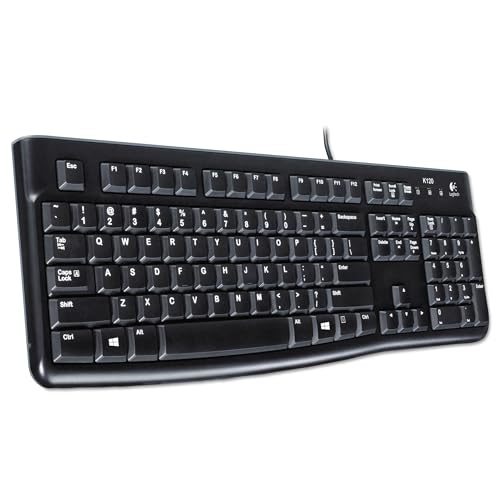
Logitech K120 USB
Corsair K70 CORE
Logitech K120 USB
Corsair K70 CORE
Logitech K120 USB
Mechanical vs. Membrane Keyboards: Which Is Worth Your Money?
Design and build: how these keyboards feel in your space
Construction and materials
We start by looking at what each keyboard is made of and why that matters day to day. The Corsair K70 Core pairs an aluminum-reinforced top plate with ABS double-shot keycaps, two layers of internal foam for sound dampening, and a detachable soft-touch palm rest. Those choices are deliberate: metal adds rigidity and a premium desk presence, double-shot caps resist legends wearing off, and the palm rest improves long sessions.


The Logitech K120 uses a simple, spill-resistant plastic shell with deep-profile membrane keys and adjustable tilt legs. It’s lightweight, low-profile, and built to be forgiving in a shared workspace; Logitech even uses some post-consumer recycled plastic.
Ergonomics and footprint
We notice the K70 sits heavier and more anchored on the desk; the magnetic palm rest makes it more comfortable for long gaming or typing sessions. The dedicated media dial and larger bezel visually signal a desk centerpiece.
The K120 is slim and unobtrusive, easy to slide into a laptop bag or tuck under a monitor. Its curved space bar and deep-key profile give a familiar office feel without the elevated acoustics of a mechanical board.
Durability, desk aesthetics, and portability
We care about the long-tail cost: cheaper plastics may save money now but can mean replacement sooner. The K70’s materials aim to justify its higher price through longevity and presence; the K120 prioritizes practicality and low upfront cost for everyday office use.
Typing feel and performance: switches, noise, and real-world use
Switches and travel
We find the K70’s pre-lubed MLX Red linear switches to be what most gamers and fast typists want: short, smooth travel and a predictable, low-force actuation that favors rapid key repeats and low finger fatigue. The lack of tactile bump means fewer surprises when you’re pushing for speed.


The K120 uses a classic membrane dome: deeper key travel, a gentler bottoming feel, and a springy return. It’s not engineered for blistering input rates, but it’s reliably familiar for long stretches of work or data entry.


Noise and office suitability
Mechanicals make more sound by nature. Corsair’s double-layer foam and pre-lubing tame sharp clacks — we’d call the K70 refined for a mechanical board, but still more audible than a membrane. If you want mechanical feel with less disruption, this one leans toward the quieter end of the gaming spectrum.
The K120’s membrane action is quiet and muted. It trades crisp feedback for discretion, which matters in shared spaces or open offices where low noise matters more than actuation clarity.
Latency, key rollover, and durability
Real-world trade-offs: speed vs. accuracy vs. silence
If you prioritize raw speed and consistent actuation for gaming or tactile precision, the K70’s linear switches and gaming hardware matter. If you prioritize quiet, inexpensive, low-profile typing in a shared environment, the K120 is the pragmatic, unobtrusive choice.
Features and ecosystem: software, customization, and extras
Software and customization
We see the K70 CORE as part of Corsair’s iCUE ecosystem: per-key RGB, deep macro programming, game integrations, and firmware updates that keep new features rolling out. iCUE lets us create lighting layers, map complex macros, and sync profiles across Corsair peripherals — useful if you want a single, unified desktop aesthetic or workflow automations. The trade-off is that iCUE is a heavyweight app; if you want simplicity, it can feel like overkill.
Extras and practical perks
Hardware extras on the K70 matter in daily use: the multi-function rotary dial and programmable media button speed up media and volume control, the magnetic soft-touch palm rest improves comfort for long sessions, and onboard profile storage means your macros and lighting travel with the keyboard (so you don’t need iCUE on every PC).
The K120 flips that script: a true plug-and-play board with no software, tested spill resistance, and an emphasis on durability and low ownership friction. There’s no lighting, no macros, and no firmware ecosystem to keep up with — which we appreciate if you want something that just works for years without updates or background services.

Feature Comparison Chart


Value, use cases, and who should buy which
The money and lifespan trade-off
We translate specs into practical value. The K70 Core sits around the midrange (~$85) and buys mechanical switches, aluminum construction, per-key RGB, onboard profiles, and a media dial — features that materially improve long-term use and workflow. Mechanical switches typically last for tens of millions of actuations, so the K70’s higher upfront cost often amortizes over many years. The K120 is a fraction of that price (~$12) and advertises up to 10 million keystrokes; it’s built to be cheap, durable, and forgettable — ideal when replacement cost matters more than bells and whistles.
Where each keyboard shines
We recommend the K70 Core when you need control and a premium feel: competitive gamers, streamers, and content creators who use macros, multi-device lighting, and on-the-fly media control. iCUE integration and onboard storage make the K70 part of a broader ecosystem, which matters if you want synced profiles across peripherals.
We recommend the K120 for straightforward, high-value needs: offices, classrooms, reception desks, or as a secondary keyboard. Its spill-resistant membrane, simple plug-and-play setup, and low price make it low-friction and low-risk.
We choose based on priorities: pick the K70 if customization and a premium typing/gaming experience matter; pick the K120 if affordability, quiet operation, and resilience are your top concerns.
Final verdict: pick based on priorities, not hype
We pick the Corsair K70 Core RGB as our winner for performance, design, and ecosystem.
Choose the Logitech K120 when you need an affordable, quiet workhorse. Which matters more: performance or practicality?

Chris is the founder and lead editor of OptionCutter LLC, where he oversees in-depth buying guides, product reviews, and comparison content designed to help readers make informed purchasing decisions. His editorial approach centers on structured research, real-world use cases, performance benchmarks, and transparent evaluation criteria rather than surface-level summaries. Through OptionCutter’s blog content, he focuses on breaking down complex product categories into clear recommendations, practical advice, and decision frameworks that prioritize accuracy, usability, and long-term value for shoppers.









