


We weigh the real-world tradeoffs between pixel-packed 4K and buttery 1440p — is higher resolution worth the GPU, desk, and ecosystem compromises, or does 1440p hit the sweet spot for design, performance, and value in today’s gaming and productivity market?
We compare the 27-inch LG 27UN850-W (4K) and Dell S2725DS (1440p) across image quality, ergonomics, connectivity, and real-world value, explaining practical trade-offs so you can choose extra pixels, higher refresh, or tighter ecosystem integration and budget.
Creative Workstation
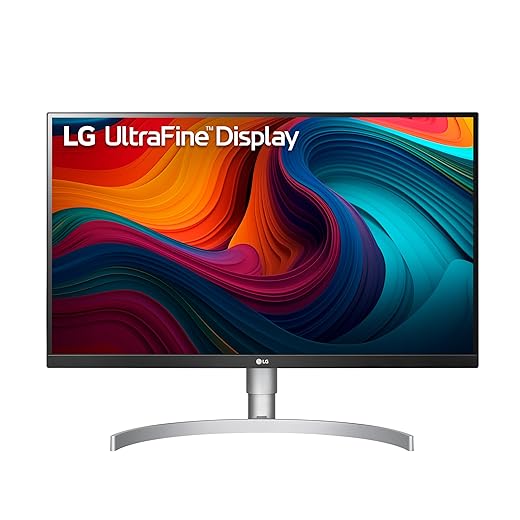
We appreciate this monitor as a creative‑first 27‑inch display: the 4K pixel density and accurate colors make text, images, and UI elements look exceptionally crisp. Its USB‑C integration and HDR400 support make it an easy fit for laptop users and photographers, but the 60 Hz native refresh rate keeps it from being a go‑to for fast‑paced, competitive gamers. In the current market, it’s a strong choice if prioritizing detail and color fidelity over high refresh rates.
Everyday Productivity
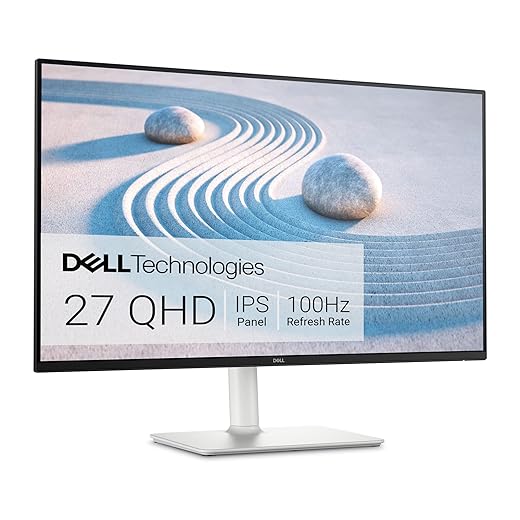
We find this monitor to be a very convincing middle ground: the 27‑inch QHD panel balances sharpness and desktop real estate while its 100 Hz refresh gives a perceptibly smoother experience than 60 Hz. Built‑in speakers, good ergonomic options, and eye‑comfort certification make it an appealing all‑rounder for everyday productivity and casual gaming. At this price tier, it’s one of the better value propositions if you want snappier motion without the higher cost of 4K at this size.
LG 27UN850
Dell S2725DS QHD
LG 27UN850
Dell S2725DS QHD
LG 27UN850
Dell S2725DS QHD
OLED vs 4K Gaming: Which Monitor Reigns at 1440p?
Specs that actually change the experience: resolution, panels, and refresh
We break down the raw numbers and explain why they matter in day‑to‑day use.
Resolution and pixel density
At 27 inches, the LG 27UN850-W’s 3840×2160 panel hits about 163 PPI; the Dell S2725DS’s 2560×1440 panel sits near 109 PPI. That difference is immediate: text, fine UI elements, and 1:1 image detail look markedly sharper on the LG. The trade-off is scaling and workflow — on Windows many users run 125–150% scaling on 4K to keep UI elements usable, which can slightly complicate some legacy apps. For photographers and video editors who need pixel-level detail, 4K at 27″ is objectively better. For general productivity and unscaled desktop space, QHD is still roomy and easier on GPU performance.


Refresh rate and gaming/generic motion
The LG is a 60 Hz panel (with AMD FreeSync), while the Dell runs up to 100 Hz. A higher refresh gives smoother mouse movement, UI scrolling, and light gaming — the Dell will feel snappier for everyday interactions and competitive play. 4K at native settings requires substantially more GPU work to hit the same framerates as 1440p; if you target 60 fps at 4K, expect to spend more on a GPU than you would to hit 100+ fps at QHD.
Panels, HDR, and connectivity
Both are IPS with ~99% sRGB coverage, so color consistency and viewing angles are comparable. The LG’s VESA DisplayHDR 400 and ~400 nits improve highlights and tone mapping but lack local dimming, so HDR effects are modest rather than transformative. The LG’s USB‑C single‑cable host connectivity is a practical win for laptop users; the Dell adds integrated 2×5W speakers and TÜV eye‑comfort certification for long sessions.


Side-by-Side Feature Comparison
Real-world performance: color, motion, and daily use
Color and creative work
We found the LG’s 4K pixel density is the headline here: text, UI anti‑aliasing, and 1:1 image detail look noticeably crisper than the Dell at the same 27‑inch size. For photo and video grading that extra precision matters — you can see fine noise, sharpening artifacts, and small retouches without zooming in as often. The LG’s DisplayHDR 400 and ~99% sRGB give better highlight behavior and starting color accuracy, but HDR400 is entry level: it improves tone mapping and highlights but won’t deliver the deep contrast or localized bloom control of higher‑end HDR monitors. If you want true color accuracy for client work, plan on calibrating the LG with a colorimeter; out of box it’s good, after calibration it’s reliable.


Motion and competitive feel
The Dell’s 100 Hz QHD panel changes the everyday perception of responsiveness. Higher refresh plus lighter GPU load at 2560×1440 means steadier frame rates on mid‑range cards (think RTX 3060 / 4060 class or AMD equivalents) — you can push higher frame targets without upgrading your GPU as aggressively as you would for smooth 4K gaming. The LG’s 60 Hz with FreeSync will still be fine for single‑player and console play, and VRR smooths dips, but competitive players will prefer the Dell’s snappier feel.


Daily use and ecosystem trade‑offs
We weigh a few practical points that shape daily satisfaction:
In short, choose LG for pixel‑dense creative work and laptop simplicity; choose Dell if you want smoother everyday motion, better value, and built‑in audio for a mixed office/gaming setup.
Design, ergonomics, and ecosystem integration
How they sit on your desk
We look at fit and finish as much as specs. The LG’s white/silver styling and slimmer bezels feel more like a modern laptop accessory — it visually pairs with MacBooks and premium Windows laptops. The Dell leans into a utilitarian, office‑friendly aesthetic with a stable base and a slightly chunkier profile that hides cable runs well.
Ports and single‑cable workflows
This is where choices become practical. The LG champions USB‑C with power delivery and downstream USB ports, which can turn a laptop into a one‑cable workstation: video, data, and charging all through a single connection. For remote and hybrid workers who open and close a laptop dozens of times a week, that single‑cable docking behavior is decisive.
The Dell lacks the same USB‑C docking convenience but includes conventional video inputs and an easier way to share audio via its integrated 2×5W speakers — handy for quick conference calls without headsets.
Ergonomics and daily comfort
The Dell S2725DS gives full stand flexibility (height, tilt, swivel, pivot) so we can dial in portrait mode or a comfortable multitasking posture. It also has TÜV Rheinland eye‑comfort features, reducing fatigue during long spreadsheets. The LG has a solid, height‑adjustable stand too, but its real ergonomic edge is decluttering the desk via USB‑C.
Software, calibration, and ecosystem conveniences
Both are plug‑and‑play, but workflow differences matter:
Why this matters: macOS handles 4K scaling smoothly; Windows still has some app‑scaling quirks at native 4K — another practical factor when choosing between pixel density and docking simplicity.
Value, use cases, and who should pick which one
Quick thesis
We map price-to-performance onto real user profiles. If you primarily edit photos/videos, do design work, or want the sharpest desktop without multiple monitors, the LG’s 4K and USB‑C docking justify the premium. If you play fast competitive games, use a mid‑range GPU, or want an ergonomic, speaker‑equipped workhorse at a lower system cost, the Dell’s QHD 100Hz is the smarter choice.
Who should buy which
Total cost of ownership (what we actually pay for)
Choose based on the workflow you actually use, not the biggest spec on the box.
Final verdict: which should you buy?
We name the LG 27UN850‑W our overall winner for creators and productivity users who need 4K, excellent color, and USB‑C single‑cable workflows.
Choose the Dell S2725DS if you prioritize smoother motion and ergonomics for mixed use or gaming — its 1440p 100Hz panel, lower GPU cost, and built‑in speakers give better real‑world value for play and daily work. Which matters more: pixels and color or refresh and responsiveness? We recommend LG for creators; pick Dell when you want smoother gameplay without upgrading GPU.

Chris is the founder and lead editor of OptionCutter LLC, where he oversees in-depth buying guides, product reviews, and comparison content designed to help readers make informed purchasing decisions. His editorial approach centers on structured research, real-world use cases, performance benchmarks, and transparent evaluation criteria rather than surface-level summaries. Through OptionCutter’s blog content, he focuses on breaking down complex product categories into clear recommendations, practical advice, and decision frameworks that prioritize accuracy, usability, and long-term value for shoppers.









