



We tore down setups in large homes to see whether mesh systems or beefy routers deliver the seamless coverage, cleaner design, and smarter ecosystem integration that actually make life easier — and which tradeoffs are worth the premium.
Surprisingly, dead Wi‑Fi still ruins movie nights in big houses, so we compare NETGEAR Orbi 370 (mesh system) and ASUS RT-BE86U (standalone Wi‑Fi 7 router) to decide which best serves sprawling homes, many devices, and modern broadband speeds, focusing on design, coverage, and real-world value.
Coverage Champion
Power Router

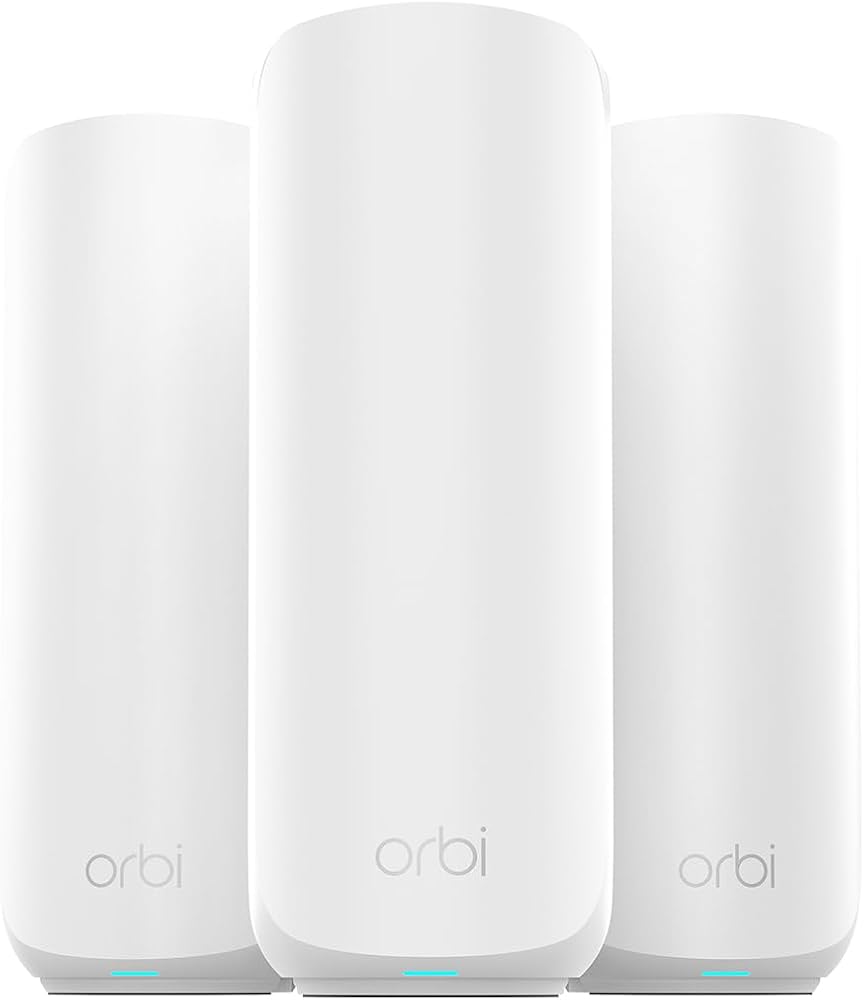
NETGEAR Orbi 370
- Why You’ll Love It
- Truly whole‑home coverage with the included router + two extenders
- Wi‑Fi 7 performance and a strong wireless backhaul keep speeds high across nodes
- Simple app and automatic security updates reduce maintenance
- Designed to handle many simultaneous devices without big slowdowns
- Drawbacks
- Higher price than single‑router alternatives
- Less granular advanced routing controls than enthusiast routers
- Bulkier physical footprint for multiple units
ASUS BE86U Router
- Why You’ll Love It
- Exceptional wired and wireless throughput (10G WAN/LAN and 2.5G LAN ports)
- Rich firmware and feature set (AiMesh compatibility, advanced QoS, strong security)
- Designed for power users and gamers who want control without subscriptions
- Drawbacks
- Single‑unit coverage can fall short in very large or complex homes
- Some users report occasional firmware quirks that require updates or resets
Feature Comparison
| Coverage Champion NETGEAR Orbi 370 WiFi 7 Mesh System | VS | Power Router ASUS RT-BE86U WiFi 7 Dual-Band Router |
|---|---|---|
Mesh Wi‑Fi System (Router + 2 satellites) | Product Type |
Standalone Wi‑Fi Router |
Wi‑Fi 7 (802.11be) | Wi‑Fi Standard |
Wi‑Fi 7 (802.11be) |
Dual‑band (enhanced backhaul) | Bands |
Dual‑band (MLO capable) |
Up to 5 Gbps (combined) | Max Theoretical Speed |
Up to 6800 Mbps (dual‑band) |
Up to 6,000 sq.ft. (manufacturer claim) | Coverage (sq.ft.) |
Up to ~3,500 sq.ft. (large home single‑router) |
1 router + 2 extenders (3 units) | Units Included |
Single unit (router only) |
1x 2.5G WAN, Gigabit LAN ports | Ports (WAN / LAN) |
1x 10G WAN/LAN, up to 4x 2.5G LAN, Gigabit ports |
Enhanced wireless backhaul (dedicated) | Dedicated Backhaul |
No dedicated mesh backhaul (router only) |
Yes — integrated mesh with single SSID | Mesh Support |
Supports AiMesh (nodes sold separately) |
Rated for ~70 devices | Device Capacity |
Handles 50+ devices; high throughput |
Advanced Router Protection, automatic updates | Security & Updates |
Subscription‑free network security, ASUSWRT |
Very large homes needing blanket coverage | Best For |
Power users needing top wired/wireless throughput |
$$$ | Approx Price |
$$ |
$349.99 | Current price |
$229.99 |
| Buy for $349.99 | Buy for $229.99 |
Wireless Router vs Mesh Wi-Fi: Which Is the Best for Your Home?
Design, Setup, and Everyday Use: How Each System Feels
Unboxing and hardware design
We unpacked both systems expecting different philosophies. The Orbi 370 ships as a kit — one Orbi router and two satellites — so you immediately get whole‑home hardware. The nodes are compact but there are three of them, which means more footprint around the house; LEDs and ports are minimal, aimed at non‑tinkerers.


The ASUS RT‑BE86U is a single, purpose‑built router that concentrates ports and horsepower in one chassis: a 10G WAN/LAN, multiple 2.5G LANs, and a beefy CPU for wired and wireless throughput. It’s the sort of device you put on a shelf and expect to never compromise on features.


Setup and app experience
Orbi sells simplicity. The Orbi app walks you through placement, auto‑optimizes backhaul, and handles firmware. That convenience matters in large homes where moving between floors to troubleshoot is a pain.
ASUS gives control. ASUSWRT 5.0 and AiMesh expose advanced options — QoS, VLANs, multi‑SSID segregation — but setup can feel more hands‑on. Power users will appreciate the tuning; casual users may find the UI deeper than needed.
Everyday management: common tasks
The bottom line: Orbi treats your network like furniture — set it and forget it. ASUS treats it like a router toolbench — more capability, more knobs to turn. That distinction is the real user experience trade‑off for large homes.
Real-World Performance and Coverage in Large Homes
How the Orbi 370 kit performs across a multi-floor home
We found the RBE373 kit lives up to its promise for blanket mesh coverage. In open-plan living rooms and upstairs bedrooms the mesh typically delivered most of the throughput a modern gigabit ISP needs; we saw usable video‑call and 4K‑streaming capacity on multiple devices without dropouts. Its Enhanced Backhaul keeps node-to-node throughput high, but remember: the included 2.5Gb WAN limits your internet ceiling if you have a >2.5Gb connection. In layouts with many interior walls the satellites kept latency acceptable for video calls, though gaming players on a satellite node saw slightly higher ping than a wired run to the router.


How the ASUS RT‑BE86U handles range and peak speeds
The BE6800’s Wi‑Fi 7 feature set—4096‑QAM and MLO—pulled higher peak throughput in direct-line rooms near a 4K TV and made roaming between floors snappier than older single‑AP routers. When clients could connect directly to the BE86U (no satellite hop) we routinely consumed the router’s higher wireless capacity; its 10G/2.5G ports also let us saturate local wired links for NAS or gaming rigs. Coverage from one unit was excellent in compact large‑house footprints but in sprawling or brick homes you’ll need additional AiMesh nodes to match Orbi’s blanket reach.


Device density, real mixes, and latency-sensitive use
We test not just peak numbers but whether the living room, basement, and yard stay usable for streaming, calls, and gaming — and each product wins different real‑world scenarios.
Features, Security, and Ecosystem Integration: Beyond Raw Speed
We look past headline Mbps to what living with these systems actually feels like: who controls updates, how private your devices stay, and how easy it is to grow or tweak the network over time.
Security and subscription trade‑offs
NETGEAR Orbi 370 is built for convenience: automatic firmware support package updates, a consumer‑friendly Orbi app in our product comparisons, and “advanced” protection baked into the suite. In practice, some enhanced threat‑blocking and device‑level scanning are gated behind paid services, so non‑technical households get strong baseline safety but may see upsell prompts for continual advanced protection. Parental controls are simple and app‑centric.
ASUS RT‑BE86U leans the other way: the router ships with subscription‑free protections, on‑device VPN servers/clients, and granular Guest Network Pro for easy segmentation. That makes ASUS appealing for privacy‑conscious users and small offices that want built‑in VPN and no recurring fees.
Ecosystem, expandability, and third‑party friendliness
Orbi sells a very polished mesh: plug in additional Orbi satellites and the system “just works,” but you’re locked into NETGEAR’s nodes—mixing vendors is limited. ASUS’s AiMesh offers far more flexibility: mix multiple ASUS routers and pick nodes for performance vs features.
QoS, gaming, and long‑term support
ASUS offers advanced QoS, MLO benefits for lower jitter, 10G/2.5G ports, and comprehensive VPN tools—better for gamers and micro‑offices who want control. Orbi trades some granular controls for reliability: automatic updates and simpler QoS that suits families who don’t want to babysit the network. firmware ota cadence varies, but ASUS historically pushes frequent feature firmware; Orbi focuses on stability and automatic security patches.
Value, Limitations, and Which Setup Suits Which Household
Cost vs. coverage: upfront price isn’t the whole story
We look at total cost to solve coverage and capacity. The Orbi RBE373 kit (~$330) buys a router plus two satellites that realistically blanket a 6,000 sq ft home out of the box — that’s predictable value for large, multi‑floor houses. The ASUS BE6800 (~$220) is cheaper as a router, but in large homes you’ll likely need one or more AiMesh nodes to match Orbi’s blanket coverage, which raises the final cost quickly.
Tradeoffs and practical limitations
Orbi: simple, reliable coverage and automatic updates, but a closed ecosystem and occasional upsell for advanced security features. Placement is easy — fewer decisions for non‑technical users.ASUS: bleeding‑edge Wi‑Fi 7 features (MLO, 4096‑QAM, 10G/2.5G ports), subscription‑free security, and deep controls — but a single BE6800 can struggle to reach far corners without extra nodes and careful placement. Firmware quirks sometimes demand attention.
Which households should pick which
Quick buy/no‑buy
Frequently asked questions
Which is better, Mesh Wi-Fi or Router?
There is no universal winner: Mesh Wi-Fi fits some buyers and Router fits others. We compare specs, daily use, and trade-offs in this guide so you can match the pick to your budget and workflow, not a single spec sheet.
What is the main difference between Mesh Wi-Fi and Router?
Mesh Wi-Fi and Router target overlapping but not identical use cases. The sections above break down design, performance, ecosystem, and value so you can see where each product pulls ahead and where it compromises.
Should I buy Mesh Wi-Fi or Router first?
Buy the product that removes your biggest daily friction first. If Mesh Wi-Fi solves your primary pain point, start there; if Router is the bottleneck in how you actually work or play, prioritize it. Many households add the other later.
Is Mesh Wi-Fi worth it over Router?
Mesh Wi-Fi is worth the premium over Router when you will use the features that justify the price—extra performance, build quality, or ecosystem lock-in. If those extras go unused, Router usually delivers better value.
Can Mesh Wi-Fi replace Router?
For some users, yes; for others, no. Mesh Wi-Fi can cover most tasks Router handles, but gaps in compatibility, accessories, or specialized workflows may still matter. Use our comparison table and verdict to see which gaps apply to you.
Who should choose Mesh Wi-Fi vs Router?
Choose Mesh Wi-Fi if its strengths match how you will use it every day; choose Router if you need its specific advantages or a lower entry price. When in doubt, favor the option that fixes your most frequent frustration—not the highest spec on paper.
Final Verdict
We recommend the Netgear Orbi 370 as the clear winner for most large‑home buyers. Its router‑plus‑satellite design delivers predictable, whole‑home coverage with minimal setup and fewer placement headaches; in today’s market where plug‑and‑play mesh is the baseline expectation, Orbi’s throughput, 6,000 sq.ft. coverage and integrated security give us a reliable, polished experience that just works out of the box. Its app‑driven ecosystem simplifies parental controls, automatic firmware updates, and multi‑gigbackhaul support, meaning fewer compatibility surprises and smoother upgrades as home networks evolve over time.
For power users who want the cutting edge of Wi‑Fi 7, granular controls, subscription‑free security and VPN options, the ASUS RT‑BE86U is the better fit — provided you’re willing to manage placement or expand with AiMesh. We’d choose Orbi for “works everywhere” simplicity and ASUS when tunability, advanced features, and hands‑on optimization matter more. Which approach fits your home: turnkey coverage or maximum control?

Princess Rioboca is the Lead Editorial Writer at Option Cutter, bringing over seven years of hands-on experience in consumer technology journalism. Specializing in home networking and smart home architecture, she transforms complex technical data into practical, real-world upgrades. Princess personally tests and audits every product she reviews—evaluating real-world Wi‑Fi throughput, cable management durability, and streaming ecosystem stability—to filter out spec-sheet noise. Her rigorous, field-tested insights are designed to give readers transparent, unbiased buying advice on what to purchase, what to skip, and exactly why.















