


We put Wi‑Fi 7’s blistering throughput, lower latency, and smarter spectrum use to the test to see whether it truly makes our homes and devices feel faster — or if Wi‑Fi 6E’s broader device support and mature ecosystem make it the smarter upgrade today.
Surprisingly, home Wi‑Fi still throttles modern setups, so we pit TP‑Link’s Archer BE24000 (Wi‑Fi 7) against ASUS’s ROG Rapture GT‑AXE11000 (Wi‑Fi 6E) to decide whether upgrading actually helps in practice for real homes and gamers today — not just on paper.
Future‑Proof Hub

We found this router to be a bold leap forward for homes that want to treat networking like infrastructure rather than an afterthought. Its hardware — from dual 10‑gig ports to a quad‑band radio and 12 antennas — is built for high‑capacity households and pro‑sumers who want to squeeze the most from multi‑gig ISPs and future devices. In practice it’s more about long‑term throughput and flexibility than immediate gains for most users, but that’s exactly why it matters now: it gives you headroom as client devices catch up.
Gaming‑Oriented Choice
We see this router as a sensible, battle‑tested choice for gamers and prosumers who want a strong 6GHz experience today without chasing bleeding‑edge hardware. It strikes a nice balance between features, firmware maturity, and price, and its gaming optimizations and ecosystem integrations (AiMesh, VPN Fusion) still make a tangible difference. For households that don’t need multi‑gig wired throughput or Wi‑Fi 7 future‑proofing, it remains an excellent, practical pick.
TP‑Link BE900
ASUS GT‑AXE11000
TP‑Link BE900
ASUS GT‑AXE11000
TP‑Link BE900
ASUS GT‑AXE11000
Wi‑Fi 7 Explained: Do You Need a New Router?
Real-world Performance: What the Specs Actually Mean
Peak vs sustained throughput
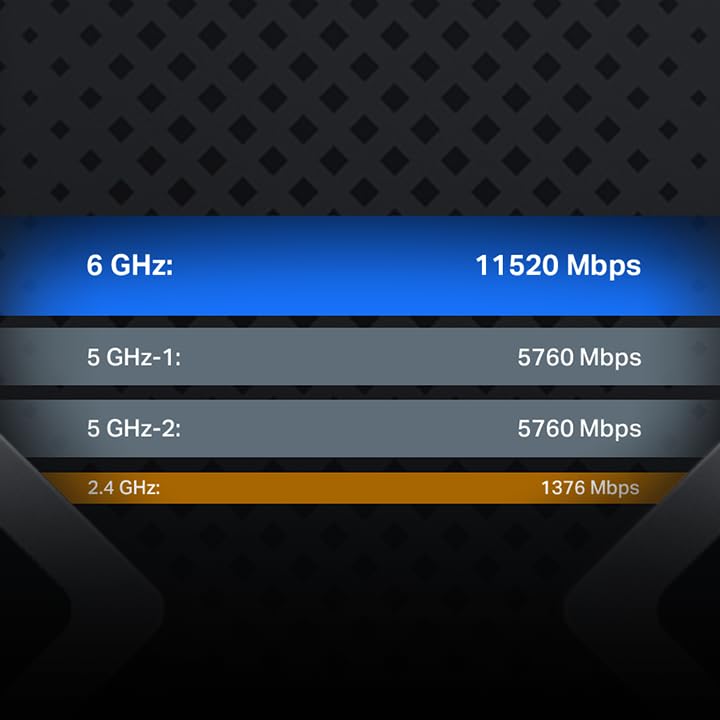
We start by separating headline numbers from what you’ll actually see. The Archer BE24000’s Wi‑Fi 7 claims (quad‑band, 320 MHz channels, 24.4 Gbps aggregate) point to very high peak capacity — ideal for simultaneous ultra‑high‑bitrate streams and AR/VR down the road. In real homes, though, those peaks are split across clients and fall quickly with distance and interference; sustained single‑device throughput will be far lower until more Wi‑Fi 7 clients exist.


ASUS GT‑AXE11000: mature 6GHz performance
The GT‑AXE11000’s Wi‑Fi 6E stack tops out around 11 Gbps aggregate and benefits today from broad client support. For gaming and single‑room 4K/8K streaming, its clean 6 GHz band and optimized firmware deliver closer-to‑promised sustained speeds for current devices.


Latency and multi‑device behavior
Wi‑Fi 7 adds multi‑link operation and improved multiuser scheduling, which can lower contention on busy networks. Practically, households with many simultaneous streams or smart‑home devices will notice smoother multi‑device behavior on the Archer, but only if clients can use those features.
Range and 6GHz tradeoffs
6 GHz is less congested but has shorter range and worse wall penetration. The Archer offsets that with additional bands and antennas; the ASUS gives cleaner local performance for devices close to the router.
Wired backhaul and NAS/internet limits
Device support and timing
Right now, Wi‑Fi 6E wins for immediate, reliable gains because clients exist. Wi‑Fi 7 (Archer) buys capacity for the near future and superior wired throughput today — useful if you run a 10G NAS or want the longest runway.
Feature Comparison Chart

Design, Setup, and Everyday User Experience
We evaluate how each router feels to live with — from unpacking to months of daily use. We focus on physical presence, the setup flow, firmware polish, QoS/game acceleration, VPN options, and which choices actually affect stability and control.
Physical design and living‑room fit
The Archer BE24000 is imposing: a dense array of 12 antennas and a glossy LED touch display give it a high‑tech, almost appliance‑like presence. The touchscreen is genuinely useful for quick status checks and basic controls without opening an app, but the unit is large and draws noticeable power.

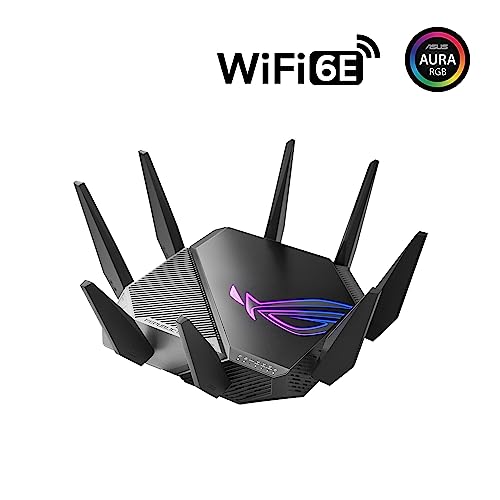
The ROG GT‑AXE11000 leans into gamer aesthetics — aggressive angles, LEDs, and a lighter footprint. It looks at home on a desk in a gaming setup and feels less like furniture than the Archer.


Setup, apps, and firmware UX
Both routers walk through a straightforward mobile or web setup. TP‑Link’s Tether app plus the on‑device touchscreen makes quick fixes painless; firmware is modern but still maturing for Wi‑Fi 7 edge cases. ASUS’s web UI and mobile app are more granular — ideal for gamers and power users — and firmware is rock‑solid thanks to years of iterative updates.
Day‑to‑day features that matter
Daily stability, parental controls, and advanced routing are better served by ASUS’s seasoned firmware. TP‑Link wins for display conveniences and superior wired throughput, which matter if you run heavy NAS or 10G backhauls.
Ecosystem, Mesh, and Future‑Proofing
Mesh compatibility and vendor lock‑in
We look at how easy it is to grow a network without being trapped by one brand. ASUS’s AiMesh is battle‑tested — years of routers and repeaters work together, and third‑party firmware and guides are plentiful. TP‑Link’s Archer BE24000 supports EasyMesh (an open standard), but the product page warns it won’t join Deco mesh systems; in practice TP‑Link’s EasyMesh interoperability is hit‑or‑miss compared with AiMesh’s polish.
Multi‑gig backbone and local traffic headroom
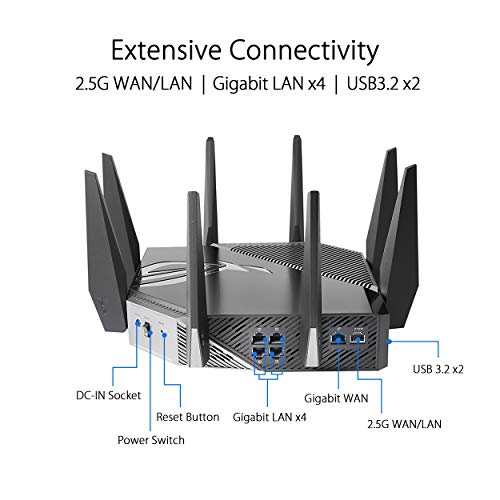
The Archer’s dual 10 Gbps ports and multiple 2.5G ports are the real, tangible future‑proofing here. If you run a heavy NAS, local 8K streaming, or multiple simultaneous AR/VR links, that wired backbone matters more than early Wi‑Fi 7 client support. The ASUS GT‑AXE11000 has a strong wired story for Wi‑Fi 6E (2.5G), but it can’t match the Archer’s raw multi‑gig capacity.
Device availability and upgrade timing
Today, Wi‑Fi 6E clients are common; Wi‑Fi 7 devices are only just entering the market. Over the next 12–36 months we expect slow, steady adoption — early adopters and prosumers first, mainstream users later. ISPs won’t push Wi‑Fi 7; you’ll still need a separate modem.
Practical limits of future‑proofing
Future‑proofing is real but conditional: Wi‑Fi 7 brings capability, not magic. If your bottleneck is wired backhaul, storage, or extreme multi‑user loads, upgrade now. If most devices are still Wi‑Fi 6/6E and you don’t need multi‑gig LAN, waiting for broader client support will save money without sacrificing experience.
Value, Use Cases, and Competitive Context
Who benefits most
We map profiles to clear recommendations:
Price vs. tangible gains and risk
The Archer (≈$450) buys raw wired capacity and future bandwidth — dual 10Gbps ports are a real ROI if your local storage or LAN is the bottleneck. That capability is unlikely to be meaningful for most homes today, and it carries early‑adopter risk: Wi‑Fi 7 clients are still sparse. The ASUS (≈$164) delivers immediate, practical benefits: a clean 6GHz lane, proven latency reductions for gaming, and a polished software stack — better value for current real‑world gains.
Competitive landscape and displacement
The Archer displaces high‑end multi‑gig routers and enterprise‑style home setups that need wired backbone headroom. The ASUS replaces aging Wi‑Fi 6/6E gaming routers and is a pragmatic upgrade for users who already rely on ASUS firmware and AiMesh.
When to upgrade now, when to wait, and staged migration
Upgrade now to Archer if you have 10Gbps ISP/NAS or plan multiple simultaneous 8K/AR/VR streams. Opt for ASUS now if competitive gaming or immediate 6GHz benefits matter. Wait if most devices are Wi‑Fi 5/6 and you don’t need multi‑gig LAN; prices and client support will improve in 12–36 months.
Staged plan: start with the ASUS for stable 6E coverage and mesh; add Archer later as a wired backbone or replace the ASUS when you introduce multi‑gig NAS or multiple Wi‑Fi 7 clients.
Final Verdict — Should You Upgrade?
We pick the TP‑Link Archer BE24000 as the upgrade winner for buyers who can use its multi‑gig wired backbone: its quad‑band Wi‑Fi 7, dual 10Gbps ports, and 12‑antenna design deliver the clearest path to gains as clients catch up. Wi‑Fi 7 matters because peak improvements require both compatible client devices and wired capacity — if you have or plan multi‑gig wiring, the Archer offers greater throughput, lower latency, and longer lifespan.
The ASUS ROG GT‑AXE11000 remains the smarter choice for gamers and ecosystem users thanks to firmware, AiMesh integration, subscription‑free security, and mature 6GHz support. For most households we recommend waiting; upgrade now only if you have multi‑gig infrastructure or competitive gaming needs.

Chris is the founder and lead editor of OptionCutter LLC, where he oversees in-depth buying guides, product reviews, and comparison content designed to help readers make informed purchasing decisions. His editorial approach centers on structured research, real-world use cases, performance benchmarks, and transparent evaluation criteria rather than surface-level summaries. Through OptionCutter’s blog content, he focuses on breaking down complex product categories into clear recommendations, practical advice, and decision frameworks that prioritize accuracy, usability, and long-term value for shoppers.









