



How we think about value when money is tight
We start with a simple rule in our how-to guides: spend on the things you touch every day and compromise on the things you rarely notice. We prioritize ergonomics, display clarity, battery resilience, and software support over headline specs like maxed-out CPU cores or megapixel counts. That focus keeps devices useful longer and saves money over time.
A low sticker price can still cost more in the long run if a device wears out, loses battery life, or stops getting updates. We map practical trade-offs, explain why ecosystem integration matters, and give clear guidance on which features are worth paying for — and which to skip.


Must-Watch Budget Tech That Actually Delivers
A simple prioritization framework: where to invest and where to compromise
Categorize what actually matters
We group features into three practical buckets so a small budget buys real value
This keeps specs from being a checklist and refocuses choices on what you touch every day.
Weight by device type and user profile
Different devices and lives demand different balances. A commuter phone needs battery and signal over raw camera megapixels; a student laptop needs a comfortable keyboard and steady battery; a creative needs color-accurate display and enough storage for files on a tablet or desktop.
Examples
Quick trade-offs we recommend
How we apply it, fast
When shopping, list your top two daily-interaction needs and your top longevity need. Use them as hard filters; everything else becomes negotiable. This simple triage turns a tight budget into smarter, longer-lasting purchases.
Build, ergonomics, and durability: the feel that defines daily use
Why feel matters
We can argue specs all day, but the thing you notice every time you pick up a device is how it feels. Weight distribution, hinge smoothness, button travel, and port placement shape minutes and hours of use more than a headline CPU number. On a commute, a phone that balances in one hand avoids thumb strain; at a cafe, a laptop with a firm hinge and a tactile keyboard keeps work flowing.
Concrete build features to prioritize
Prioritize these tactile basics over flashy materials
Ingress, finishes, and impact resistance
Budget devices increasingly copy premium looks—glass backs and metal trim—but aesthetics don’t equal durability. A metal frame with a textured plastic back often survives drops better than all-glass designs with zero extra cost. Look for basic IPx or IP5x dust/water resistance where offered, Gorilla Glass or similar on screens, and matte or textured finishes that hide scuffs.
How to test in the store (quick checklist)
Smart compromises: accept slightly heavier metal over flimsy plastic, favor secure hinges over paper-thin bezels. Next, we’ll look at how display and audio choices amplify—or undermine—those tactile wins.
Display and audio: perceptual quality beats headline specs
We care less about pixel counts and more about what we actually see and hear every day. A dim, glossy panel or tinny wireless headphones will sap usability faster than a slightly lower resolution. Brightness, contrast, reflectivity, viewing angle, and speaker placement shape whether a device feels premium—or frustrating—outside the spec sheet.
Panel types and HDR: what to prioritize
Know the basic tradeoffs: IPS gives reliable color and wide viewing angles; oled delivers deep blacks and punchy contrast; VA panels can offer high contrast but poorer angles. On budget devices, HDR is often cosmetic—boosted tone-mapping rather than true peak-brightness local dimming. For mixed lighting use, prioritize sustained brightness (300–400+ nits for daytime use) and low reflectivity over a 4K label you’ll never appreciate on a 13–15-inch screen.
Refresh rates and real-world battery cost
High refresh rates (90–240Hz) create silky motion, but they’re a battery tax. If you’re not gaming competitively, a well-implemented 60–90Hz panel with adaptive toggling is usually the smarter choice. Gaming laptops that tout 144Hz+ make sense for esports, but for web browsing, reading, and video on a standard laptop, that extra smoothness is a luxury that shortens runtime.
Audio: placement, imaging, and integrated features
Speaker orientation matters. Front-firing or upward-firing stereo speakers with good separation outperform louder bottom-firing mono setups — for calls and travel, noise-cancelling headphones often matter more than studio frequency response. Look for stereo imaging and bass that doesn’t distort at moderate volumes. Integrated audio features—Dolby Atmos virtualization, spatial enhancements, and hardware noise suppression—can drastically improve calls and streaming on budget gear.
Quick, actionable tests (in-store or via reviews)
These perceptual details are the difference between a device that merely survives and one you enjoy using day after day.
Performance, storage, and battery life: measuring what actually matters
Sustained performance vs. burst numbers
Benchmarks that show a one-second peak score are tempting, but they lie about everyday use. We care how a chip behaves after 10–20 minutes of real work: dozens of browser tabs, a long video call, or a Lightroom tweak. Midrange silicon — think mainstream Intel Core i5 U-series, AMD Ryzen 5 mobile chips, or current Snapdragon 7/8-class SoCs — paired with a competent cooling design will usually feel faster than a higher-clocked part that immediately thermal-throttles. When testing, look for sustained multi-core scores and heat/clock stability over time rather than headline ghz.
Storage speed beats headline capacity
A slow eMMC or ancient SATA SSD turns every task into waiting. Fast NVMe (or UFS in phones) makes the whole system snappier: app launches, swapping, photo imports, and background updates finish sooner, which matters more than an extra 256GB you’ll rarely use. If you must choose, prioritize a smaller, faster NVMe drive over a larger, sluggish one.

Battery life and charging that fit real days
Battery claims are lab numbers. We map runtimes to realistic days: mixed web, messaging, streaming, and occasional productivity. Fast charging is a time saver — for laptops, 45W+ top-ups make midday boosts practical; for phones, 30–67W reduces anxiety about low battery. Also look for software battery care: optimized charging, charge caps, and thermal management to preserve capacity long-term.
How these choices change ownership costs
Faster storage and better thermal design keep devices responsive longer, delay obsolescence, and hold resale value. That means paying a bit more up front for sensible engineering can lower the total cost of ownership. Next, we’ll look at connectivity, repairability, and resale details that cement whether a bargain stays one.
Software, updates, and ecosystem integration: the unseen features that define longevity
Why software is a long-term feature
We treat software as part of the product’s hardware: frequent security patches, major OS upgrades, and a well-maintained skin materially extend a device’s useful life. Phones that still get updates five years later feel modern; devices abandoned after two years stop getting features and become security risks. That erosion is invisible until it’s painful.
How to vet a maker’s history
Look beyond marketing promises. Check
If a brand has consistently delivered on updates — Apple (long OS support), Google (consistent Pixels), Samsung (recent multi-year commitments) — we factor that into the value calculation.

Ecosystem services that save money
Cross-device continuity, cloud backup, and accessory compatibility reduce upgrade friction. Examples that matter in daily life:
Practical checklist — what justifies a small premium
When we’re already invested in a platform, ecosystem fit often trumps a few extra specs: it’s the software stitching that keeps a cheap device useful for longer.
Connectivity, repairability, and resale: the practical add-ons that affect total cost
Ports and everyday expandability
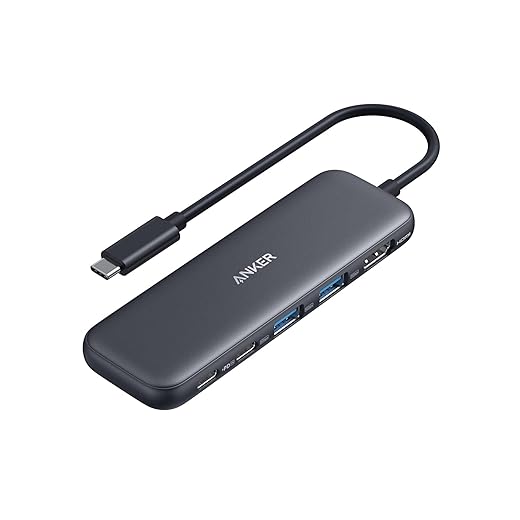
When money is tight, a missing port is an invisible recurring expense. A couple of well‑placed USB‑C ports on a laptop or desktop, a microSD slot for extra photos, or a passable webcam can save us from buying hubs, dongles, or external webcams. Look at real‑world layouts: are the ports grouped awkwardly? Is there at least one data‑capable USB‑C (not just charging)? If you regularly move between home and office, a 4K‑capable HDMI or a wired Ethernet option on a dock is worth the premium.
Repairability and service networks
Repairability is a top budget metric because replaceable parts extend life. We check
Products like the Framework Laptop and Fairphone show how modular design keeps costs down over five years. Even if a phone is cheap upfront, glued‑in batteries and proprietary screws can turn a small repair into a replacement.
Warranties, trade‑ins, and certified refurbished
A long warranty, extensive service network, or a credible certified‑refurb program makes an initial discount less attractive. Compare:
We run the math: purchase price minus expected trade‑in or repair costs over two years to judge net cost.
Quick checklist — must‑have connectivity and support features
With these practical filters, we can avoid hidden expenses and keep our tech useful longer — next, we synthesize these trade‑offs in the article’s conclusion.
Making smarter trade-offs for better long-term value
We should invest in the things that shape everyday life and longevity across computers & tablets, phones, and headphones: comfortable ergonomics, dependable displays and batteries, real-world performance, and reliable software updates. Those choices change how we interact with devices daily and protect value over years; headline specs like raw CPU numbers, megapixel counts, or flashy extras rarely repay their cost if they don’t improve the actual experience. In today’s market, strong software support and ecosystem fit often outperform nominal hardware advantages because they extend usefulness and security.
Quick tactics: buy refurbished phones or refurbished tablets, check update policies and generous return windows, and favor repairability. Rule of thumb: spend a little more where it changes the experience, save where it doesn’t — compare options in our product reviews before you checkout.
Frequently asked questions
What is the main point of “Buying Tech on a Budget”?
This piece explains where buying tech on a budget matters in real buying decisions—not just headline specs. We focus on trade-offs, who benefits most, and what to verify before you spend.
Who should read this buying tech on a budget guide?
Read it if you are actively shopping, upgrading, or trying to separate marketing claims from day-to-day use. Skip it if you already own the gear and are not planning a change this season.
What changed recently around buying tech on a budget?
Prices, firmware, and feature tiers shift quickly in this category. We call out what is new enough to affect your decision and what is incremental hype you can safely ignore.
How should I use this editorial when buying?
Treat it as context before you compare models: note the risks and priorities here, then cross-check specs and current pricing on the picks that match how you actually use the product.
What is easy to get wrong about buying tech on a budget?
Buyers often overweight one spec—brightness, speed, or brand—and underweight fit for their room, ecosystem, or warranty support. We flag the mismatch we see most often in reader questions.
Where should I go next after reading?
Use the related comparisons and top picks linked near the end of this article for model-level shortlists, then confirm return policies and compatibility with the devices you already own.

Iqra Jumar is Option Cutter's editorial writer. She writes practical editorials and buyer guides that focus on real-world upgrades—better Wi‑Fi, cleaner cable setups, smarter streaming, and everyday fixes—not spec-sheet noise alone. Her work helps readers decide what to change now, what to skip, and why.









