



Why choosing the right upgrade matters
Which upgrade will actually make games feel better: a faster router, a snappy SSD, or a more powerful GPU? We get this question all the time. Sluggish gaming can come from network lag, long load screens, or low frame rates, and the right fix depends on where the bottleneck lives.
We approach this practically. For each upgrade we judge three things: how noticeable the improvement is in day-to-day play, how easy it is to integrate into your setup, and whether the cost makes sense over time. We focus on user experience, design, and how each choice fits into today’s ecosystem of consoles, PCs, and cloud services.
Our goal in this how-to guide is not to declare one part the winner for everyone. Instead we’ll give a design-minded framework so you can pick the upgrade in our PC gaming aisle that actually fixes your problem and lasts through the next generation. We prioritize long-term value, compatibility, and measurable real-world speed.


Top WiFi Picks for a Smooth Gaming PC
Fixing latency and stability: when a better router is the smartest play
When a router upgrade actually moves the needle
We’ve seen gamers swap GPUs or cram in NVMe drives only to discover their multiplayer woes never budged. A router matters when the problem is network behavior — not raw bandwidth. Look for these symptoms:
If that sounds familiar, a better router can reduce packet loss, lower jitter, and keep latency steady in real time — which is far more valuable for competitive play than a few extra megabits per second.
What modern routers bring to the table
New designs aren’t just about faster top speeds. They add features that change the play experience
We often recommend a budget‑minded Wi‑Fi 6 TP-Link router as a practical upgrade for players in small apartments who need better 5GHz coverage without expensive mesh gear.
Quick diagnostics: prove the network is the bottleneck
Before buying, do these simple checks
Optimize first, replace when necessary
Try firmware. If interference is the problem, reposition the router or add a mesh node with a wired backhaul. Replace the router when firmware is stagnant, you need Wi‑Fi 6/6E features, or coverage/latency still lag after optimization.
How this interacts with SSDs and GPUs
A solid network removes the online choke point so SSD faster loads and GPU higher frame rates actually shine. Upgrading the router is the right first move when multiple users, Wi‑Fi dead zones, or jitter — not gaming laptop CPU/GPU limits — are visibly slowing your gaming sessions.
Speeding load times and responsiveness: what an SSD actually changes
What SSDs actually change in gameplay
We swap a spinning disk for solid state and the difference is immediate in daily play: shorter load screens, faster installs and patches, and a snappier OS. In games that load whole levels (linear shooters, story games), an SSD cuts loading by a large percent. In open‑world titles that stream assets, SSDs reduce texture pop‑in and stuttering when you blitz across the map — but how much depends on the game engine and its streaming model. Think Ratchet & Clank on PS5 (designed around ultra‑fast storage) versus older PC games that still pre‑load most assets into RAM.
Why drive design and real‑world speed differ
Manufacturers quote sequential MB/s, but gaming often depends on random I/O and low latency. Key variables
Good examples: a Samsung 970 EVO Plus or WD Black SN850 will beat a SATA MX500 in random read latency, which matters for streaming; a SATA MX500 or Crucial BX500 is still a solid value for long installs and general boot speed.
Capacity vs speed: when SATA is “good enough”
If you play mostly multiplayer shooters with modest maps, a SATA SSD (or even a high‑capacity SATA like the MX500) often feels fine — you’ll shave seconds off loads and eliminate HDD stutters. If you play modern open‑world titles or want the shortest possible fast‑travel and stream times, NVMe adds noticeable gains.
Practical constraints and quick fixes
Check compatibility (M.2 NVMe slot, PCIe generation) and OS support (Windows 10/11 + DirectStorage roadmap). Use migration tools (Samsung Data Migration, Macrium Reflect) to clone OS/games; back up first and set BIOS to AHCI/NVMe mode. Remember: an SSD helps paging, but low RAM or a weak CPU/GPU can still bottleneck performance.
Storage bottleneck checklist
If these signs match, an SSD — NVMe for streaming‑heavy modern titles, SATA for budget lifts — is likely the best next step. Upgrading storage also reshapes expectations: once load times are gone, the GPU becomes the next obvious frontier.
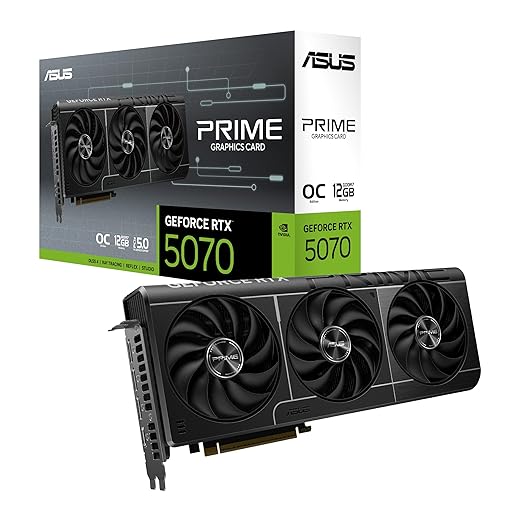
Raising frame rates and visual fidelity: the GPU as the obvious but sometimes costly choice
The simplest trade: frames, resolution, and features
When we talk about the GPU, we’re talking about the component that directly converts scene complexity into frames on your monitor. Upgrade the GPU and you get higher FPS, smoother frame pacing, and the headroom to crank texture, shadow, and post‑processing settings. You also unlock modern features—ray tracing for realistic lighting, and image‑reconstruction tech (DLSS, FSR, XeSS) that gives a big visual uplift without a proportional FPS hit.
What to expect in real play: 1080p, 1440p, 4K
Practical expectations depend on resolution and competitive targets
Don’t chase raw TFLOPs—look at real benchmarks for your favorite titles. A 30–60% uplift between generations is common, but it varies by engine and driver optimization.
When a GPU upgrade won’t fix things
GPUs don’t cure network lag, slow drives, or engine‑level CPU bottlenecks. If frame times are uneven or your CPU sits at 100% while the GPU is under 90% utilization, the CPU is the limiter. Also, massive texture pop‑ins can be storage/streaming issues, not GPU throughput.
System interactions: power, thermals, and CPU pairing
Upgrading the GPU often forces other checks
Ecosystem, drivers, and special features
Driver maturity and vendor tools change perceived value. NVIDIA’s DLSS and low‑latency driver modes favor competitive and high‑fidelity play, while AMD’s FSR/XeSS offer broader hardware compatibility. GeForce Experience and Radeon Adrenalin add capture, tuning, and driver features that affect day‑to‑day experience.
Buying pointers — what we prioritize
Next, we’ll look beyond headline parts to smaller upgrades and hidden bottlenecks that often decide whether a big GPU purchase actually delivers the experience we expect.
Looking beyond the headline parts: complementary upgrades and hidden bottlenecks
When we step back from the big three (router, SSD, GPU), we start seeing the platform as an ecosystem. A fast GPU looks slow if the CPU stalls frames; a snappy SSD is wasted if the OS is busy thrashing memory. We focus on the user‑facing impacts: input latency, frame‑time consistency, thermal throttling, and overall ergonomics.
CPU and RAM: pairing for real-world play
A modern midrange CPU (for example, a Ryzen 5 5600X or an Intel Core i5‑13600K) usually pairs well with contemporary GPUs. If your CPU is pegged at 100% in games, upgrading the GPU won’t raise FPS. RAM size and speed matter more than marketers admit: 16GB is still fine for single‑player gaming, but 32GB buys headroom for streaming, heavy browser use, or large open worlds (we’ve seen stutters disappear in Red Dead when moving to 32GB).
Cooling and power: keep silicon in its sweet spot
Thermal throttling and power limits shave effective performance. Small case airflow, dusted heatsinks, or a borderline PSU can turn a new GPU into a paperweight. Aim for:
Motherboard I/O and storage paths
Check PCIe lane allocation, NVMe slot bandwidth, and SATA vs. NVMe placement. A single NVMe tucked behind a GPU can thermally throttle; some boards share lanes and will cut speeds when multiple devices are populated.

Peripherals, drivers, and OS habits
Input devices and software shape perceived latency far more than raw FPS sometimes. A 1 ms mouse on a 240 Hz monitor feels different from a 10 ms wireless mouse on 60 Hz. Also watch background services, overlay software, and Windows power plans—High Performance vs. Balanced can change clock behavior in gaming.
Troubleshooting flow: find the dominant bottleneck
- Monitor: run MSI Afterburner (CPU/GPU/VRAM usage, temps, frame times).
- Is CPU at 100%? Lower CPU‑bound settings (shadows, draw distance) to test.
- Is GPU underutilized with stutters? Check RAM/disk usage and thermals.
- Do load times stutter or textures pop in? Inspect SSD bandwidth and drivers.
- Is network lag present? Ping and packet loss tests; isolate router vs. ISP.
- Try a clean boot or a live USB to rule out background processes.
Next, we’ll use these observations to build a practical decision framework so you can choose the most effective upgrade for your playstyle and budget.
A decision framework for different kinds of gamers: how to choose based on our priorities
We turn the analysis into a fast, testable path. Below we map five common player profiles to the upgrade that most often gives the biggest perceptual win, and we weigh cost, integration friction, longevity, and ecosystem perks.
Competitive online players
Primary fix: router/network first; peripherals second; GPU only if FPS is below monitor refresh.

Single‑player / AAA enthusiasts
Primary fix: NVMe SSD (open‑world texture streaming) → GPU upgrade (visuals) → CPU/RAM tuning.
Streamers and content creators
Primary fix: balanced GPU + CPU + 32GB RAM; NVMe for scratch disks; consider hardware encoders (NVIDIA NVENC).
Budget‑conscious buyers
Primary fix: SSD and network improvements first; buy last‑gen GPU used or midrange new.
Shared or wireless‑congested homes
Primary fix: mesh/Wi‑Fi 6/6E router, QoS, wired backhaul where possible.
Quick decision trees (simple rules of thumb)
Resale and upgrade cycles
We prefer upgrades that preserve resale value and cross‑platform usefulness: NVMe drives and quality PSUs are portable; GPUs fluctuate with market cycles and vendor driver lock‑ins (RTX features vs. AMD equivalents affect long‑term utility).
Prioritized shopping checklists
With these profiles and quick checks, you should be able to pick the single upgrade that delivers the largest real-world improvement for your playstyle. Next, we’ll wrap up with a pragmatic summary to help finalize your choice.
A pragmatic wrap-up: pick the fix that addresses the real problem
We’re not handing out one-size-fits-all prescriptions: if your main pain is stutter and networking lag, a modern router (and a network check) will usually deliver the most immediate, user-facing improvement; if game launches and level streaming drag, an NVMe SSD transforms load times and system responsiveness; and if frame rates or graphical settings are what hold you back, the GPU is the correct — albeit costlier — leverage point. Start by diagnosing: measure ping and packet loss, compare load times on HDD versus SSD, and check GPU utilization during play.
Balance that diagnosis with ecosystem fit (console vs PC), power and cooling, and how long you want the upgrade to last. Prioritize the smallest change that removes your actual bottleneck. Our closing advice: profile first, then invest where the measurements point — you’ll get more perceivable gains for less money today.
Frequently asked questions
What is the main point of “What to Upgrade First for Faster Gaming”?
This piece explains where what to upgrade first for faster gaming matters in real buying decisions—not just headline specs. We focus on trade-offs, who benefits most, and what to verify before you spend.
Who should read this what to upgrade first for faster gaming guide?
Read it if you are actively shopping, upgrading, or trying to separate marketing claims from day-to-day use. Skip it if you already own the gear and are not planning a change this season.
What changed recently around what to upgrade first for faster gaming?
Prices, firmware, and feature tiers shift quickly in this category. We call out what is new enough to affect your decision and what is incremental hype you can safely ignore.
How should I use this editorial when buying?
Treat it as context before you compare models: note the risks and priorities here, then cross-check specs and current pricing on the picks that match how you actually use the product.
What is easy to get wrong about what to upgrade first for faster gaming?
Buyers often overweight one spec—brightness, speed, or brand—and underweight fit for their room, ecosystem, or warranty support. We flag the mismatch we see most often in reader questions.
Where should I go next after reading?
Use the related comparisons and top picks linked near the end of this article for model-level shortlists, then confirm return policies and compatibility with the devices you already own.

Iqra Jumar is Option Cutter's editorial writer. She writes practical editorials and buyer guides that focus on real-world upgrades—better Wi‑Fi, cleaner cable setups, smarter streaming, and everyday fixes—not spec-sheet noise alone. Her work helps readers decide what to change now, what to skip, and why.









