
Less glare, more page‑turning: Which eReaders actually REST your eyes (and your brain)?
E-readers can save your eyes. We read for hours. Screens that don’t glare or blast blue light make that possible.
We looked for devices that feel like paper, not a mini tablet. We cared about display warmth, contrast, ergonomics, and how the software keeps distractions away.
Top Picks
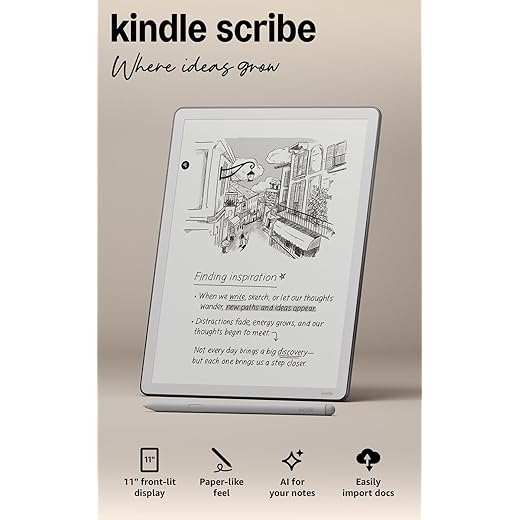


Kindle Scribe 11-inch — Large Display
We appreciated the bigger canvas for reading PDFs, sketching, and longform note taking — it reads like a paper notebook at scale. The improved speed and cloud integrations make it more useful as a work device than earlier Scribе models.
Why the 11‑inch matters now
We see the 11‑inch Scribe as a product that pushes e‑ink beyond casual reading into more productive workflows. The larger display is especially valuable if you live in PDFs, textbooks, or manuscripts: pages appear closer to print size, and annotations don’t feel cramped. Amazon’s focus on AI features and cloud import/export points toward a device intended for real work, not just leisure reading.
Features we tested and liked
The hardware improvements — a thinner body, faster page turns, and improved pen responsiveness — make daily use much smoother. We particularly liked the ability to import a PDF from Google Drive and mark it up without bouncing between desktop apps. For students and professionals, that saves a surprising amount of time.
Practical caveats
At this price point expectations are high. Some users reported uneven front lighting or bezel preferences, and the device’s size makes it less pocketable. Still, if you prioritize on‑page real estate and handwriting, the 11‑inch Scribe transforms how comfortable and efficient reading and annotating feel.
Kindle Scribe 10.2-inch (64GB)
We found it to be the best bridge between an e‑reader and a digital notebook for people who read and annotate frequently. The handwriting feel and AI note tools make it useful for study, work, and creative projects without the distraction of a full tablet.
Who this is for
We think the 10.2‑inch Scribe is aimed at readers who take notes, mark up documents, and want handwriting to feel natural. It’s less about replacing a tablet and more about removing the distractions that come with them: no social apps, no notifications, and a writing surface that encourages focused work.
What we liked in daily use
In practice the Scribe shines when we import PDFs, annotate manuscripts, or keep project notebooks. The Active Canvas behavior — where the device creates room for notes beside book pages — makes annotation feel intuitive. The AI tools for summarization and handwriting conversion save time when we want to distill long notes into action items or share typed copies with colleagues.
Tradeoffs and context
The Scribe’s compromises are mostly about software maturity and price. The hardware and writing feel are excellent, but switching between books and notebooks can be slower than we’d like. If you want a multipurpose tablet with a large app ecosystem, a tablet still wins; if you want a focused place to read and write that’s easy on the eyes, the Scribe is hard to beat.
Paperwhite Signature 7-inch (32GB)
We like the Signature Edition when you want the convenience of auto‑adjusting lighting and generous storage without a huge price premium. The extra capacity and wireless charging are small conveniences that compound into a noticeably smoother experience for heavy readers.
What sets it apart
The Signature Edition builds on the standard Paperwhite with a few practical touches: automatic light adjustment, wireless charging, and 32GB of storage. Those features don’t change the basic reading experience, but they remove recurring annoyances — you don’t fiddle with brightness when moving from indoors to sunlight, and you have room for audiobooks, large PDFs, and many books without juggling space.
Real‑world benefits
For anyone who reads long PDFs or keeps many audiobooks, the storage bump is meaningful. The auto light makes the device more usable across changing light without manual adjustments, which helps preserve a consistent, low‑strain reading experience. Wireless charging is a nice convenience — especially if you keep a charger beside the bed and don’t want to fumble with cables.
Where it doesn’t shine
This edition is more of a convenience upgrade than a dramatic leap — if you rarely read in mixed lighting or don’t need the extra storage, a base Paperwhite gets most of the same eye‑comfort benefits for less. The device remains firmly in Amazon’s ecosystem, so borrowers from other stores will still face some friction.
Paperwhite Signature 7-inch (32GB) Black
We think it’s an attractive mid‑tier option for readers who want convenience features without stepping up to a Scribe. The auto‑light and wireless charging smooth a few common irritations and keep the device feeling modern at bedside.
Who should consider it
We recommend the Signature Edition to readers who want subtle conveniences that change daily routines: automatic brightness, a wireless charging option, and plenty of storage. These aren’t headline features, but together they make the device feel thought‑through and closer to a finished product for bedside reading.
Day‑to‑day experience
In our testing the auto‑adjust feature reduced the number of times we reached for manual controls when moving between rooms or lighting situations. The wireless charging dock (sold separately) is a convenience we found ourselves appreciating more than expected — set it down and it’s ready to read in the morning.
Limitations to be aware of
If you don’t need extra storage or wireless charging, the base Paperwhite gives most of the same eye comfort for less money. And if you’ve invested in another e‑book ecosystem, the Signature Edition won’t remove that friction.
Kindle Paperwhite 7-inch — Fast Reader
We found it to be a balanced, fast, and comfortable e‑reader that prioritizes reading time over distractions. The display, warmth control, and battery life make it an easy recommendation for heavy readers who want something low‑fuss.
Why we picked it
We like this Paperwhite because it refines the classic Kindle formula: a high‑contrast 7‑inch e‑ink screen, simple software, and battery life that lets you forget chargers. The upgrades we noticed — faster page turns and a slightly higher contrast display — are the kind of incremental improvements that matter over long reading sessions: less eye fatigue, fewer micropauses when flipping pages, and a warmer night mode for bedtime reading.
Key features that matter in daily use
The display is engineered to minimize glare and reflect ambient light rather than shine into your eyes. In practice that means comfortable daytime reading outdoors and a warm, amber tone at night that reduces blue light exposure. The UI keeps things intentionally simple — there are no social apps or push notifications — and that focus is a big part of why reading feels restful.
Practical notes and tradeoffs
We appreciated how the device disappears in use: fast page turns, reliable touch response, and a thin design that fits in one hand. The tradeoff is the expected Kindle lock‑in — if you already own a large Amazon library this device is ideal, but sideloading EPUBs or relying on other ecosystems adds small friction. For most readers looking to minimize eye strain, the Paperwhite hits the sweet spot between price, comfort, and battery life.
Kobo Libra Colour 7-inch Kaleido 3
We appreciated the Kaleido 3 color layer for covers, comics, and illustrated books — it brings visual content to e‑ink without the glare of an LCD. Ergonomics and page buttons make it a comfortable pick for long sessions with mixed media.
What the Libra Colour does differently
The Libra Colour pushes e‑ink into areas that used to require tablets: color covers, comics, cookbooks, and illustrated novels. It won’t match an OLED or LCD for saturation and motion, but Kaleido 3 renders muted, readable color that preserves the advantages of e‑ink — low reflectivity and low eye fatigue.
Day‑to‑day use and design
In regular reading we found the device especially useful for graphic novels and children’s picture books where color highlights improve context. The ergonomics are also well considered: page buttons and a slightly offset grip make single‑handed reading comfortable. Battery life remains long despite the color layer because e‑ink only consumes power on page changes.
Who should choose it
If you mostly read novels, it’s overkill and monochrome devices give better contrast per dollar. But if you frequently read illustrated works, comics, or want a color‑capable e‑ink device that still limits blue light and distractions, the Libra Colour occupies a useful middle ground between black‑and‑white e‑readers and full tablets.
Kobo Clara BW 6-inch ComfortLight PRO
We liked its clean interface, fast performance, and tight library integration through OverDrive. The ComfortLight PRO and optional dark mode make it an excellent choice for readers who want a calm, customizable experience without Amazon’s ecosystem.
Why Kobo Clara matters
We recommend the Clara BW to readers who want an alternative to Amazon’s lock‑in. Its EPUB first‑class support, OverDrive integration for library loans, and a thoughtful ComfortLight PRO that reduces blue light make it a strong contender for people who borrow books or prefer open formats.
Practical strengths
The Clara feels snappy in daily use and its small size makes it easy to hold for hours. The addition of dark mode and color‑temperature control is a notable advantage for night readers: combined with the e‑ink surface, it reduces the sense of glare and helps maintain sleep‑friendly light exposure.
Considerations before buying
If you’re deeply invested in Amazon purchases, the Clara adds friction because it doesn’t natively use Amazon’s bookstore. Also, readers who rely heavily on marked‑up PDFs and advanced annotations may find the Clara’s tools limiting compared with larger devices. For most general readers who borrow from libraries and want a focused, eye‑friendly experience, it’s one of the best alternatives.
BK6033 6-inch Budget E‑Reader
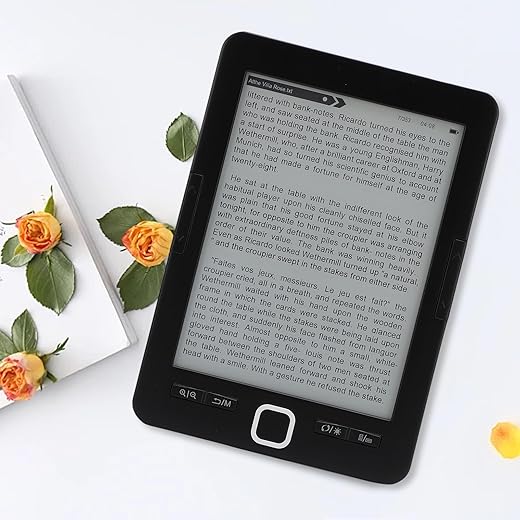
We found it to be a competent budget e‑reader that covers the essentials — readable e‑ink, adjustable fonts, and basic audio support — but it lacks the polish of mainstream brands. It’s a sensible starter device if price is the main factor.
Where it fits in the market
This BK6033 is clearly positioned as an entry‑level e‑reader: low price, fundamental features, and expandable storage. For readers who mainly want an inexpensive device for novels and basic PDFs, it delivers the essentials: a 6‑inch e‑ink screen, font and brightness control, and audiobook playback in supported formats.
What you get for the money
In use we found the interface workable but noticeably less refined than mainstream devices. Page turns can feel a touch slower, and UI animations are minimal or missing, but the core reading experience — contrast, adjustable text, and long standby time — remains serviceable. If you’re budget‑conscious and don’t need cloud services or a large commercial store integration, this model is a practical pick.
Drawbacks to accept with the price
Expect compromises in speed, screen uniformity, and software niceties. It’s not designed for heavy PDF workflows or complex annotation. For light reading and portability on a tight budget, it’s defensible; for frequent library loans, advanced formatting, or long PDFs, a higher‑end reader will be much more comfortable on the eyes.
Final Thoughts
We recommend two clear winners based on how people actually read. For anyone who treats their e-reader like a notebook or portable office, the Kindle Scribe 11-inch — Large Display is our top pick. Its big canvas changes the game for PDFs, longform note taking, and sketching. The extra real estate makes annotations readable at scale, and faster performance plus cloud integrations mean it works as a focused productivity device rather than a gimmicky stylus toy. Pick the Scribe if you regularly mark up documents, study from PDFs, or want a tablet‑light, paper‑like workspace.
For pure reading comfort on long sessions, the Kindle Paperwhite 7-inch — Fast Reader is our other pick. It’s balanced, fast, and built to keep eyes relaxed: excellent contrast, reliable warmth control, and long battery life. The Paperwhite prioritizes reading time over extras, so you get fewer distractions and more uninterrupted pages. Choose the Paperwhite if you want the most comfortable, low‑fuss reading experience for novels, commutes, and bedtime.
Both picks matter in today’s market: the Scribe pushes e‑ink into productivity use cases that used to require tablets, while the Paperwhite preserves the core promise of eReaders — long, comfortable reading without eye strain. If you need library integration without Amazon, consider a Kobo Clara BW; but for the clearest, least eye‑straining experiences we found, the Scribe and Paperwhite are the ones to buy.

Chris is the founder and lead editor of OptionCutter LLC, where he oversees in-depth buying guides, product reviews, and comparison content designed to help readers make informed purchasing decisions. His editorial approach centers on structured research, real-world use cases, performance benchmarks, and transparent evaluation criteria rather than surface-level summaries. Through OptionCutter’s blog content, he focuses on breaking down complex product categories into clear recommendations, practical advice, and decision frameworks that prioritize accuracy, usability, and long-term value for shoppers.