



We put the M4 iPad Air and M4 iPad Pro through real-world tests to see whether the Pro’s studio-grade power actually changes day-to-day use or if the Air’s smarter, lighter package gives most people everything they need—so which should we buy?
We compare Apple’s iPad Air 11‑inch (M3) and iPad Pro 13‑inch (M4) to help you decide which fits your needs. We focus on performance, display, cameras, ecosystem integration, and how those differences matter for real-world use today — the same lens we use across product comparisons.
Everyday Power

Pro Workstation

iPad Air M3
- Strong M3 performance for everyday productivity and light pro tasks
- Lightweight 11-inch chassis that’s easy to carry and use all day
- Great value relative to Pro with support for Apple Pencil Pro and Magic Keyboard
- Solid front and rear cameras with Center Stage for video calls
- Wi‑Fi 6E and USB‑C for modern connectivity
- 60Hz display lacks ProMotion’s 120Hz smoothness
- No Thunderbolt/USB‑4 — limits high-speed external workflows
iPad Pro M4
- Industry‑leading M4 performance for demanding creative and pro workflows
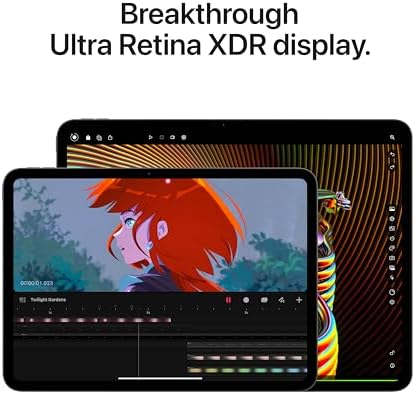
- Best‑in‑class 13‑inch Ultra Retina XDR display with ProMotion and high HDR brightness
- Thunderbolt/USB‑4 port and LiDAR expand pro connectivity and AR use cases
- Larger screen and better sustained performance for multitasking and media creation
- Top‑tier audio and camera system for calls and content capture
- Significantly more expensive than Air — high entry price for many users
- Larger size and weight reduce portability compared with 11‑inch Air
Feature Comparison
| Everyday Power Apple iPad Air 11-inch M3, 128GB, Space Gray | VS | Pro Workstation Apple iPad Pro 13-inch M4, 256GB, Space Black |
|---|---|---|
M3 (Apple Intelligence optimized) | Chip |
M4 (up to 10‑core CPU / 10‑core GPU) |
11-inch | Display Size |
13-inch |
Liquid Retina (LCD) | Display Type |
Ultra Retina XDR (mini‑LED) |
Standard Liquid Retina (no XDR) | Peak Brightness / HDR |
Extreme brightness and XDR HDR support |
60Hz | Refresh Rate |
ProMotion 120Hz |
128GB | Storage (base) |
256GB |
Up to 1TB | Max Storage |
Up to 2TB |
12MP Wide (True Tone flash) | Rear Camera |
12MP Wide (ProRes support) + LiDAR |
12MP Center Stage | Front Camera |
12MP Ultra Wide (landscape) with Center Stage |
No | LiDAR Scanner |
Yes |
Touch ID (top button) | Biometrics |
Face ID |
USB‑C (no Thunderbolt) | Ports |
USB‑C with Thunderbolt / USB‑4 |
Wi‑Fi 6E | Wi‑Fi |
Wi‑Fi 6E |
All‑day battery (Apple estimate) | Battery Life (claimed) |
All‑day battery (Apple estimate) |
1.01 pounds | Weight |
1.27 pounds |
$$ (approx $$$) | Starting Price |
$$$$ (approx $$$$) |
$559.00 | Current price |
$1,209.02 |
| Buy for $559.00 | Buy for $1,209.02 |
iPad Air (M3) vs iPad Pro (M4): Don’t Make This Mistake!
Design, Portability, and Build: Which One Fits Your Carry?
We start with the most palpable differences: size, weight, and how each iPad feels in real‑world use. The iPad Air’s 11‑inch footprint (9.74 × 7.02 × 0.24 in, ~1.01 lb) makes it the easier daily carry — it slips into backpacks and smaller bags, feels lighter in one hand during reading, and pairs well with compact keyboards. The iPad Pro’s 13‑inch presence (11.09 × 8.48 × 0.2 in, ~1.27 lb) dominates a workspace, gives us more room for split‑screen multitasking and creative canvases, and sits more stably on a desk.
What we notice in daily handling


Ergonomics and unlocking
The Air’s Touch ID in the top button is fast and private — handy when we’re masked or in crowded spaces. The Pro’s Face ID is seamless at a desk or when holding the device upright, but it’s less convenient in some real‑world scenarios.

Desk vs. commute
On a desk, the Pro’s larger footprint gives a better typing angle with full‑size keyboards and a more immersive media experience (also more stable when sketching). On the go, the Air wins: lighter, easier to stash, and still powerful enough for most tasks. Accessories exaggerate this split — larger Magic Keyboard options favor the Pro; compact keyboard covers and Apple Pencil pairing keep the Air our pick for most commuters and students.
Performance, M3 vs M4: Real-World Speed and Future-Proofing
We dig into the chips because headline specs don’t always translate to everyday experience. The Air packs Apple’s M3 chip while the Pro brings the newer M4 silicon — both are blazingly fast for apps, multitasking, and media consumption, but the M4’s improvements show up in sustained workloads, AI-driven features, and heavier creative tasks.
Everyday responsiveness (what you’ll actually feel)
For typical use—video calls, Safari tabs, streaming, note‑taking, and light photo edits—the M3 in the 11‑inch Air is instantaneous. Apps open quickly, multitasking is smooth, and iPadOS features like Stage Manager behave reliably. If you’re a student or a commuter who values portability, the M3 delivers more than enough performance for years of daily use.


Sustained workloads and thermals (where the M4 pulls ahead)
When we push both tablets—layer‑heavy Photoshop files, long 4K exports, or complex ProMotion games—the M4 keeps a clearer lead, especially if you offload media to external SSDs. Benchmarks favor the M4 in GPU and Neural Engine tasks, and the Pro’s larger 13‑inch chassis dissipates heat better, so peak performance lasts longer before throttling.


Why the neural advantage matters now
Practical takeaway
Display, Cameras, and Media: Is the Pro Worth the Visual Upgrade?
Display: size, brightness, and HDR that you can actually see
We tested both screens side-by-side. The Air’s 11‑inch Liquid Retina panel is sharp, color‑accurate, and excellent for movies, games, and casual editing. But the 13‑inch Ultra Retina XDR on the Pro is a different class for HDR: it pushes specular highlights, contrast, and peak brightness much further, so highlights pop, blacks look deeper, and HDR footage feels cinematic. ProMotion (120Hz) on the Pro also makes scrolling and Apple Pencil interactions noticeably smoother than the Air’s 60Hz panel — a small thing that matters during long editing or drawing sessions and when you want the interface to feel instant.
Cameras and LiDAR: practical gains for creators and AR
Both tablets use 12MP front and back cameras, so baseline image quality is similar. What changes the experience is the Pro’s LiDAR and front‑camera layout. LiDAR improves autofocus in low light, produces more reliable portrait-style effects, and unlocks room‑scanning and AR tools that are simply more usable on the Pro. The Pro’s landscape-front camera and larger frame also give more natural composition for video calls and content recorded in landscape.
Audio and media workflow: speakers, editing space, and ports
The Pro’s four‑speaker array fills a room in a way the Air can’t — it’s louder and fuller for watching shows or rough-cutting video. The bigger canvas plus Thunderbolt/USB‑4 on the Pro streamlines external monitor, drive, and high‑bitrate export workflows, and the 256GB base helps for larger media libraries.
Ecosystem, Software, and Value: Accessories, Storage, and Long-Term Support
How iPadOS levels the field — but hardware defines the workflow
We like that iPadOS gives both tablets near-identical software capabilities: Stage Manager, Apple Intelligence features, Apple Pencil support, and the same App Store ecosystem. That parity means the difference comes down to hardware — the Pro’s M4, larger canvas, Thunderbolt port, and Face ID enable workflows the Air simply can’t match.
Authentication and everyday ergonomics
Face ID on the Pro feels more natural when the iPad lives on a Magic Keyboard in landscape — it unlocks and authenticates without contortions, which speeds app sign-ins and payments during long sessions. Touch ID on the Air is faster for one-handed unlocks, better for couch use, and less finicky with masks or gloves.
Accessories and expandability
Accessories push the experience in different directions. The Pro pairs with larger Magic Keyboard folios, Thunderbolt docks, and pro-focused styluses to become a laptop substitute. The Air favors lighter keyboards and the Apple Pencil (USB‑C) or Apple Pencil Pro for sketching and quick note-taking — more portable, less desk-bound.
Value calculus on Amazon
Price matters. If the Air’s lower cost or a meaningful Amazon discount fits your daily needs, it’s the best value for most people — use NIST mobile-device security guidance and FTC online marketplace buying tips when comparing third-party listings. If you rely on a bigger screen, more base storage, Thunderbolt workflows, or maximum longevity, we’d pay the premium for the Pro — see more product comparisons before you checkout.
Frequently asked questions
Which is better, iPad Air (M4) or iPad Pro (M4)?
There is no universal winner: iPad Air (M4) fits some buyers and iPad Pro (M4) fits others. We compare specs, daily use, and trade-offs in this guide so you can match the pick to your budget and workflow, not a single spec sheet.
What is the main difference between iPad Air (M4) and iPad Pro (M4)?
iPad Air (M4) and iPad Pro (M4) target overlapping but not identical use cases. The sections above break down design, performance, ecosystem, and value so you can see where each product pulls ahead and where it compromises.
Should I buy iPad Air (M4) or iPad Pro (M4) first?
Buy the product that removes your biggest daily friction first. If iPad Air (M4) solves your primary pain point, start there; if iPad Pro (M4) is the bottleneck in how you actually work or play, prioritize it. Many households add the other later.
Is iPad Air (M4) worth it over iPad Pro (M4)?
iPad Air (M4) is worth the premium over iPad Pro (M4) when you will use the features that justify the price—extra performance, build quality, or ecosystem lock-in. If those extras go unused, iPad Pro (M4) usually delivers better value.
Can iPad Air (M4) replace iPad Pro (M4)?
For some users, yes; for others, no. iPad Air (M4) can cover most tasks iPad Pro (M4) handles, but gaps in compatibility, accessories, or specialized workflows may still matter. Use our comparison table and verdict to see which gaps apply to you.
Who should choose iPad Air (M4) vs iPad Pro (M4)?
Choose iPad Air (M4) if its strengths match how you will use it every day; choose iPad Pro (M4) if you need its specific advantages or a lower entry price. When in doubt, favor the option that fixes your most frequent frustration—not the highest spec on paper.
Final Verdict: Which Should You Buy?
We tested both iPads across daily tasks, creative workflows, and media consumption and found a clear winner for most people: the iPad Air 11‑inch (M3). It balances performance, portability, and value—fast M3 silicon, lighter chassis, Touch ID, and a lower entry price—making it ideal for students, commuters, and anyone who needs a responsive tablet for apps, note‑taking, and casual creative work without the extra bulk or cost. Its design and integration with iPadOS give the best everyday experience in Apple’s lineup right now.
Opt for the iPad Pro 13‑inch (M4) only if you need the largest, brightest Ultra Retina XDR display, higher base storage, LiDAR, and the most headroom for pro apps, AR, and future AI features. Ready to upgrade your workflow? We recommend the Air as the everyday pick; the Pro is niche.

Princess Rioboca is the Lead Editorial Writer at Option Cutter, bringing over seven years of hands-on experience in consumer technology journalism. Specializing in home networking and smart home architecture, she transforms complex technical data into practical, real-world upgrades. Princess personally tests and audits every product she reviews—evaluating real-world Wi‑Fi throughput, cable management durability, and streaming ecosystem stability—to filter out spec-sheet noise. Her rigorous, field-tested insights are designed to give readers transparent, unbiased buying advice on what to purchase, what to skip, and exactly why.















